> ## Documentation Index
> Fetch the complete documentation index at: https://docs.go.aiinsurance.io/llms.txt
> Use this file to discover all available pages before exploring further.
# Events
> Claims and incidents: the events list, creating events, the event detail page and every tab — including Legal — and the Actions menu.
An [**event**](/entities/event) is a loss event recorded against one or more of
your [exposures](/app/features/exposures) — either a **claim** or an
**incident**. The **Events** entry in the sidebar opens the area.
This page is the reference for the Events area. For the end-to-end claim
walkthrough — first notice through closing — see
[Handling claims](/app/workflows/claims).
## Claims vs. incidents
Every event is one or the other:
* An **incident** is a loss that's been reported but hasn't (yet) become a
claim — a precautionary notice, a circumstance being watched.
* A **claim** is an actual demand being worked.
The type isn't fixed: an incident can be **promoted to a claim**, and an open
claim recorded prematurely can be **reverted to an incident** — both from the
Actions menu, keeping everything else about the event (fields, files, notes,
contacts, tasks) intact. See
[Event actions](/app/features/event-actions#convert-between-claim-and-incident).
Permissions distinguish the two as well: a role can be allowed to work claims
but not incidents, or vice versa, so what you can see and do may differ by
event type.
## The events list
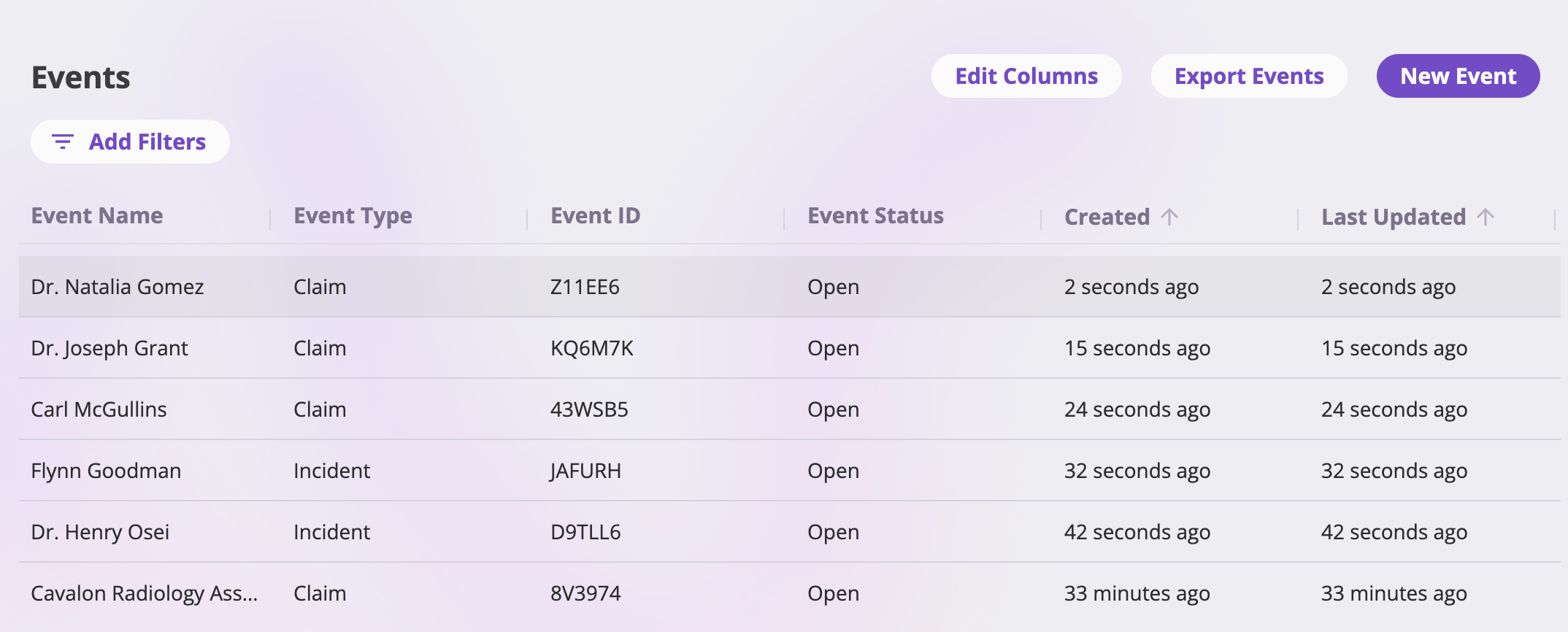 * **Columns** — the defaults are *Event Name*, *Event Type* (claim or
incident), *Reference ID* (the event's short generated identifier),
*Status*, *Created*, and *Last Updated*. **Edit Columns** adds, removes, and
reorders columns — any configured event field, plus the *Created By* system
column.
* **Claim vs. incident** — the *Event Type* column shows which each event is;
filter on it to see only claims or only incidents.
* **Filters** — **Add Filters** builds filters on any column (status, type,
dates, any configured field); active filters show as pills.
* **Sorting & pagination** — click a sortable header to sort (newest updated
first by default); pick 25, 50, 100, or 200 rows per page.
* **Opening an event** — click a row to open its detail page.
* **Export Events** — the standard entity export (Excel, CSV, or Google
Drive), carrying your current filters. See
[Exports & saved views](/app/features/exports-saved-views).
## Creating an event
**New Event** opens the create page: the event's fields as configured for your
company. The **Create** button enables once every required field is filled;
creating saves the event and opens its detail page.
A few things the platform handles for you on save:
* **Linked exposures are required** — an event must be filed against at least
one exposure.
* The **event name** is generated automatically from the linked exposures (and
the claimant, where your configuration captures one). You can override it
later with **Rename** from the Actions menu.
* A **reference ID** is stamped automatically.
* The **status** starts as **Open**.
## Statuses
An event is either **Open** or **Closed** — shown as a tag next to the event's
name and as the Status column in lists. Closing records a **closed date**;
re-opening clears it. Closing locks nothing away: every tab stays viewable,
and a closed event can be re-opened at any time. See
[Event actions](/app/features/event-actions#close-an-event).
## The event detail page
The header shows the event's **name**, its **Open/Closed** status tag, and the
**Actions** menu (summarized [below](#the-actions-menu)).
* **Columns** — the defaults are *Event Name*, *Event Type* (claim or
incident), *Reference ID* (the event's short generated identifier),
*Status*, *Created*, and *Last Updated*. **Edit Columns** adds, removes, and
reorders columns — any configured event field, plus the *Created By* system
column.
* **Claim vs. incident** — the *Event Type* column shows which each event is;
filter on it to see only claims or only incidents.
* **Filters** — **Add Filters** builds filters on any column (status, type,
dates, any configured field); active filters show as pills.
* **Sorting & pagination** — click a sortable header to sort (newest updated
first by default); pick 25, 50, 100, or 200 rows per page.
* **Opening an event** — click a row to open its detail page.
* **Export Events** — the standard entity export (Excel, CSV, or Google
Drive), carrying your current filters. See
[Exports & saved views](/app/features/exports-saved-views).
## Creating an event
**New Event** opens the create page: the event's fields as configured for your
company. The **Create** button enables once every required field is filled;
creating saves the event and opens its detail page.
A few things the platform handles for you on save:
* **Linked exposures are required** — an event must be filed against at least
one exposure.
* The **event name** is generated automatically from the linked exposures (and
the claimant, where your configuration captures one). You can override it
later with **Rename** from the Actions menu.
* A **reference ID** is stamped automatically.
* The **status** starts as **Open**.
## Statuses
An event is either **Open** or **Closed** — shown as a tag next to the event's
name and as the Status column in lists. Closing records a **closed date**;
re-opening clears it. Closing locks nothing away: every tab stays viewable,
and a closed event can be re-opened at any time. See
[Event actions](/app/features/event-actions#close-an-event).
## The event detail page
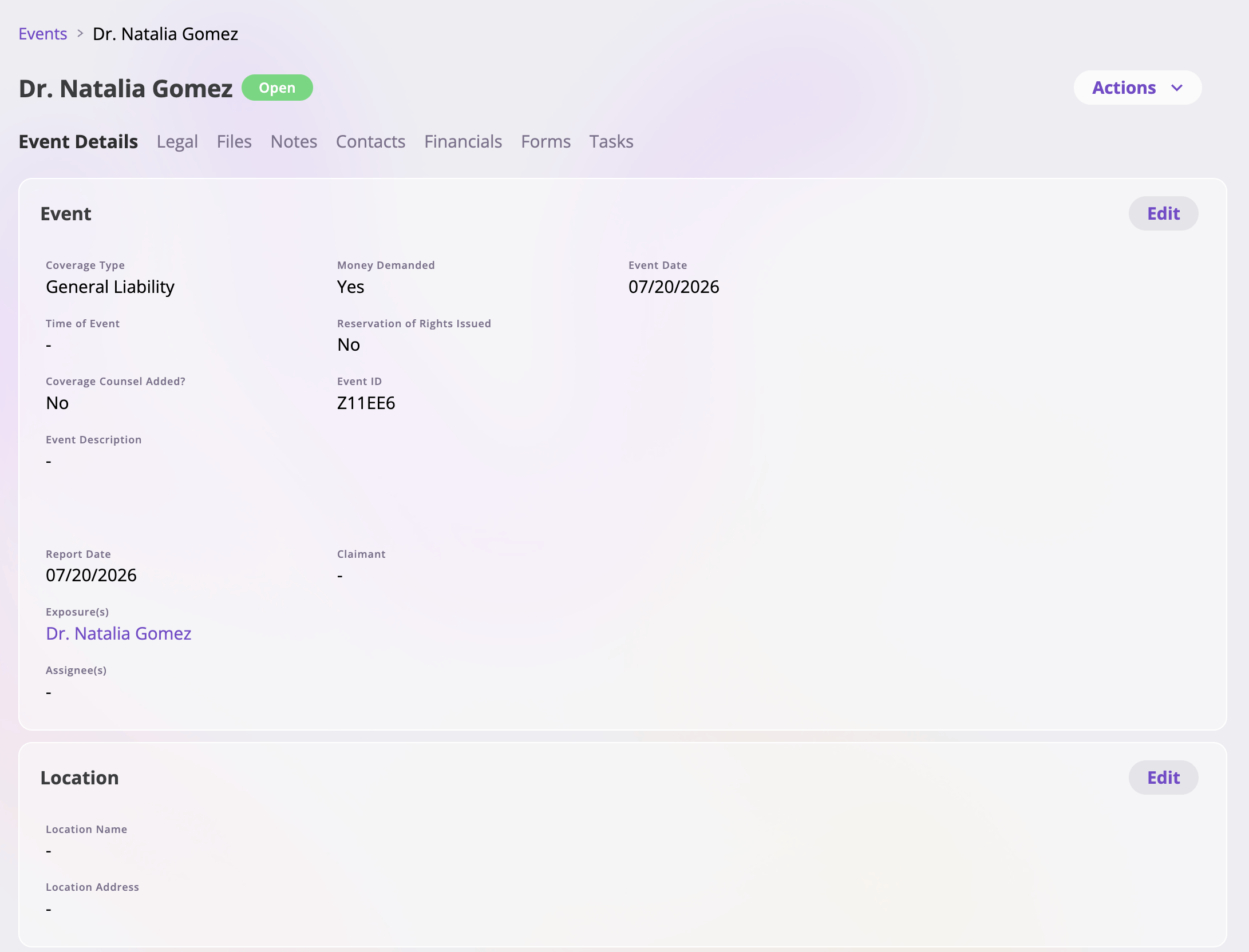
The header shows the event's **name**, its **Open/Closed** status tag, and the
**Actions** menu (summarized [below](#the-actions-menu)).
 ### Tabs at a glance
| Tab | What it shows | Visible when |
| --------------------------------------- | -------------------------------------------------------------------------------------------- | ------------------------------------------- |
| [Event Details](#the-event-details-tab) | The event's fields — what/when/where, coverage, dates. | Always |
| [Legal](#the-legal-tab) | Litigation details — lawsuit information and the parties involved. | Always |
| Files | Files attached to the event — see [Files & notes](/app/features/files-notes). | Your role can view files |
| Notes | Free-form notes on the event — see [Files & notes](/app/features/files-notes#the-notes-tab). | Your role can read notes on this event type |
| [Contacts](#the-contacts-tab) | The people involved — claimants, attorneys, adjusters. | Always |
| [Financials](#the-financials-tab) | Reserves, the loss & operating report, and the event's invoices. | Your role can view financials |
| Forms | Documents generated for this event — see [Generating forms](/app/features/forms). | Your role can view forms |
| Tasks | Tasks linked to this event — see [Dashboard & tasks](/app/features/dashboard-tasks). | Your role can view tasks |
## The Event Details tab
The event's fields, laid out in cards — which cards and fields appear depends
on your company's configuration (dates of loss and report, coverage type,
descriptions, adjuster details, and so on). To change a value, edit the card,
make your changes, and save; only the fields you actually changed are written,
and a card can be cancelled to discard its edits.
## The Legal tab
The Legal tab collects the event's **litigation details**, in the same
editable-cards layout as Event Details. The exact fields are configured per
company; a typical setup includes:
* **Lawsuit information** — whether a lawsuit has been filed, the case number
and case name, and the served / filed / trial dates.
* **Plaintiffs and defendants** — the parties to the suit, each with their
**attorney** linked from your [Directory](/app/features/directory) (with the
attorney's phone, email, and firm pulled from the directory record — and a
*Create new attorney* option right in the picker if they aren't in the
Directory yet).
### Tabs at a glance
| Tab | What it shows | Visible when |
| --------------------------------------- | -------------------------------------------------------------------------------------------- | ------------------------------------------- |
| [Event Details](#the-event-details-tab) | The event's fields — what/when/where, coverage, dates. | Always |
| [Legal](#the-legal-tab) | Litigation details — lawsuit information and the parties involved. | Always |
| Files | Files attached to the event — see [Files & notes](/app/features/files-notes). | Your role can view files |
| Notes | Free-form notes on the event — see [Files & notes](/app/features/files-notes#the-notes-tab). | Your role can read notes on this event type |
| [Contacts](#the-contacts-tab) | The people involved — claimants, attorneys, adjusters. | Always |
| [Financials](#the-financials-tab) | Reserves, the loss & operating report, and the event's invoices. | Your role can view financials |
| Forms | Documents generated for this event — see [Generating forms](/app/features/forms). | Your role can view forms |
| Tasks | Tasks linked to this event — see [Dashboard & tasks](/app/features/dashboard-tasks). | Your role can view tasks |
## The Event Details tab
The event's fields, laid out in cards — which cards and fields appear depends
on your company's configuration (dates of loss and report, coverage type,
descriptions, adjuster details, and so on). To change a value, edit the card,
make your changes, and save; only the fields you actually changed are written,
and a card can be cancelled to discard its edits.
## The Legal tab
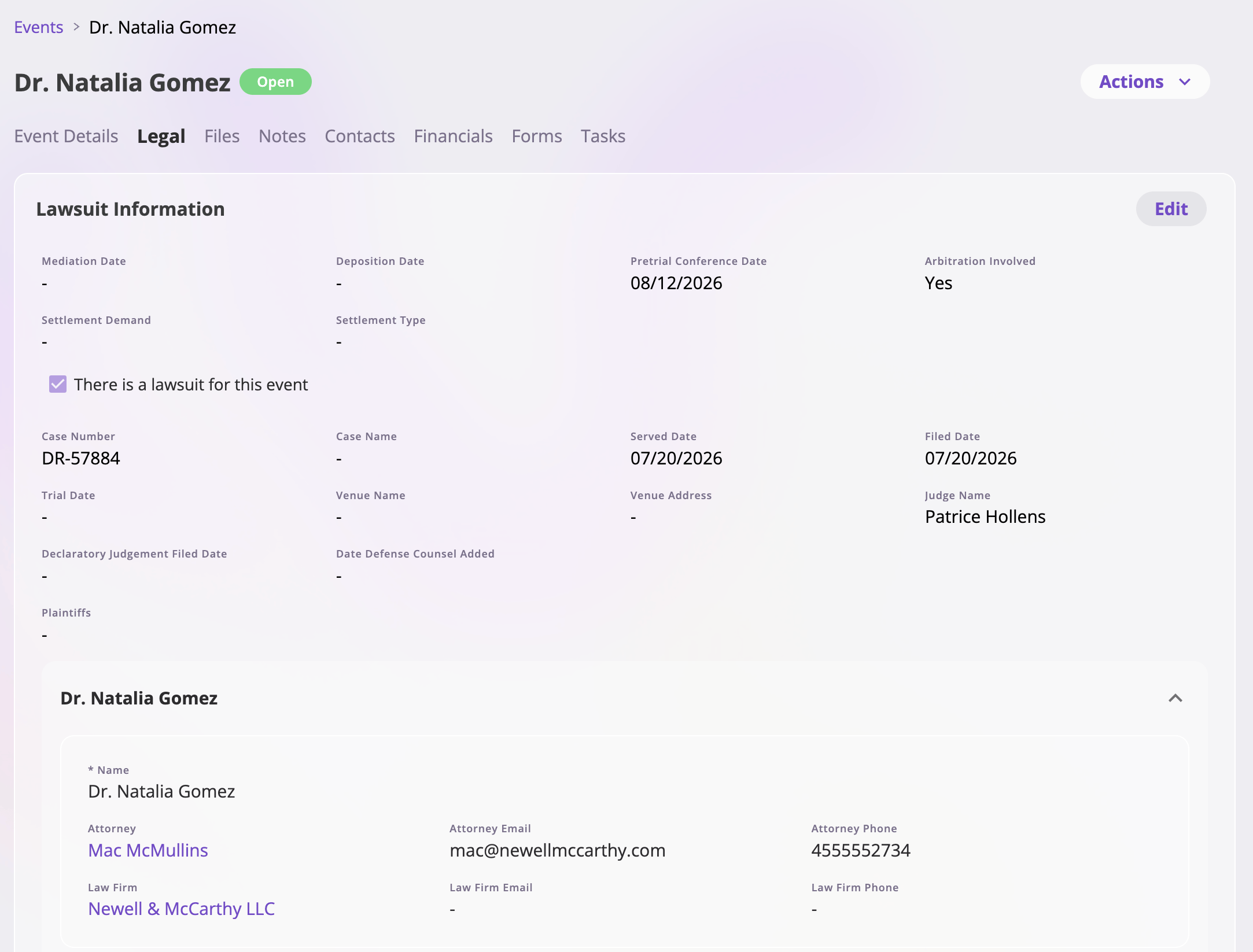
The Legal tab collects the event's **litigation details**, in the same
editable-cards layout as Event Details. The exact fields are configured per
company; a typical setup includes:
* **Lawsuit information** — whether a lawsuit has been filed, the case number
and case name, and the served / filed / trial dates.
* **Plaintiffs and defendants** — the parties to the suit, each with their
**attorney** linked from your [Directory](/app/features/directory) (with the
attorney's phone, email, and firm pulled from the directory record — and a
*Create new attorney* option right in the picker if they aren't in the
Directory yet).
 ## The Contacts tab
The people involved in the loss — the claimant, opposing counsel, adjusters,
witnesses — are attached to the event as **contacts**: links to people in your
[Directory](/app/features/directory). From the tab you can add contacts
(searching the Directory, or creating a new person inline), edit a person's
details in place, and remove a contact (which only unlinks — it never deletes
the person). The full behavior is documented at
[Directory & contacts](/app/features/directory#the-contacts-tab-on-other-records).
Where your configuration captures a **claimant**, the platform uses it when
generating the event's name — so a claim reads naturally in lists
("‹claimant› vs. ‹insured›").
## The Financials tab
The event's money view: the **Overview report** (with a reserve-update action on
each invoice type that carries reserves), and sub-tabs for the event's
**invoices** and its **reserve update** history. Everything created here is
automatically linked to the event. The full reference is the [Financials
guide](/financials/overview).
## The Actions menu
The **Actions** menu at the top right collects everything you can do to the
event as a whole. It adapts to the event — claims and incidents get their own
flavors of each action, options follow the event's status, and actions your
role can't perform don't appear.
| Action | Appears on |
| -------------------------------------------- | ------------- |
| Close Claim / Close Incident | Open events |
| Re-open Claim / Re-open Incident | Closed events |
| Revert to Incident | Open claims |
| Create Claim From Incident | Incidents |
| New Task | All events |
| Generate Claim Form / Generate Incident Form | All events |
| Rename Claim / Rename Incident | All events |
| Delete Claim / Delete Incident | All events |
Every action — its dialog, availability conditions, and effects — is
documented action by action in
[**Event actions**](/app/features/event-actions).
## The Contacts tab
The people involved in the loss — the claimant, opposing counsel, adjusters,
witnesses — are attached to the event as **contacts**: links to people in your
[Directory](/app/features/directory). From the tab you can add contacts
(searching the Directory, or creating a new person inline), edit a person's
details in place, and remove a contact (which only unlinks — it never deletes
the person). The full behavior is documented at
[Directory & contacts](/app/features/directory#the-contacts-tab-on-other-records).
Where your configuration captures a **claimant**, the platform uses it when
generating the event's name — so a claim reads naturally in lists
("‹claimant› vs. ‹insured›").
## The Financials tab
The event's money view: the **Overview report** (with a reserve-update action on
each invoice type that carries reserves), and sub-tabs for the event's
**invoices** and its **reserve update** history. Everything created here is
automatically linked to the event. The full reference is the [Financials
guide](/financials/overview).
## The Actions menu
The **Actions** menu at the top right collects everything you can do to the
event as a whole. It adapts to the event — claims and incidents get their own
flavors of each action, options follow the event's status, and actions your
role can't perform don't appear.
| Action | Appears on |
| -------------------------------------------- | ------------- |
| Close Claim / Close Incident | Open events |
| Re-open Claim / Re-open Incident | Closed events |
| Revert to Incident | Open claims |
| Create Claim From Incident | Incidents |
| New Task | All events |
| Generate Claim Form / Generate Incident Form | All events |
| Rename Claim / Rename Incident | All events |
| Delete Claim / Delete Incident | All events |
Every action — its dialog, availability conditions, and effects — is
documented action by action in
[**Event actions**](/app/features/event-actions).