> ## Documentation Index
> Fetch the complete documentation index at: https://docs.go.aiinsurance.io/llms.txt
> Use this file to discover all available pages before exploring further.
# Exposures
> The exposures list, creating exposures, and the exposure detail page — the cross-reference hub linking to every quote, policy, submission, and event that touches it.
An [**exposure**](/entities/exposure) is a thing you insure — a property, a
vehicle, a physician, a location, whatever your company's lines of business
cover (some companies call this the *insured*). Exposures exist independently
of any one quote or policy: the same exposure can appear on this year's policy,
next year's renewal, several quotes, and a claim. That makes the exposure
detail page the natural **cross-reference hub** — from one exposure you can
reach everything that touches it.
Open the area from the **Exposures** entry in the sidebar.
Which fields an exposure carries — and which **exposure types** exist
(property, vehicle, physician, …) — depends entirely on how your company is
configured. See [How your app is configured](/app/getting-started/configuration).
## The exposures list
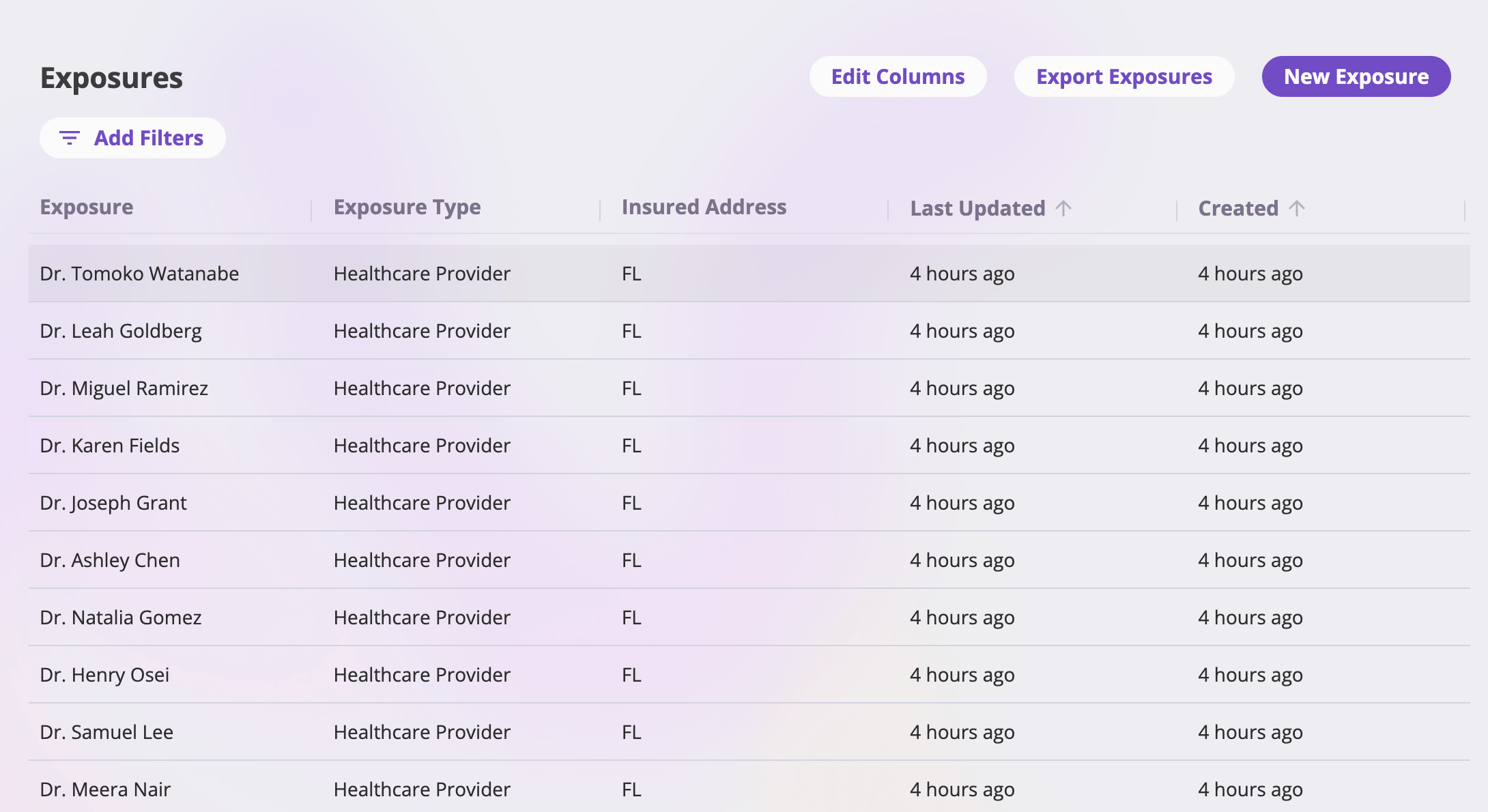 * **Columns** — the defaults are *Name*, *Type*, *Address*, *Last Updated*, and
*Created*. **Edit Columns** adds, removes, and reorders columns — any
configured exposure field, plus the system columns *Created*, *Last
Updated*, *Created By*, and *Updated By*.
* **Filters** — **Add Filters** builds filters on any column; active filters
show as pills.
* **Sorting & pagination** — click a sortable column header to sort (newest
updated first by default); pick 25, 50, 100, or 200 rows per page.
* **Opening an exposure** — click a row to open its detail page.
* **Export Exposures** — the standard entity export (Excel, CSV, or Google
Drive), carrying your current filters. See
[Exports & saved views](/app/features/exports-saved-views).
## Creating an exposure
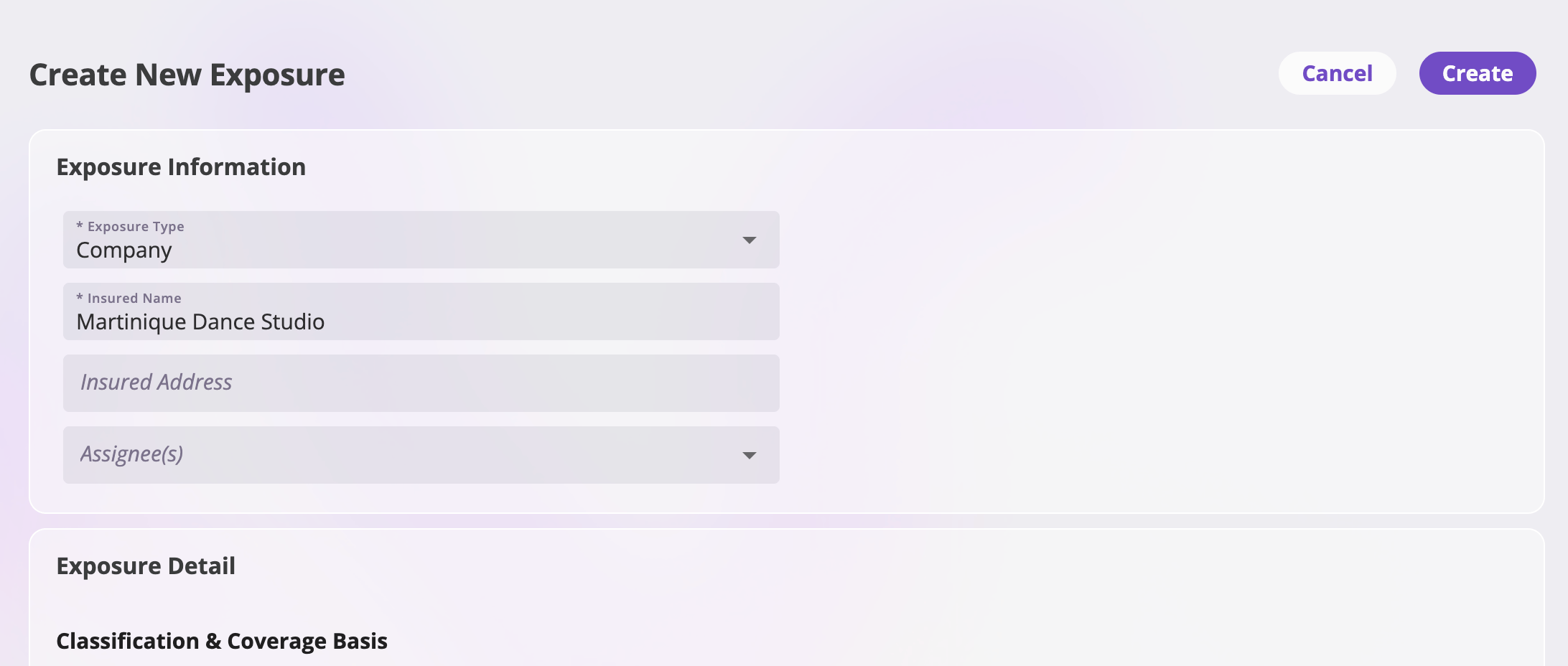
**New Exposure** at the top right of the list opens the create page: the
exposure's fields as configured for your company, laid out in cards. The
**Create** button stays disabled until every required field is filled;
**Cancel** returns you to the list. Creating saves the exposure and takes you
to its detail page.
* **Columns** — the defaults are *Name*, *Type*, *Address*, *Last Updated*, and
*Created*. **Edit Columns** adds, removes, and reorders columns — any
configured exposure field, plus the system columns *Created*, *Last
Updated*, *Created By*, and *Updated By*.
* **Filters** — **Add Filters** builds filters on any column; active filters
show as pills.
* **Sorting & pagination** — click a sortable column header to sort (newest
updated first by default); pick 25, 50, 100, or 200 rows per page.
* **Opening an exposure** — click a row to open its detail page.
* **Export Exposures** — the standard entity export (Excel, CSV, or Google
Drive), carrying your current filters. See
[Exports & saved views](/app/features/exports-saved-views).
## Creating an exposure
**New Exposure** at the top right of the list opens the create page: the
exposure's fields as configured for your company, laid out in cards. The
**Create** button stays disabled until every required field is filled;
**Cancel** returns you to the list. Creating saves the exposure and takes you
to its detail page.
 Exposures are also created inside the quote flow — including in bulk from a
spreadsheet — and linked to the quote as you go. See
[Quoting new business](/app/workflows/quoting).
## The exposure detail page
The header shows the exposure's **name** and the **Actions** menu (see
[Actions](#the-actions-menu)). Below it, the tabs — each one a different view
of what references this exposure:
| Tab | What it shows | Visible when |
| ---------------------------------------- | --------------------------------------------------------------------------------------------------------------------------- | ------------------------------ |
| [Details](#the-details-tab) | The exposure's fields, editable — with a policy-context lens to see the values a given policy holds for it. | Always |
| [Quotes](#the-cross-reference-tabs) | Every quote that includes this exposure. | Your role can view quotes |
| [Policies](#the-cross-reference-tabs) | Every policy that covers, or has ever covered, this exposure. | Your role can view policies |
| [Submissions](#the-cross-reference-tabs) | Every submission that references this exposure. | Your role can view submissions |
| Files | Files attached to the exposure — see [Files & notes](/app/features/files-notes). | Your role can view files |
| [Events](#the-cross-reference-tabs) | The events (claims and incidents) filed against this exposure. | Your role can view events |
| Notes | Free-form notes on the exposure — see [Files & notes](/app/features/files-notes#the-notes-tab). | Your role can read notes |
| Contacts | The people linked to this exposure — see [Directory & contacts](/app/features/directory#the-contacts-tab-on-other-records). | Always |
## The Details tab
The Details tab shows the exposure's fields in cards. To change a value, edit
the card, make your changes, and save (or cancel to discard).
### The policy-context lens
An exposure has one set of **baseline** values — what you see and edit by
default — but each policy that covers it captured its *own* copy of the
exposure's values when it was bound, and those can differ (from the baseline,
and from date to date within a policy term). The dropdown at the top of the
tab switches between them:
Exposures are also created inside the quote flow — including in bulk from a
spreadsheet — and linked to the quote as you go. See
[Quoting new business](/app/workflows/quoting).
## The exposure detail page
The header shows the exposure's **name** and the **Actions** menu (see
[Actions](#the-actions-menu)). Below it, the tabs — each one a different view
of what references this exposure:
| Tab | What it shows | Visible when |
| ---------------------------------------- | --------------------------------------------------------------------------------------------------------------------------- | ------------------------------ |
| [Details](#the-details-tab) | The exposure's fields, editable — with a policy-context lens to see the values a given policy holds for it. | Always |
| [Quotes](#the-cross-reference-tabs) | Every quote that includes this exposure. | Your role can view quotes |
| [Policies](#the-cross-reference-tabs) | Every policy that covers, or has ever covered, this exposure. | Your role can view policies |
| [Submissions](#the-cross-reference-tabs) | Every submission that references this exposure. | Your role can view submissions |
| Files | Files attached to the exposure — see [Files & notes](/app/features/files-notes). | Your role can view files |
| [Events](#the-cross-reference-tabs) | The events (claims and incidents) filed against this exposure. | Your role can view events |
| Notes | Free-form notes on the exposure — see [Files & notes](/app/features/files-notes#the-notes-tab). | Your role can read notes |
| Contacts | The people linked to this exposure — see [Directory & contacts](/app/features/directory#the-contacts-tab-on-other-records). | Always |
## The Details tab
The Details tab shows the exposure's fields in cards. To change a value, edit
the card, make your changes, and save (or cancel to discard).
### The policy-context lens
An exposure has one set of **baseline** values — what you see and edit by
default — but each policy that covers it captured its *own* copy of the
exposure's values when it was bound, and those can differ (from the baseline,
and from date to date within a policy term). The dropdown at the top of the
tab switches between them:
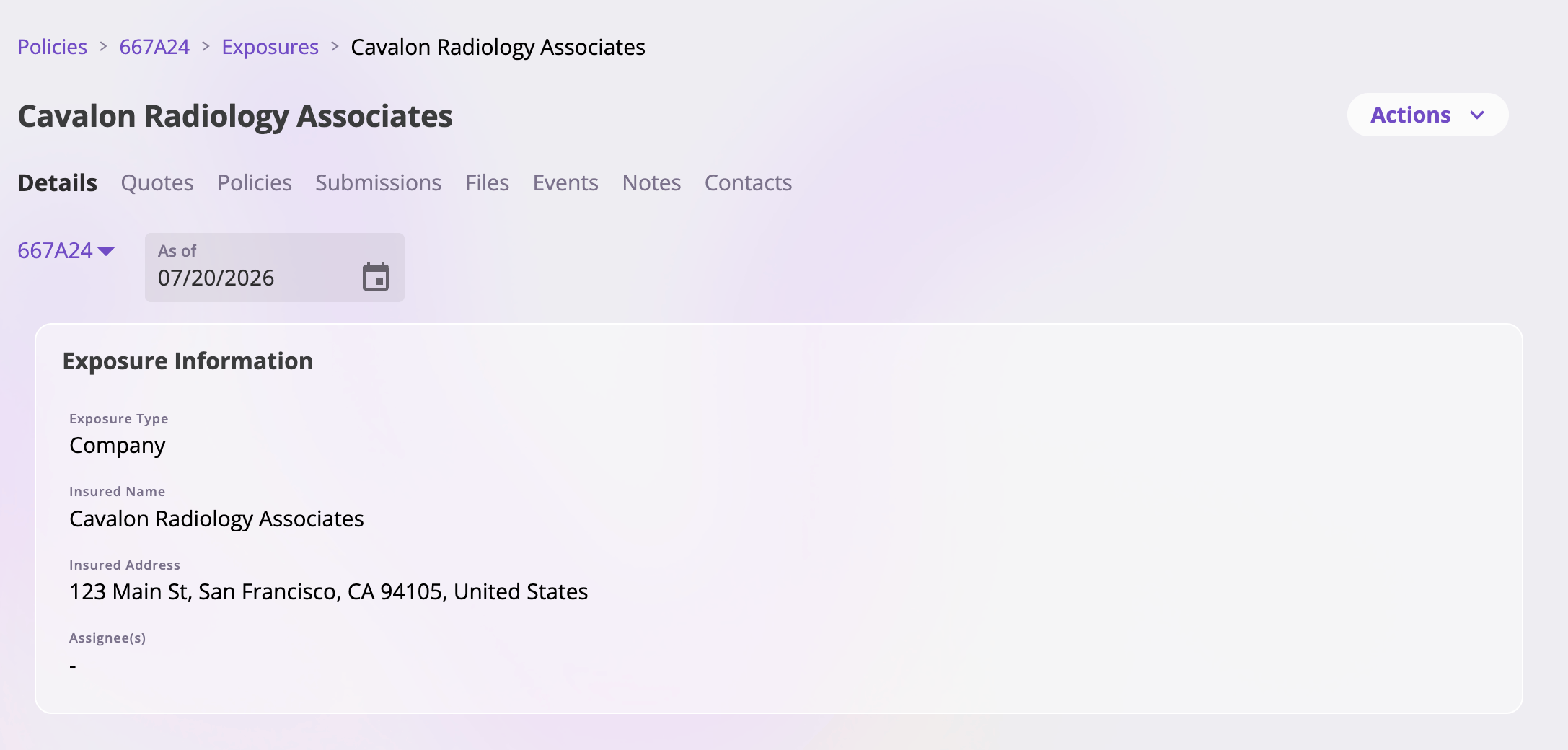 * **Baseline** (the default) — the exposure's own current values. This is the
only context where the cards are editable.
* **A policy** — one entry per policy that references the exposure. Selecting
one shows the exposure's values *as that policy holds them*, read-only, with
an **As of** date picker (bounded to the policy's term) to view the values
in force on any date — an endorsement to the policy may have changed them
mid-term. If the selected policy has no data for this exposure on the chosen
date, a notice says so.
Editing the baseline does **not** change what any bound policy holds — a
policy's copy of the exposure changes only through an endorsement to that
policy. See [Servicing a policy](/app/workflows/servicing-policies).
## The cross-reference tabs
Four tabs list the records that reference this exposure. Each is a table with
its own **Edit Columns** button, and each row links to the record's detail
page:
* **Quotes** — every quote that includes this exposure. Default columns:
*Quote Number* (pinned), *Submission*, *Status*, *Type*, *Last Updated*,
*Created* — mirroring the Quotes list. See
[Quotes](/app/features/quotes).
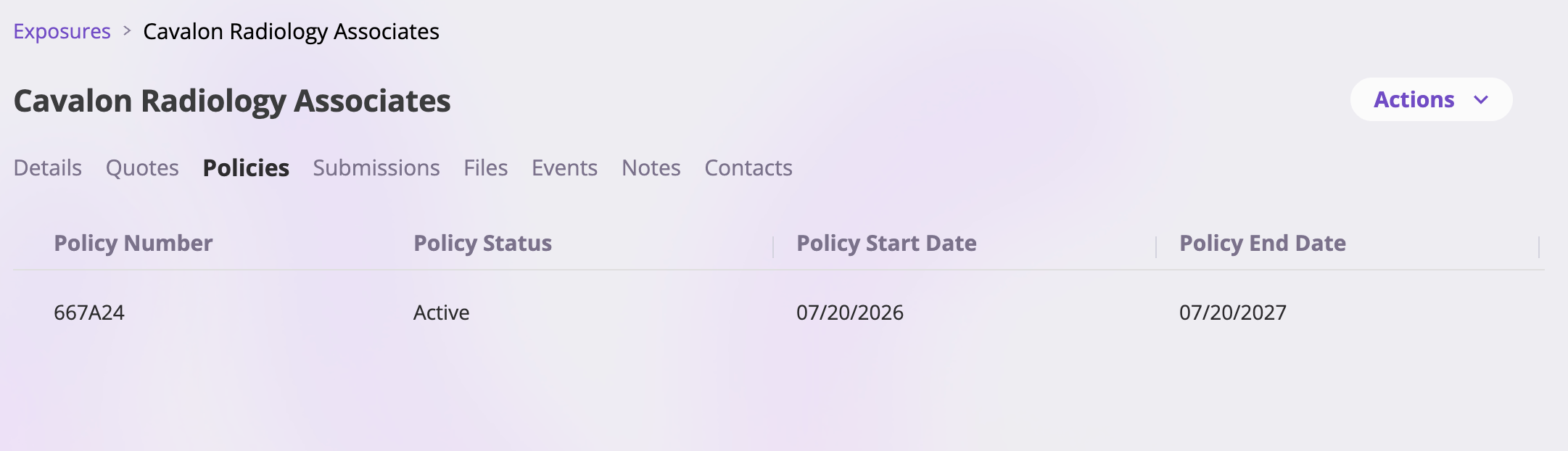
* **Policies** — every policy that covers this exposure, or covered it during
any part of its term — one row per policy, shown at its latest state.
Default columns mirror the [Policies list](/app/features/policies).
* **Submissions** — every submission that references this exposure. Default
columns: *Submission Number* (pinned), *Name*, *Status*, *Type*, *Last
Updated*, *Created*. See [Submissions](/app/features/submissions).
* **Events** — the claims and incidents filed against this exposure, with a
search box. Default columns: *Event Name* (pinned), *Event Type*,
*Reference ID*, *Status*. See [Events](/app/features/events).
* **Baseline** (the default) — the exposure's own current values. This is the
only context where the cards are editable.
* **A policy** — one entry per policy that references the exposure. Selecting
one shows the exposure's values *as that policy holds them*, read-only, with
an **As of** date picker (bounded to the policy's term) to view the values
in force on any date — an endorsement to the policy may have changed them
mid-term. If the selected policy has no data for this exposure on the chosen
date, a notice says so.
Editing the baseline does **not** change what any bound policy holds — a
policy's copy of the exposure changes only through an endorsement to that
policy. See [Servicing a policy](/app/workflows/servicing-policies).
## The cross-reference tabs
Four tabs list the records that reference this exposure. Each is a table with
its own **Edit Columns** button, and each row links to the record's detail
page:
* **Quotes** — every quote that includes this exposure. Default columns:
*Quote Number* (pinned), *Submission*, *Status*, *Type*, *Last Updated*,
*Created* — mirroring the Quotes list. See
[Quotes](/app/features/quotes).
* **Policies** — every policy that covers this exposure, or covered it during
any part of its term — one row per policy, shown at its latest state.
Default columns mirror the [Policies list](/app/features/policies).
* **Submissions** — every submission that references this exposure. Default
columns: *Submission Number* (pinned), *Name*, *Status*, *Type*, *Last
Updated*, *Created*. See [Submissions](/app/features/submissions).
* **Events** — the claims and incidents filed against this exposure, with a
search box. Default columns: *Event Name* (pinned), *Event Type*,
*Reference ID*, *Status*. See [Events](/app/features/events).
 An empty tab says so explicitly (for example, *"No quotes reference this
exposure yet."*).
## The Actions menu
The **Actions** menu at the top right holds one action:
| Action | Appears on | What it does |
| --------------- | ------------------------------------------------- | ------------------------------------------------------ |
| Delete Exposure | All exposures (if your role can delete exposures) | Permanently deletes the exposure after a confirmation. |
Before showing the confirmation, the app checks whether anything still
references the exposure. If something does — a quote, policy, submission, or
event still linked to it — the dialog explains why the exposure can't be
deleted, and the delete button is disabled. Otherwise, confirming deletes the
exposure and returns you to the list.
Deleting an exposure is permanent — there is no undo. The reference check
exists precisely because exposures are shared: remove it from the records
that use it before deleting it.
An empty tab says so explicitly (for example, *"No quotes reference this
exposure yet."*).
## The Actions menu
The **Actions** menu at the top right holds one action:
| Action | Appears on | What it does |
| --------------- | ------------------------------------------------- | ------------------------------------------------------ |
| Delete Exposure | All exposures (if your role can delete exposures) | Permanently deletes the exposure after a confirmation. |
Before showing the confirmation, the app checks whether anything still
references the exposure. If something does — a quote, policy, submission, or
event still linked to it — the dialog explains why the exposure can't be
deleted, and the delete button is disabled. Otherwise, confirming deletes the
exposure and returns you to the list.
Deleting an exposure is permanent — there is no undo. The reference check
exists precisely because exposures are shared: remove it from the records
that use it before deleting it.