> ## Documentation Index
> Fetch the complete documentation index at: https://docs.go.aiinsurance.io/llms.txt
> Use this file to discover all available pages before exploring further.
# OFAC screening
> Screen an exposure against sanctions lists, review potential matches, and understand when a saved result is out of date.
An [exposure](/app/features/exposures) can carry an **OFAC screening** card:
a set of entry boxes for the party's identifying details and a button that
submits them to the sanctions screening service. The result — including any
**potential matches** for a person to review — is saved on the exposure and
shown right below the button.
Screening is **advisory**. It never blocks a save, a quote, a bind, an issue,
or an import; it exists to put sanctions information in front of a person at
the moment they can act on it.
The screening card appears only where your configuration places it, and the
boxes it shows are chosen per placement. If you expect screening on an
exposure type and don't see it, contact your AI Insurance team. (Screening
is also available to integrations through the
[OFAC screening API](/api-reference/ofac-screening/overview).)
## Running a screening
The card shows an entry box for each configured detail. **Name** is always
present — it's the one detail a screening can't run without — and the rest
vary by configuration: **Subject type**, **Date of birth**, **Gender**,
**Citizenship**, **Nationality**, **Phone number**, **Email address**,
**Crypto address**, **Address**, and **Identity documents** (add rows with
**Add identity document**).
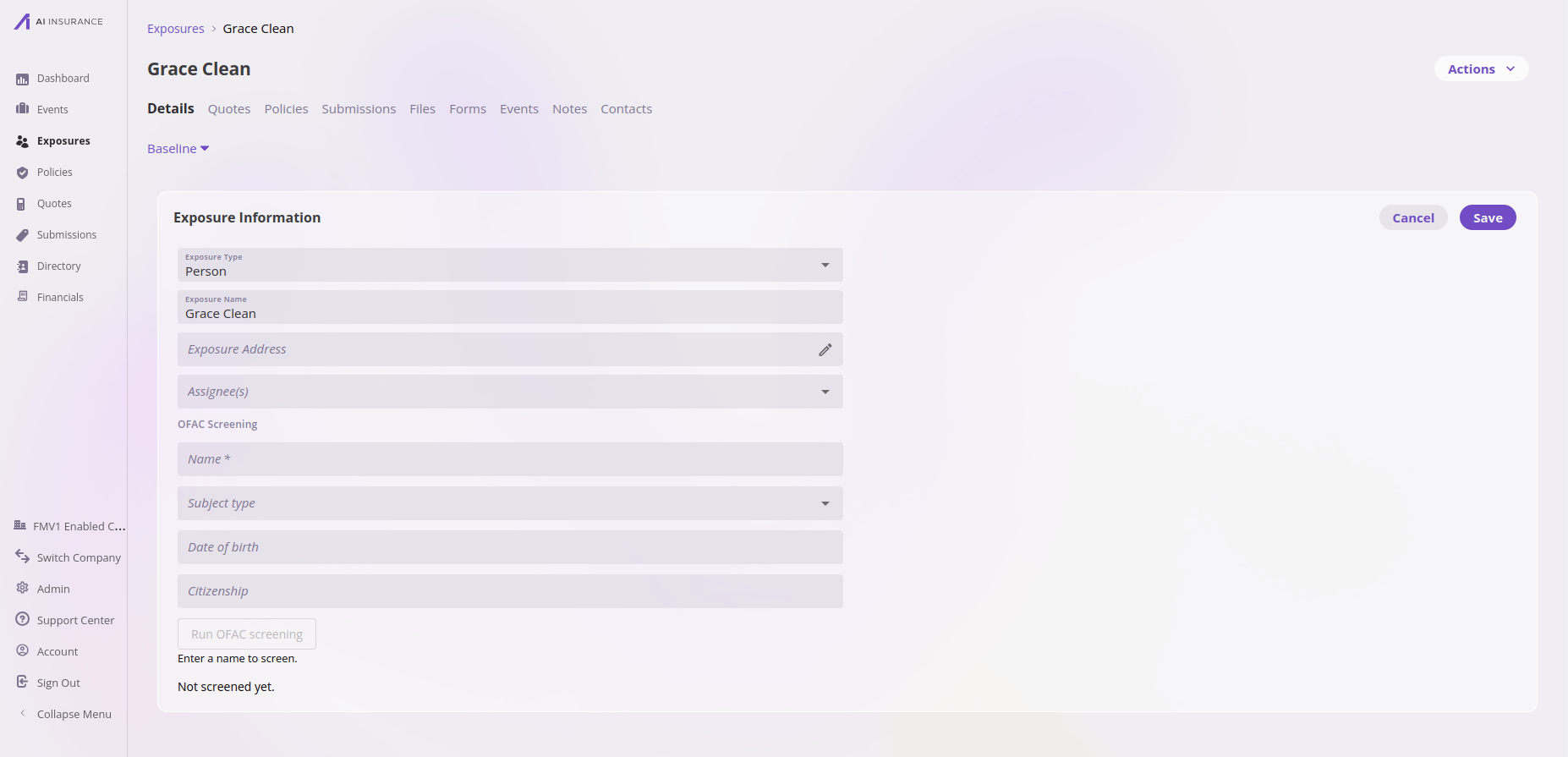 **Name** starts filled in from the exposure's own name, and you can change it
before running — an AKA or a corrected spelling is a normal reason to. Saving
the exposure keeps whatever name the box holds, so the record carries the name
it would be screened under even if nobody has run a screening yet. Every other
detail is entered by hand.
Type the values to screen and select **Run OFAC screening**. The button reads
**Running screening…** while the call is in flight and **Re-run OFAC
screening** once a result exists. Until a name is entered the button is
disabled with *Enter a name to screen.*, and on a record that hasn't been
saved yet you'll see *Save this record before running a screening.* — save
first, then run.
Before the first run, the result area reads *Not screened yet.*
Which sanctions lists are checked and the match threshold are fixed platform
settings, recorded on every result. They are not configurable per company or
per screening.
## Reading a result
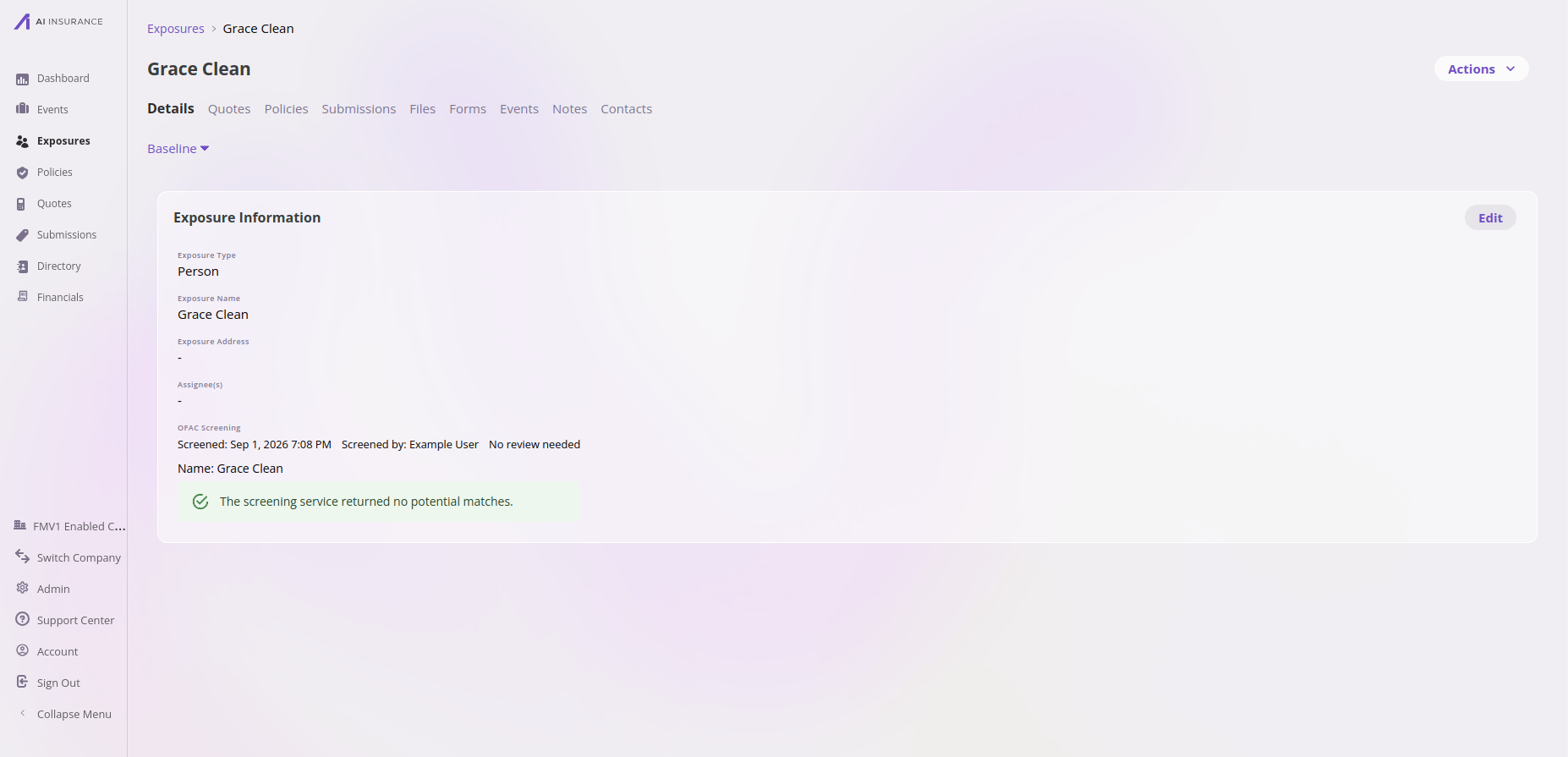
A clean run shows *The screening service returned no potential matches.*
Every saved result also records **Screened:** (when) and **Screened by:**
(who, or *External API* when an integration ran it), plus a review status: *No review needed*, *Review pending*,
*Reviewed — cleared*, or *Reviewed — confirmed*.
**Name** starts filled in from the exposure's own name, and you can change it
before running — an AKA or a corrected spelling is a normal reason to. Saving
the exposure keeps whatever name the box holds, so the record carries the name
it would be screened under even if nobody has run a screening yet. Every other
detail is entered by hand.
Type the values to screen and select **Run OFAC screening**. The button reads
**Running screening…** while the call is in flight and **Re-run OFAC
screening** once a result exists. Until a name is entered the button is
disabled with *Enter a name to screen.*, and on a record that hasn't been
saved yet you'll see *Save this record before running a screening.* — save
first, then run.
Before the first run, the result area reads *Not screened yet.*
Which sanctions lists are checked and the match threshold are fixed platform
settings, recorded on every result. They are not configurable per company or
per screening.
## Reading a result
A clean run shows *The screening service returned no potential matches.*
Every saved result also records **Screened:** (when) and **Screened by:**
(who, or *External API* when an integration ran it), plus a review status: *No review needed*, *Review pending*,
*Reviewed — cleared*, or *Reviewed — confirmed*.
 ## Reviewing potential matches
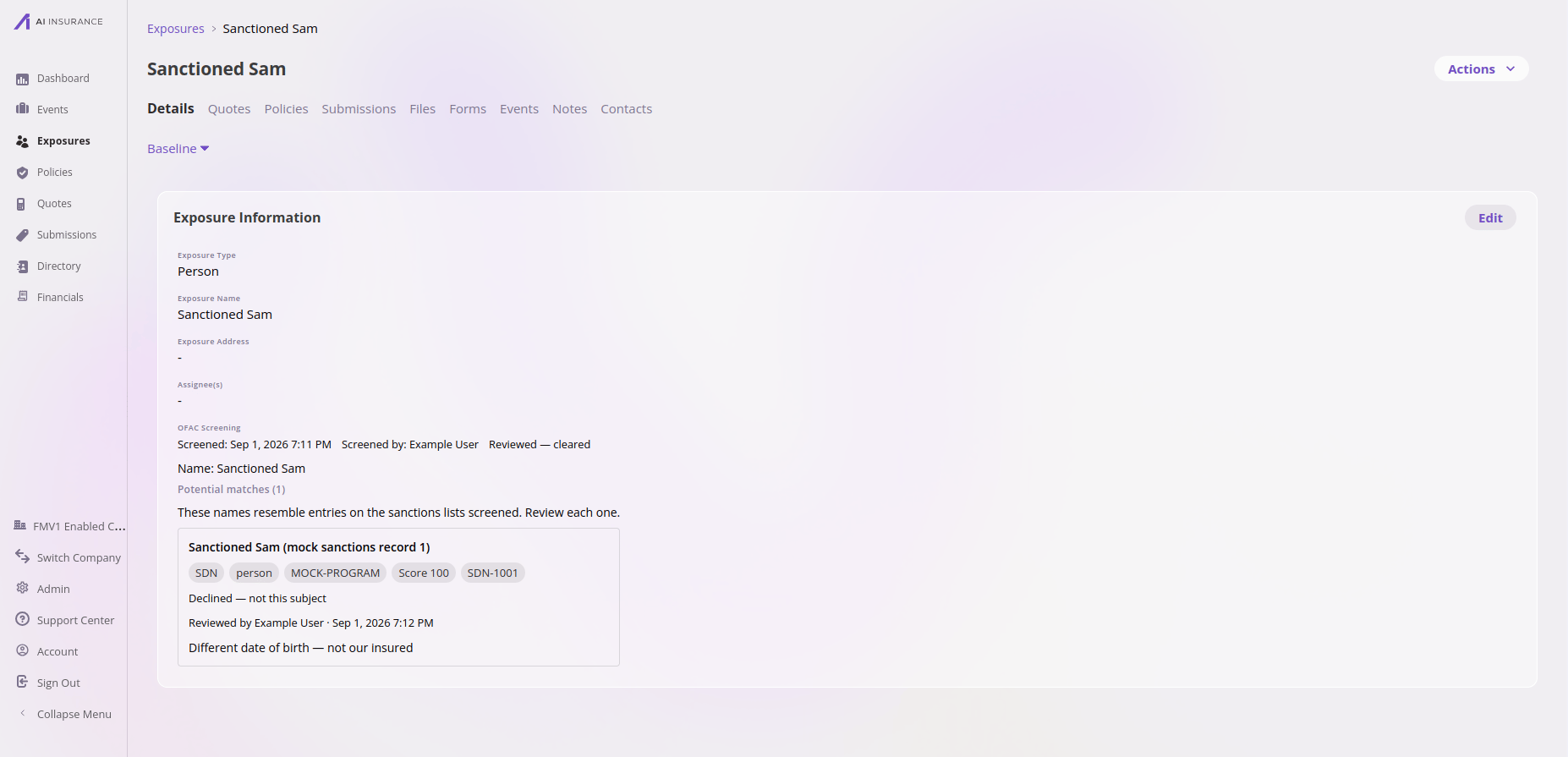
When the service finds similar names, the result shows **Potential matches
(N)**: *These names resemble entries on the sanctions lists screened. Review
each one.* Each match card carries the sanctions record's name, its source
list, type, programs, match score, and record id, with a status caption —
*Not yet reviewed*, *Confirmed as a match*, or *Declined — not this subject*.
Anyone who can edit the exposure can review: select **Confirm** or
**Decline** on each match, optionally adding a **Review note (optional)**.
A decision can be reversed with **Clear decision**. Every decision records
who made it and when — *Reviewed by {name} · {date, time}* — and the overall
review status stays *Review pending* until every match is decided.
## Reviewing potential matches
When the service finds similar names, the result shows **Potential matches
(N)**: *These names resemble entries on the sanctions lists screened. Review
each one.* Each match card carries the sanctions record's name, its source
list, type, programs, match score, and record id, with a status caption —
*Not yet reviewed*, *Confirmed as a match*, or *Declined — not this subject*.
Anyone who can edit the exposure can review: select **Confirm** or
**Decline** on each match, optionally adding a **Review note (optional)**.
A decision can be reversed with **Clear decision**. Every decision records
who made it and when — *Reviewed by {name} · {date, time}* — and the overall
review status stays *Review pending* until every match is decided.
 A potential match is a **name similarity**, not a determination that your
party is the sanctioned party — that judgement is exactly what the review
step exists for. Confirming a match records the conclusion; it does not
block anything.
## When values change
A screening describes the values that were submitted, at the moment they were
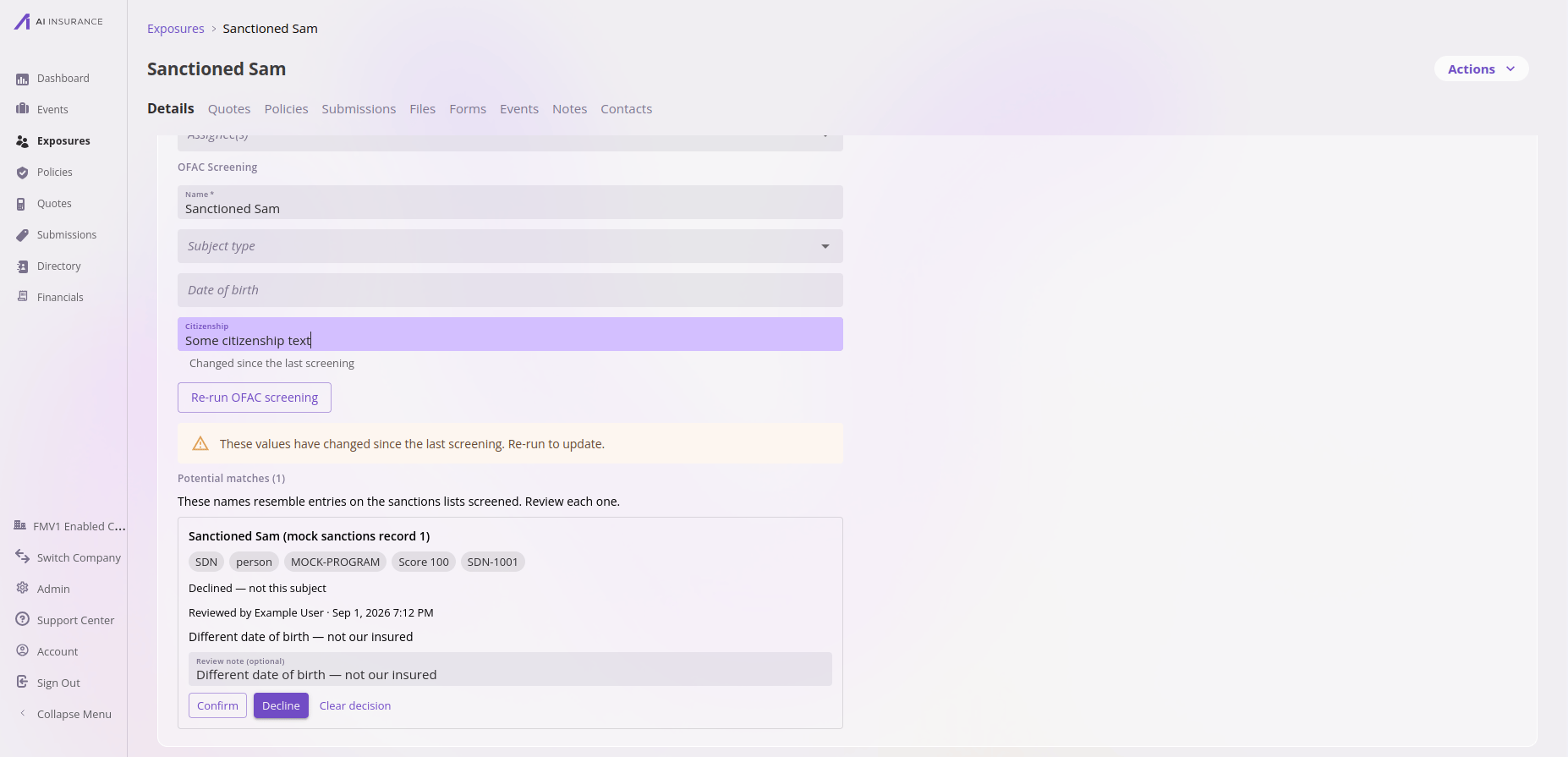
submitted. If an entry box is edited afterwards it shows *Changed since the
last screening*, and the result carries a warning: *These values have changed
since the last screening. Re-run to update.* The saved result stays visible —
it's still a true record of what was screened — but it no longer describes
the current values.
A potential match is a **name similarity**, not a determination that your
party is the sanctioned party — that judgement is exactly what the review
step exists for. Confirming a match records the conclusion; it does not
block anything.
## When values change
A screening describes the values that were submitted, at the moment they were
submitted. If an entry box is edited afterwards it shows *Changed since the
last screening*, and the result carries a warning: *These values have changed
since the last screening. Re-run to update.* The saved result stays visible —
it's still a true record of what was screened — but it no longer describes
the current values.
 Sanctions lists also change over time, so even an untouched result only
speaks as of its **Screened:** date. Re-running is always safe — but note a
re-run **replaces** the previous result, including its review decisions,
which were about a different screening.
## Screening status on a quote's Exposures step
Where your configuration enables it, the **Exposures** table in the quote
wizard carries an **OFAC status** column, so every exposure's screening state
is readable without opening each one. Each row shows a short phrase:
| Phrase | What it means |
| ----------------------------------- | -------------------------------------------------------------------------------------------------------- |
| *Not screened* | No screening has run on this exposure yet. |
| *Did not complete* | The screening did not run to completion, so there is no result to read. Open the exposure and re-run it. |
| *No potential matches* | The screening completed and the service matched nothing against the sanctions lists. |
| *Potential matches — review needed* | The service returned potential matches and nobody has decided on them yet. |
| *Reviewed — none applied* | Every potential match was declined on review. |
| *Potential match confirmed* | A reviewer confirmed one of the potential matches. |
A **Show OFAC status** switch above the table turns the column off and on. It
starts on.
The column is not clickable. Each row's edit control is the way into the
exposure, where the full OFAC screening card and its **Re-run OFAC screening**
button live.
### When a row's result no longer fits it
Two muted notes can appear under a phrase:
* *Screened values have changed* when a screened value was edited afterwards.
This is the same condition the screening card reports, and re-running clears
it.
* *Screened as “{name}”* when the exposure has been **renamed** since it was
screened. Read this one carefully: re-running on its own screens the name the
card still holds, so change the **Name** box on the OFAC card to the current
name first. A name that differs on purpose, such as a legal name or an AKA,
keeps reporting this, which is the honest answer rather than a claim the
result is out of date.
### The banner above the table
When any exposure on the quote needs attention, a banner appears at the top of
the card. **One banner shows at a time, the most serious that applies:**
* **A confirmed potential match**, in red. A reviewer concluded that one of the
potential matches applies. This is the only one of the two that reports a
finding rather than outstanding work.
* **Exposures needing OFAC attention**, in amber. Something is waiting on a
person: potential matches nobody has decided on, a screening that did not
complete, or both. The banner counts them together, and the status column is
where you see which is which.
Because only the most serious shows, a quote with a confirmed match will not
also show the amber banner. The status column still reports every row
individually, which is why it is on by default.
The banner is what makes collapsing the column safe: it appears whether or not
the column is showing. Like the rest of screening, it is **advisory**. It
blocks no save, quote, bind, issue, or import, it covers only the quote you are
looking at, and it notifies nobody.
The column, the toggle, and the banner appear only where your configuration
turns them on for a company that is actually running OFAC screening. Every
state except the rename note is also visible on the exposure's own OFAC
screening card.
## Renewals
When a renewal quote opens in the quote wizard, each carried-over exposure
that has screening values is **automatically re-screened** against the
current lists, and the fresh results land on the renewal's draft rows. Prior
review decisions are not carried forward — the new screening is reviewed on
its own.
## Permissions
Running a screening and reviewing matches are exposure updates and use that
same permission — there is no separate screening authority. Without it, the
run button reports *You do not have permission to run a screening.*
## When a screening fails
A run that doesn't complete is saved as a failed screening with no result —
never silently substituted. The card says what happened and invites a
re-run, for example *The screening service did not respond in time. Re-run to
try again.* An identity document missing its number or type is flagged — *An
identity document is incomplete and was not included in the screening.* — and
if the card reports *Screening is not switched on for this field. Ask an
administrator to check its placement.*, the field's configuration needs
attention rather than the values.
Because every run is a fresh, independent screening, retrying a failure is
always safe.
## Differences from the legacy app
If you used OFAC screening in the previous AI Insurance application, the
behavior here is deliberately different in a few ways:
| Legacy behavior | Now |
| ---------------------------------------------------------- | --------------------------------------------------------------------------------------- |
| Screening fired automatically as you typed | Values are entered, then screened explicitly with **Run OFAC screening** |
| Review decisions recorded no reviewer or time | Every decision records who and when |
| Results could only be reused when the name matched exactly | Staleness is derived by comparing all screened values, and shown on the card |
| Matches were associated by name | Each screening carries a stable case id, so results can never attach to the wrong party |
| Missing service credentials silently produced fake results | A misconfigured service is a visible failure, never a fake result |
Importing exposures stores screening values but runs no screening — imported
parties are screened when someone next runs the card (see
[the API overview](/api-reference/ofac-screening/overview) for the same rule
on the integration side).
Sanctions lists also change over time, so even an untouched result only
speaks as of its **Screened:** date. Re-running is always safe — but note a
re-run **replaces** the previous result, including its review decisions,
which were about a different screening.
## Screening status on a quote's Exposures step
Where your configuration enables it, the **Exposures** table in the quote
wizard carries an **OFAC status** column, so every exposure's screening state
is readable without opening each one. Each row shows a short phrase:
| Phrase | What it means |
| ----------------------------------- | -------------------------------------------------------------------------------------------------------- |
| *Not screened* | No screening has run on this exposure yet. |
| *Did not complete* | The screening did not run to completion, so there is no result to read. Open the exposure and re-run it. |
| *No potential matches* | The screening completed and the service matched nothing against the sanctions lists. |
| *Potential matches — review needed* | The service returned potential matches and nobody has decided on them yet. |
| *Reviewed — none applied* | Every potential match was declined on review. |
| *Potential match confirmed* | A reviewer confirmed one of the potential matches. |
A **Show OFAC status** switch above the table turns the column off and on. It
starts on.
The column is not clickable. Each row's edit control is the way into the
exposure, where the full OFAC screening card and its **Re-run OFAC screening**
button live.
### When a row's result no longer fits it
Two muted notes can appear under a phrase:
* *Screened values have changed* when a screened value was edited afterwards.
This is the same condition the screening card reports, and re-running clears
it.
* *Screened as “{name}”* when the exposure has been **renamed** since it was
screened. Read this one carefully: re-running on its own screens the name the
card still holds, so change the **Name** box on the OFAC card to the current
name first. A name that differs on purpose, such as a legal name or an AKA,
keeps reporting this, which is the honest answer rather than a claim the
result is out of date.
### The banner above the table
When any exposure on the quote needs attention, a banner appears at the top of
the card. **One banner shows at a time, the most serious that applies:**
* **A confirmed potential match**, in red. A reviewer concluded that one of the
potential matches applies. This is the only one of the two that reports a
finding rather than outstanding work.
* **Exposures needing OFAC attention**, in amber. Something is waiting on a
person: potential matches nobody has decided on, a screening that did not
complete, or both. The banner counts them together, and the status column is
where you see which is which.
Because only the most serious shows, a quote with a confirmed match will not
also show the amber banner. The status column still reports every row
individually, which is why it is on by default.
The banner is what makes collapsing the column safe: it appears whether or not
the column is showing. Like the rest of screening, it is **advisory**. It
blocks no save, quote, bind, issue, or import, it covers only the quote you are
looking at, and it notifies nobody.
The column, the toggle, and the banner appear only where your configuration
turns them on for a company that is actually running OFAC screening. Every
state except the rename note is also visible on the exposure's own OFAC
screening card.
## Renewals
When a renewal quote opens in the quote wizard, each carried-over exposure
that has screening values is **automatically re-screened** against the
current lists, and the fresh results land on the renewal's draft rows. Prior
review decisions are not carried forward — the new screening is reviewed on
its own.
## Permissions
Running a screening and reviewing matches are exposure updates and use that
same permission — there is no separate screening authority. Without it, the
run button reports *You do not have permission to run a screening.*
## When a screening fails
A run that doesn't complete is saved as a failed screening with no result —
never silently substituted. The card says what happened and invites a
re-run, for example *The screening service did not respond in time. Re-run to
try again.* An identity document missing its number or type is flagged — *An
identity document is incomplete and was not included in the screening.* — and
if the card reports *Screening is not switched on for this field. Ask an
administrator to check its placement.*, the field's configuration needs
attention rather than the values.
Because every run is a fresh, independent screening, retrying a failure is
always safe.
## Differences from the legacy app
If you used OFAC screening in the previous AI Insurance application, the
behavior here is deliberately different in a few ways:
| Legacy behavior | Now |
| ---------------------------------------------------------- | --------------------------------------------------------------------------------------- |
| Screening fired automatically as you typed | Values are entered, then screened explicitly with **Run OFAC screening** |
| Review decisions recorded no reviewer or time | Every decision records who and when |
| Results could only be reused when the name matched exactly | Staleness is derived by comparing all screened values, and shown on the card |
| Matches were associated by name | Each screening carries a stable case id, so results can never attach to the wrong party |
| Missing service credentials silently produced fake results | A misconfigured service is a visible failure, never a fake result |
Importing exposures stores screening values but runs no screening — imported
parties are screened when someone next runs the card (see
[the API overview](/api-reference/ofac-screening/overview) for the same rule
on the integration side).