> ## Documentation Index
> Fetch the complete documentation index at: https://docs.go.aiinsurance.io/llms.txt
> Use this file to discover all available pages before exploring further.
# Quotes
> The Quotes list, the quote detail page and its tabs, every quote status and type, and every quote action with its availability conditions.
A [quote](/entities/quote) prices a risk: it collects the coverage terms,
exposures, and premium for a proposed policy (or a proposed change to one).
This page is the reference for the **Quotes** area; for the step-by-step
guides, see [Quoting new business](/app/workflows/quoting) and
[Binding a quote](/app/workflows/binding).
## The Quotes list
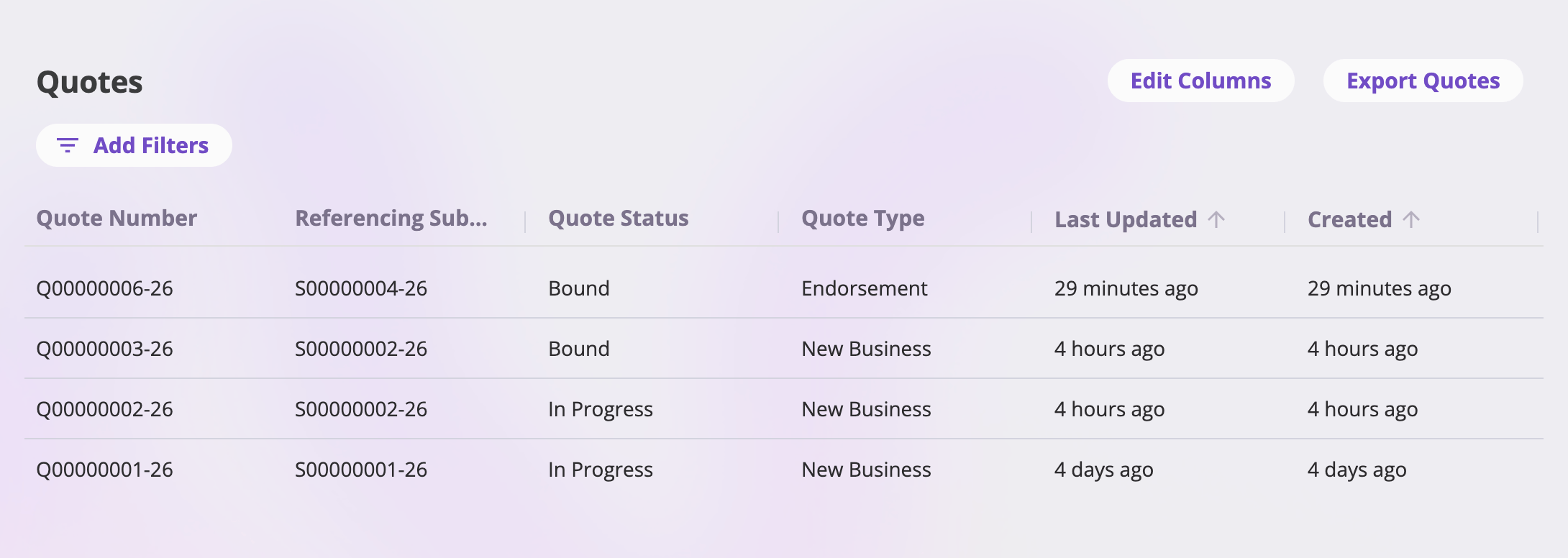
Open **Quotes** in the sidebar. Each row is a quote; selecting a row opens its
[detail page](#the-quote-detail-page).
 ### Toolbar
| Button | What it does |
| ----------------- | ----------------------------------------------------------------------------------------------------------------- |
| **Edit Columns** | Choose, reorder, and save the list's columns — including shared [saved views](/app/features/exports-saved-views). |
| **Export Quotes** | Exports the list — see [Exports & saved views](/app/features/exports-saved-views). |
There is no "create quote" button here: quotes are created from a
[submission](/app/features/submissions) (its Quotes card's **New Quote**
button) or by the quote wizard when you create a submission — see
[Quoting new business](/app/workflows/quoting).
### Columns
Column headers follow your company's configured field labels. By default the
list shows **Quote Number** (always pinned as the first column), the
**Submission** the quote belongs to, **Status**, **Type**, **Last Updated**,
and **Created**. **Edit Columns** can add any other configured quote field,
plus the system columns *Created*, *Last Updated*, and *Created By*.
* **Sorting** — the Created and Last Updated columns are sortable (the
default sort is Last Updated, newest first).
* **Filters** — **Add Filters** opens the filter picker; you can filter on
the list's fields with type-appropriate inputs (text, dates, numbers,
option choices, users, linked records). Active filters show as pills you
can edit or remove.
* **Pagination** — the footer pages through results at 25, 50, 100, or 200
rows per page.
## Quote statuses
Every quote is in exactly one status. The status keys are fixed by the
platform; the label shown in the Status column is configurable per company
(defaults in parentheses). The quote detail header shows its own spelled-out
label:
| Status (detail header) | List label (default) | What it means | How a quote gets it |
| ---------------------- | -------------------- | ---------------------------------------------------------------------------------------------------------------------------------------------------------------------------------------------- | --------------------------------------------------------------------------------------------------------------------- |
| **In Progress** | In Progress | The quote is a working draft in the quote wizard. | Every quote starts here; it stays In Progress across saves until you complete it. |
| **Quote Complete** | Sent | The quote is finished — priced, reviewed, and ready to be bound (or sent to the insured). | Selecting **Complete Quote** on the wizard's final step. |
| **Bound to Policy** | Bound | The quote has been bound: its terms are applied — a new policy for a new-business or renewal quote, or a change to the source policy for an endorsement, cancellation, or reinstatement quote. | Finishing the [bind flow](/app/workflows/binding) — or, for a cancellation or reinstatement, confirming its own flow. |
| **Canceled** | Cancelled | The quote was withdrawn without being bound. | The **Cancel Quote** action. |
| **Archived** | Archived | The quote is parked out of the way. | Not set by any in-app action today; it can be set through the [API](/api-reference/entities/overview). |
## Quote types
Every quote also carries a **type**, set when it's created and never changed.
The type determines what binding the quote does — and which actions it offers:
| Type | Binding it… |
| ----------------- | ------------------------------------------------ |
| **New Business** | Creates a brand-new policy. |
| **Renewal** | Creates the next policy term. |
| **Endorsement** | Applies a mid-term change to the source policy. |
| **Cancellation** | Cancels the source policy as of the chosen date. |
| **Reinstatement** | Reinstates the cancelled source policy. |
Endorsement, cancellation, and reinstatement quotes are anchored to the policy
they modify from the moment they're created — they appear on that policy even
before they're bound. See [Servicing a policy](/app/workflows/servicing-policies).
## The quote detail page
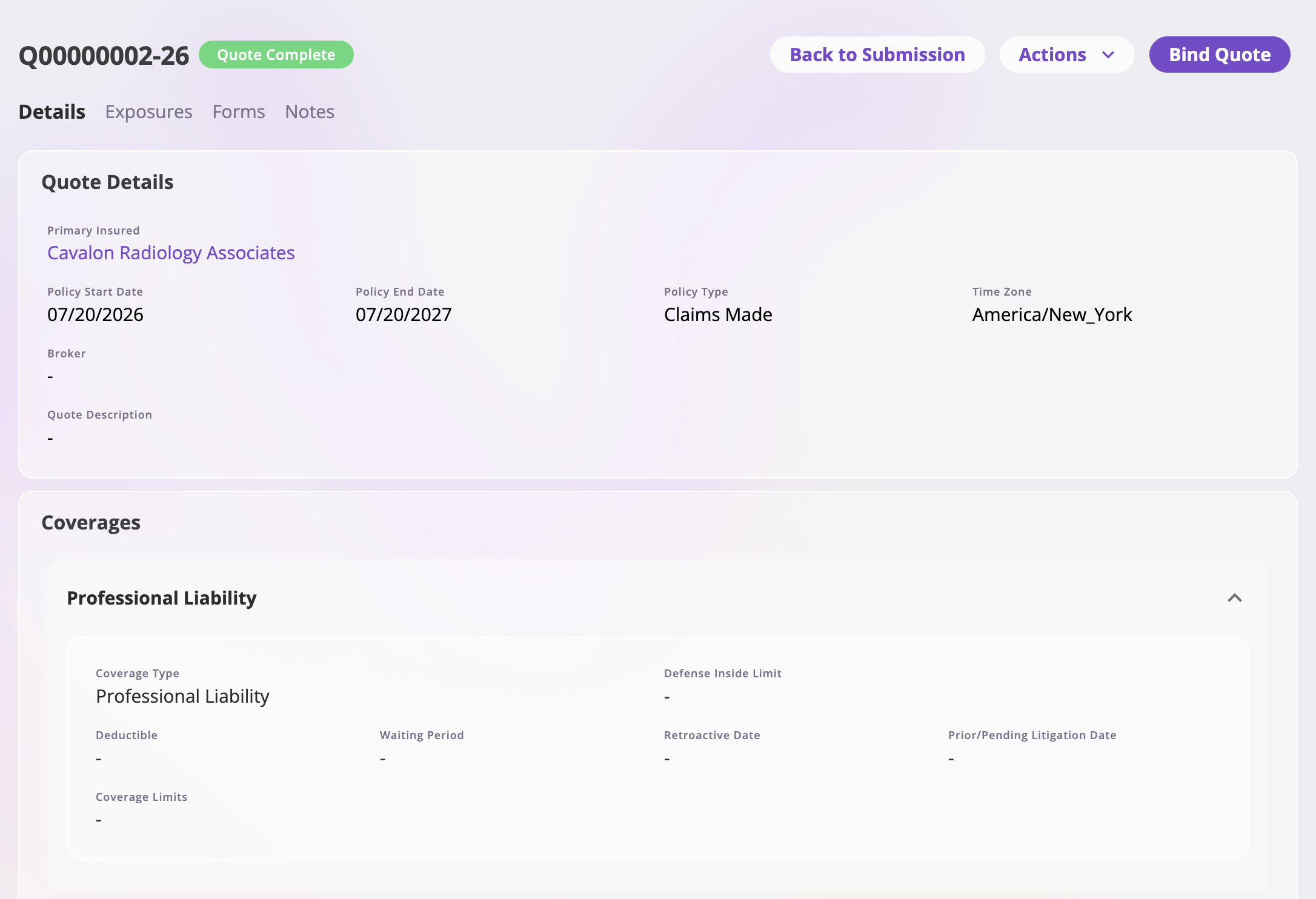
The detail page is headed by the **quote number** and a **status tag**, with
the header buttons at the top right and the tab bar beneath.
### Toolbar
| Button | What it does |
| ----------------- | ----------------------------------------------------------------------------------------------------------------- |
| **Edit Columns** | Choose, reorder, and save the list's columns — including shared [saved views](/app/features/exports-saved-views). |
| **Export Quotes** | Exports the list — see [Exports & saved views](/app/features/exports-saved-views). |
There is no "create quote" button here: quotes are created from a
[submission](/app/features/submissions) (its Quotes card's **New Quote**
button) or by the quote wizard when you create a submission — see
[Quoting new business](/app/workflows/quoting).
### Columns
Column headers follow your company's configured field labels. By default the
list shows **Quote Number** (always pinned as the first column), the
**Submission** the quote belongs to, **Status**, **Type**, **Last Updated**,
and **Created**. **Edit Columns** can add any other configured quote field,
plus the system columns *Created*, *Last Updated*, and *Created By*.
* **Sorting** — the Created and Last Updated columns are sortable (the
default sort is Last Updated, newest first).
* **Filters** — **Add Filters** opens the filter picker; you can filter on
the list's fields with type-appropriate inputs (text, dates, numbers,
option choices, users, linked records). Active filters show as pills you
can edit or remove.
* **Pagination** — the footer pages through results at 25, 50, 100, or 200
rows per page.
## Quote statuses
Every quote is in exactly one status. The status keys are fixed by the
platform; the label shown in the Status column is configurable per company
(defaults in parentheses). The quote detail header shows its own spelled-out
label:
| Status (detail header) | List label (default) | What it means | How a quote gets it |
| ---------------------- | -------------------- | ---------------------------------------------------------------------------------------------------------------------------------------------------------------------------------------------- | --------------------------------------------------------------------------------------------------------------------- |
| **In Progress** | In Progress | The quote is a working draft in the quote wizard. | Every quote starts here; it stays In Progress across saves until you complete it. |
| **Quote Complete** | Sent | The quote is finished — priced, reviewed, and ready to be bound (or sent to the insured). | Selecting **Complete Quote** on the wizard's final step. |
| **Bound to Policy** | Bound | The quote has been bound: its terms are applied — a new policy for a new-business or renewal quote, or a change to the source policy for an endorsement, cancellation, or reinstatement quote. | Finishing the [bind flow](/app/workflows/binding) — or, for a cancellation or reinstatement, confirming its own flow. |
| **Canceled** | Cancelled | The quote was withdrawn without being bound. | The **Cancel Quote** action. |
| **Archived** | Archived | The quote is parked out of the way. | Not set by any in-app action today; it can be set through the [API](/api-reference/entities/overview). |
## Quote types
Every quote also carries a **type**, set when it's created and never changed.
The type determines what binding the quote does — and which actions it offers:
| Type | Binding it… |
| ----------------- | ------------------------------------------------ |
| **New Business** | Creates a brand-new policy. |
| **Renewal** | Creates the next policy term. |
| **Endorsement** | Applies a mid-term change to the source policy. |
| **Cancellation** | Cancels the source policy as of the chosen date. |
| **Reinstatement** | Reinstates the cancelled source policy. |
Endorsement, cancellation, and reinstatement quotes are anchored to the policy
they modify from the moment they're created — they appear on that policy even
before they're bound. See [Servicing a policy](/app/workflows/servicing-policies).
## The quote detail page
The detail page is headed by the **quote number** and a **status tag**, with
the header buttons at the top right and the tab bar beneath.
 ### Header buttons
Besides the [Actions menu](#actions), the header offers direct buttons that
follow the quote's state:
| Button | Shown when | What it does |
| ---------------------- | ---------------------------------------------------------- | ---------------------------------------------------------------------------------------- |
| **Back to Submission** | The quote belongs to a submission | Opens the submission. |
| **Go to Policy** | The quote is Bound to Policy | Opens the linked policy. |
| **Continue Editing** | The quote is In Progress (and your role can update quotes) | Reopens the quote in the wizard where you left off. |
| **Bind Quote** | The quote is [bindable](#bind-a-quote) | Starts the bind flow — the same action as the menu's Bind Quote, called out as a button. |
### Tabs
| Tab | Shown when | What's on it |
| ------------- | ------------------------ | ------------------------------------------------------------------------------------------------------------------------------------------------------------------------------------------------------------------------------------------------------- |
| **Details** | Always | A read-only view of the quote's fields — coverage terms, premium, and whatever else your company's configuration puts on the quote page. To change anything, use **Continue Editing** (an In Progress quote) — completed quotes aren't edited in place. |
| **Exposures** | Always | A table of the exposures this quote references, with the same Edit Columns/sort/filter tools as other lists. The quote's primary insured is badged **Primary Insured**. Default columns: Exposure Name (pinned), Type, Address, Last Updated, Created. |
| **Forms** | Your role can view forms | The documents generated for this quote — see [Generating forms](/app/features/forms). |
| **Notes** | Always | Free-form notes on the quote — see [Files & notes](/app/features/files-notes). |
## Actions
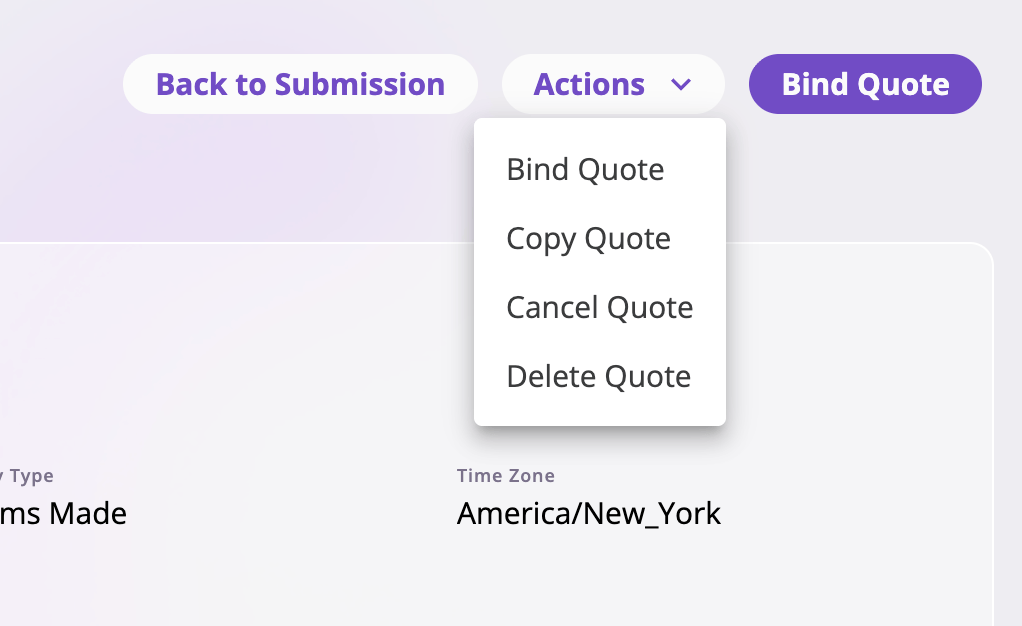
The **Actions** menu at the top right collects the quote-level actions. The
menu (together with Continue Editing and Bind Quote) only appears for roles
that can update quotes; within it, options your role isn't allowed to perform
don't appear either.
### Header buttons
Besides the [Actions menu](#actions), the header offers direct buttons that
follow the quote's state:
| Button | Shown when | What it does |
| ---------------------- | ---------------------------------------------------------- | ---------------------------------------------------------------------------------------- |
| **Back to Submission** | The quote belongs to a submission | Opens the submission. |
| **Go to Policy** | The quote is Bound to Policy | Opens the linked policy. |
| **Continue Editing** | The quote is In Progress (and your role can update quotes) | Reopens the quote in the wizard where you left off. |
| **Bind Quote** | The quote is [bindable](#bind-a-quote) | Starts the bind flow — the same action as the menu's Bind Quote, called out as a button. |
### Tabs
| Tab | Shown when | What's on it |
| ------------- | ------------------------ | ------------------------------------------------------------------------------------------------------------------------------------------------------------------------------------------------------------------------------------------------------- |
| **Details** | Always | A read-only view of the quote's fields — coverage terms, premium, and whatever else your company's configuration puts on the quote page. To change anything, use **Continue Editing** (an In Progress quote) — completed quotes aren't edited in place. |
| **Exposures** | Always | A table of the exposures this quote references, with the same Edit Columns/sort/filter tools as other lists. The quote's primary insured is badged **Primary Insured**. Default columns: Exposure Name (pinned), Type, Address, Last Updated, Created. |
| **Forms** | Your role can view forms | The documents generated for this quote — see [Generating forms](/app/features/forms). |
| **Notes** | Always | Free-form notes on the quote — see [Files & notes](/app/features/files-notes). |
## Actions
The **Actions** menu at the top right collects the quote-level actions. The
menu (together with Continue Editing and Bind Quote) only appears for roles
that can update quotes; within it, options your role isn't allowed to perform
don't appear either.
 ### The menu at a glance
Which actions appear follows the quote's **status** (and, for some, its
**type**):
| Action | In Progress | Quote Complete | Bound | Canceled / Archived |
| ------------------------------- | :---------: | :------------------------------------: | :-------------------: | :-----------------: |
| [Bind Quote](#bind-a-quote) | — | ✓ (new business, endorsement, renewal) | — | — |
| [Copy Quote](#copy-a-quote) | ✓ | ✓ | ✓ (new business only) | — |
| [Cancel Quote](#cancel-a-quote) | — | ✓ | — | — |
| [Delete Quote](#delete-a-quote) | ✓ | ✓ | — | ✓ |
### Complete a quote
Completing isn't a menu action — it's the final step of the quote wizard. On
an In Progress quote, select **Continue Editing**, work through to the last
step, and select **Complete Quote** (on a new-business quote it's a split
button also offering **Bind Quote** directly). Completing marks the quote
**Quote Complete** and returns you to its detail page. See
[Quoting new business](/app/workflows/quoting).
### Bind a quote
**Bind Quote** (the callout button and the menu entry do the same thing)
starts the [bind flow](/app/workflows/binding), which applies the completed
quote — a new-business or renewal quote becomes a policy; an endorsement's
change is recorded on its source policy.
Availability: the quote must be **Quote Complete** and of type **New
Business**, **Endorsement**, or **Renewal**. Cancellation and reinstatement
quotes never offer Bind — their own short flows confirm directly, so they go
straight from In Progress to Bound and never sit at Quote Complete. See
[Servicing a policy](/app/workflows/servicing-policies).
### Copy a quote
**Copy Quote** opens the wizard on a **new quote pre-filled from this one** —
same type, same submission — so you can quote a variation without re-keying.
For endorsement, cancellation, and reinstatement quotes, the copy stays
anchored to the same policy and effective date.
Availability: any In Progress or Quote Complete quote, and a **bound
new-business** quote (its copy is a fresh new-business draft). A bound
endorsement/renewal/cancellation/reinstatement quote can't be copied — it has
already been applied to its policy. Requires a role that can create quotes.
### Cancel a quote
**Cancel Quote** asks for confirmation, then sets the quote's status to
**Canceled**. The quote and all its tabs remain viewable; use it for a quote
that was completed but won't be taken up.
Availability: **Quote Complete** quotes only. (An In Progress quote you no
longer want is deleted, not canceled.)
### Delete a quote
**Delete Quote** asks for confirmation, permanently deletes the quote, and
returns you to its submission (or to the Quotes list if it had none).
Availability: In Progress, Quote Complete, Canceled, and Archived quotes —
**a bound quote can't be deleted**. Requires a role that can delete quotes.
Deletion is permanent — there is no undo. If the quote should simply stop
being an active option, [cancel it](#cancel-a-quote) instead; canceling
keeps the record.
Deleting a submission's quotes is also the prerequisite for deleting the
submission itself — see
[Submissions → Delete a submission](/app/features/submissions#delete-a-submission).
### The menu at a glance
Which actions appear follows the quote's **status** (and, for some, its
**type**):
| Action | In Progress | Quote Complete | Bound | Canceled / Archived |
| ------------------------------- | :---------: | :------------------------------------: | :-------------------: | :-----------------: |
| [Bind Quote](#bind-a-quote) | — | ✓ (new business, endorsement, renewal) | — | — |
| [Copy Quote](#copy-a-quote) | ✓ | ✓ | ✓ (new business only) | — |
| [Cancel Quote](#cancel-a-quote) | — | ✓ | — | — |
| [Delete Quote](#delete-a-quote) | ✓ | ✓ | — | ✓ |
### Complete a quote
Completing isn't a menu action — it's the final step of the quote wizard. On
an In Progress quote, select **Continue Editing**, work through to the last
step, and select **Complete Quote** (on a new-business quote it's a split
button also offering **Bind Quote** directly). Completing marks the quote
**Quote Complete** and returns you to its detail page. See
[Quoting new business](/app/workflows/quoting).
### Bind a quote
**Bind Quote** (the callout button and the menu entry do the same thing)
starts the [bind flow](/app/workflows/binding), which applies the completed
quote — a new-business or renewal quote becomes a policy; an endorsement's
change is recorded on its source policy.
Availability: the quote must be **Quote Complete** and of type **New
Business**, **Endorsement**, or **Renewal**. Cancellation and reinstatement
quotes never offer Bind — their own short flows confirm directly, so they go
straight from In Progress to Bound and never sit at Quote Complete. See
[Servicing a policy](/app/workflows/servicing-policies).
### Copy a quote
**Copy Quote** opens the wizard on a **new quote pre-filled from this one** —
same type, same submission — so you can quote a variation without re-keying.
For endorsement, cancellation, and reinstatement quotes, the copy stays
anchored to the same policy and effective date.
Availability: any In Progress or Quote Complete quote, and a **bound
new-business** quote (its copy is a fresh new-business draft). A bound
endorsement/renewal/cancellation/reinstatement quote can't be copied — it has
already been applied to its policy. Requires a role that can create quotes.
### Cancel a quote
**Cancel Quote** asks for confirmation, then sets the quote's status to
**Canceled**. The quote and all its tabs remain viewable; use it for a quote
that was completed but won't be taken up.
Availability: **Quote Complete** quotes only. (An In Progress quote you no
longer want is deleted, not canceled.)
### Delete a quote
**Delete Quote** asks for confirmation, permanently deletes the quote, and
returns you to its submission (or to the Quotes list if it had none).
Availability: In Progress, Quote Complete, Canceled, and Archived quotes —
**a bound quote can't be deleted**. Requires a role that can delete quotes.
Deletion is permanent — there is no undo. If the quote should simply stop
being an active option, [cancel it](#cancel-a-quote) instead; canceling
keeps the record.
Deleting a submission's quotes is also the prerequisite for deleting the
submission itself — see
[Submissions → Delete a submission](/app/features/submissions#delete-a-submission).