> ## Documentation Index
> Fetch the complete documentation index at: https://docs.go.aiinsurance.io/llms.txt
> Use this file to discover all available pages before exploring further.
# Person
> An individual in the directory — brokers, attorneys, contacts, and more.
A **person** is an individual the platform knows about — a broker, an attorney, a
claimant, any named contact. People live in the **directory**, alongside
[organizations](/entities/organization), and they're the records behind the
**Contacts** you attach to submissions, quotes, events, and exposures.
A key idea: **contacts are just people.** When you add a contact to an event or an
exposure, you're linking a person record. The same person can be a contact on many
records, and updating their details once updates them everywhere.
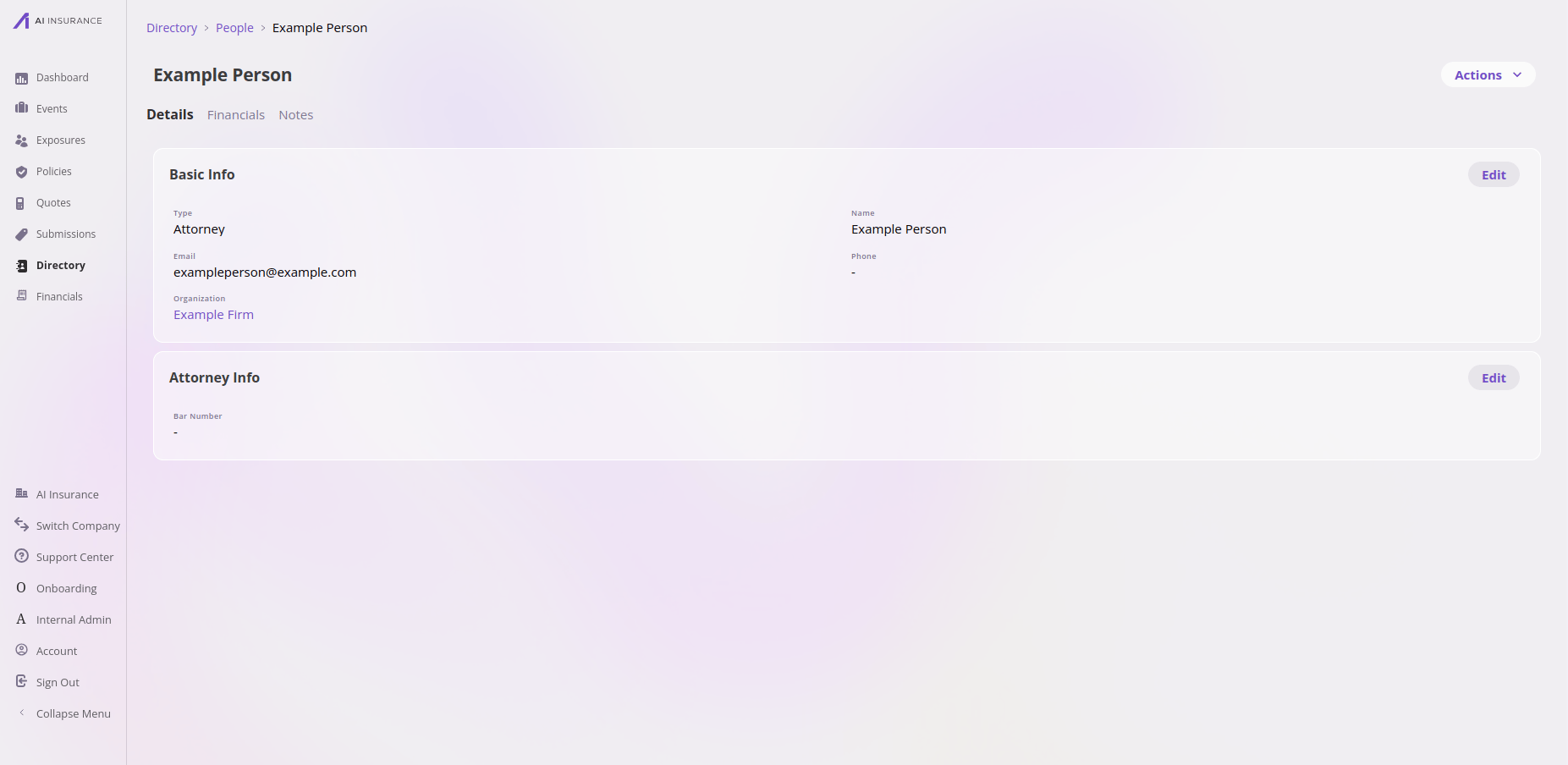 Working in the app? See the [Directory and contacts feature reference](/app/features/directory) for people, organizations, and the Contacts tab.
## How its data works
A person is a set of **fields configured per company**. Every person has a name,
and can also have a **type** (optional for people — see below).
**Types are configured per company, and you can create any number of them.** Out of
the box the directory ships with person types like *attorney*, *broker*, and
*other*, but your company defines its own list. Every person has a **baseline** set
of fields (name, organization, and any others your company configures); the type
then **adds type-specific fields on top** — an *attorney* surfaces attorney details,
a *broker* surfaces broker details.
**In the app, creating a person makes you pick a type.** The **Create Person**
button opens a menu of your configured person types (for example *Attorney*,
*Broker*, *Other*); you choose one, and it's filled in and locked on the create
form. *Other* is the catch-all when no specific type fits — so every person created
through the app ends up with a type.
Underneath, the type is actually **optional**: a person *can* have no type at all
(for example, one created directly through the API), in which case they simply show
the baseline fields and none of the type-specific extras. It's the in-app flow, not
the data model, that requires a choice. (Contrast
[organizations](/entities/organization), where a type is **required** at both
levels.)
## What it connects to
| Connects to | How |
| ------------------------------------------- | -------------------------------------------------------------------------------------------------------------------------------------- |
| [Organization](/entities/organization) | A person may be linked to **at most one** organization. The link is **optional** — a person doesn't have to belong to an organization. |
| Events, Exposures, Submissions ("Contacts") | A person can be attached as a **contact** on these records (many-to-many). |
## Files, Notes & Contacts
In the app, a person has a **Notes** tab only (no Files or Contacts tabs). The API
is broader than the in-app tabs — see the
[overview](/entities/overview#what-every-entity-has-in-common).
**Where it lives.** People are top-level entities surfaced through the **Directory**
UI at `/directory/person`. Through the API they're the `person` entity on the
unified CRUD surface — see the [Entities API
overview](/api-reference/entities/overview).
**Framework-required fields.**
| Field | Notes |
| -------------- | ---------------------------------------------------------- |
| `name` | Display name. |
| `type` | Option Set ("Person Type"). **Nullable** — may be omitted. |
| `organization` | Single join to one Organization. **Nullable.** |
**Types and type-driven fields.** Person types are values in the per-company
"Person Type" option set (part of the company's configuration). Type-specific
fields are implemented as embedded objects revealed by display conditions on the
type (e.g. attorney details shown when `type == "attorney"`).
**Type permissions.** Person and Organization reuse the
`company.fmv1_custom_object:*` permission family.
Working in the app? See the [Directory and contacts feature reference](/app/features/directory) for people, organizations, and the Contacts tab.
## How its data works
A person is a set of **fields configured per company**. Every person has a name,
and can also have a **type** (optional for people — see below).
**Types are configured per company, and you can create any number of them.** Out of
the box the directory ships with person types like *attorney*, *broker*, and
*other*, but your company defines its own list. Every person has a **baseline** set
of fields (name, organization, and any others your company configures); the type
then **adds type-specific fields on top** — an *attorney* surfaces attorney details,
a *broker* surfaces broker details.
**In the app, creating a person makes you pick a type.** The **Create Person**
button opens a menu of your configured person types (for example *Attorney*,
*Broker*, *Other*); you choose one, and it's filled in and locked on the create
form. *Other* is the catch-all when no specific type fits — so every person created
through the app ends up with a type.
Underneath, the type is actually **optional**: a person *can* have no type at all
(for example, one created directly through the API), in which case they simply show
the baseline fields and none of the type-specific extras. It's the in-app flow, not
the data model, that requires a choice. (Contrast
[organizations](/entities/organization), where a type is **required** at both
levels.)
## What it connects to
| Connects to | How |
| ------------------------------------------- | -------------------------------------------------------------------------------------------------------------------------------------- |
| [Organization](/entities/organization) | A person may be linked to **at most one** organization. The link is **optional** — a person doesn't have to belong to an organization. |
| Events, Exposures, Submissions ("Contacts") | A person can be attached as a **contact** on these records (many-to-many). |
## Files, Notes & Contacts
In the app, a person has a **Notes** tab only (no Files or Contacts tabs). The API
is broader than the in-app tabs — see the
[overview](/entities/overview#what-every-entity-has-in-common).
**Where it lives.** People are top-level entities surfaced through the **Directory**
UI at `/directory/person`. Through the API they're the `person` entity on the
unified CRUD surface — see the [Entities API
overview](/api-reference/entities/overview).
**Framework-required fields.**
| Field | Notes |
| -------------- | ---------------------------------------------------------- |
| `name` | Display name. |
| `type` | Option Set ("Person Type"). **Nullable** — may be omitted. |
| `organization` | Single join to one Organization. **Nullable.** |
**Types and type-driven fields.** Person types are values in the per-company
"Person Type" option set (part of the company's configuration). Type-specific
fields are implemented as embedded objects revealed by display conditions on the
type (e.g. attorney details shown when `type == "attorney"`).
**Type permissions.** Person and Organization reuse the
`company.fmv1_custom_object:*` permission family.