> ## Documentation Index
> Fetch the complete documentation index at: https://docs.go.aiinsurance.io/llms.txt
> Use this file to discover all available pages before exploring further.
# Approvals
> Money cannot move on an invoice nobody approved
Approval is a separate axis from everything else in Financials. An invoice's
status records whether it has been paid. Its **approval** records whether anyone
authorized paying it. The two are independent facts about the same invoice.
## The Rule
**Money cannot move on an unapproved invoice.** An invoice must be approved
before a payment can be recorded against it.
## Approval Is Usually Implicit
When a user with authority to approve an invoice records a payment against it,
the app approves it as part of the same action. The approval is implied by the
authority; no separate step is required.
Approvals become visible in two situations:
* **The user lacks authority.** The payment is refused, and the invoice stays
unapproved until someone with authority approves it.
* **Approval and payment are done by different people.** One person reviews and
approves; another records the payment later.
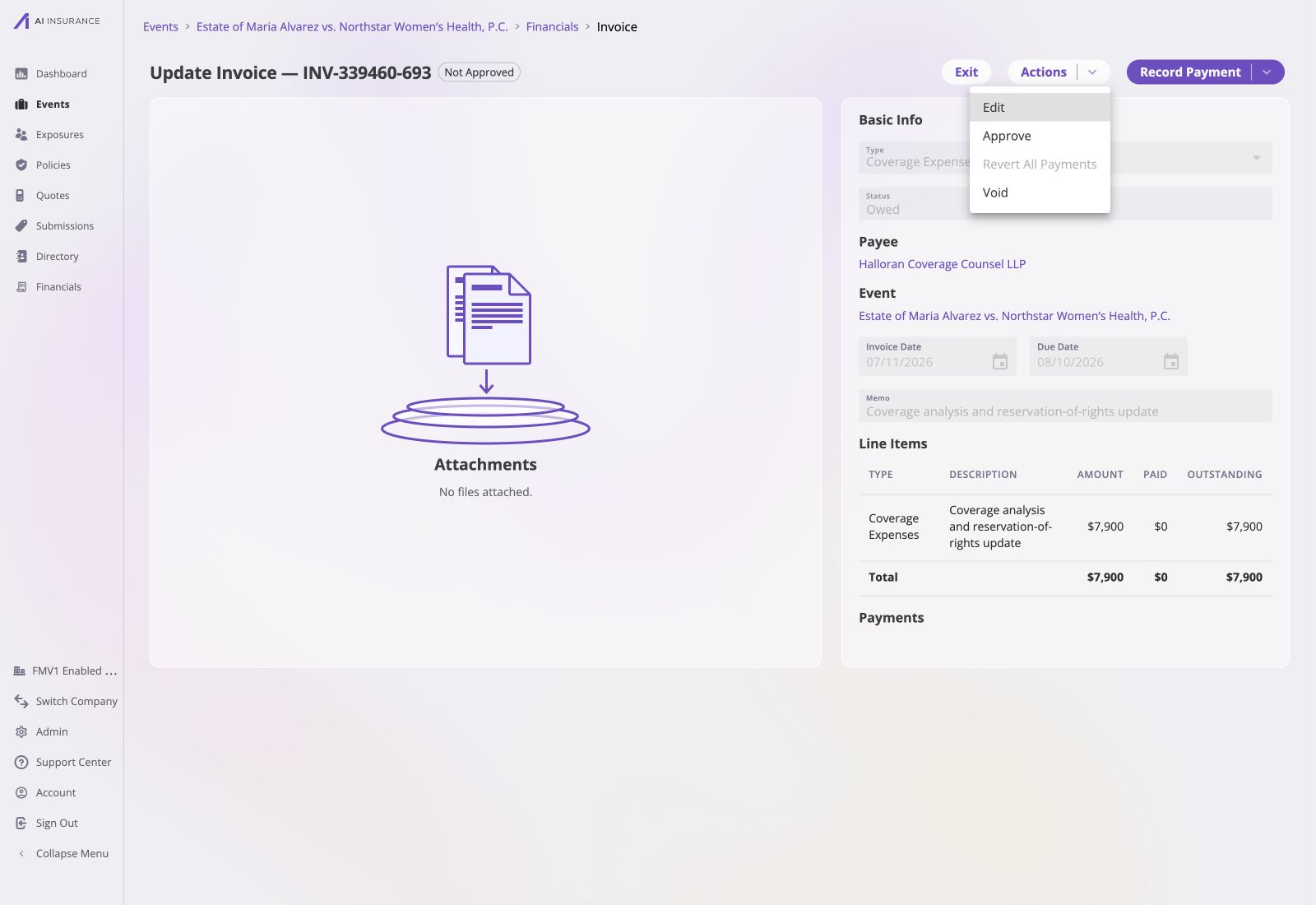
For that second case, approval is also an explicit action: open an invoice and
approve it, or select several in a listing and use **Actions → Approve**.
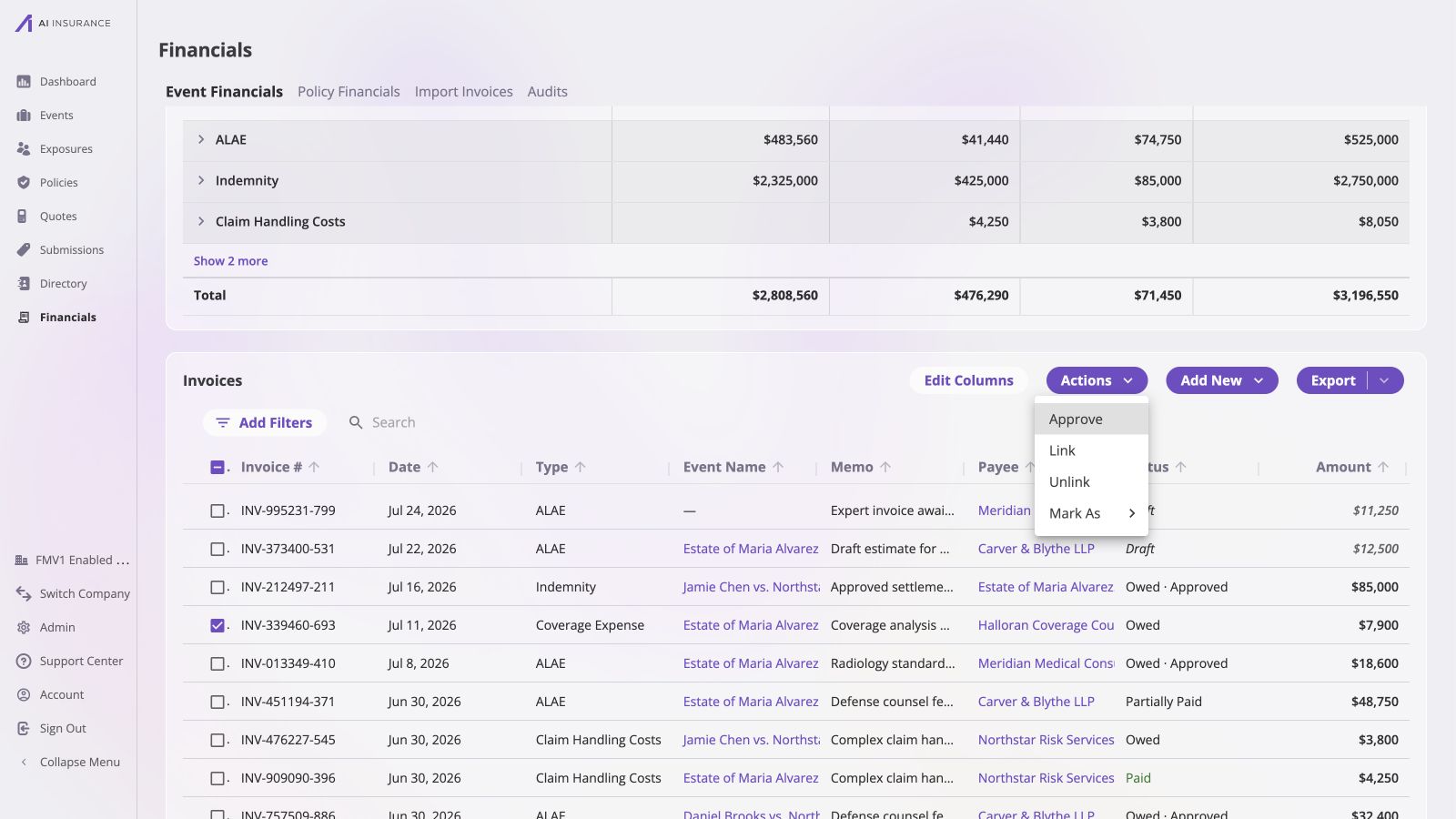
 In the listing, **Owed** and **Owed · Approved** make the two axes visible side
by side. Selecting an unapproved row enables **Actions → Approve** without
changing the invoice's payment-derived status.
In the listing, **Owed** and **Owed · Approved** make the two axes visible side
by side. Selecting an unapproved row enables **Actions → Approve** without
changing the invoice's payment-derived status.
 ## Approval Is Irrevocable Once Money Has Moved
Approval can be revoked — but only while the invoice is still unpaid.
| Invoice state | Can approval be revoked? |
| -------------- | ------------------------ |
| Owed | Yes |
| Partially Paid | No |
| Paid | No |
Once any payment has been recorded, the approval that authorized it cannot be
taken back. Un-approving such an invoice requires removing its payments first,
which returns it to Owed, and then revoking.
* **Approval is only ever removed deliberately.** Nothing clears an approval as a
side effect. Removing a paid invoice's payments returns it to Owed and leaves it
**approved** — it simply becomes revocable again. Leaving it unapproved requires
a second, explicit step.
* **Editing an invoice does not reset its approval.** What was approved — the
type and the line item amounts — cannot change after creation, so an edit
cannot change what was approved.
* **Approval is not part of the status.** A Paid invoice is always approved,
because money moved. An Owed invoice may be approved or not, and both are
normal — the listing writes the approved case as **Owed · Approved**, the one
place the two axes are shown together.
Approval is therefore asymmetric: it *arrives* implicitly, as a side effect of an
authorized user recording a payment, and it *leaves* only on explicit request.
That asymmetry ensures an approval is never lost by accident while the invoice is
being worked on.
## Configuring Approval Authority
Approval authority is set under **Admin → Financials Configuration →
Approvals**. The [Approvals configuration
page](/financials/pages/approvals) shows how to create roles and assign company
users to them.
By default there are no custom rules, which means **everyone can approve
anything**. This is the default before approvals are configured, and it is
appropriate for a small team.
Enabling custom rules narrows it. There are two parts:
A role is a named level of authority. Each role sets a **per-invoice-type
ceiling** — the largest amount someone with that role may approve on that
type.
* A type with a ceiling of, say, \$5,000 → invoices up to \$5,000.
* A type with no limit → any amount.
* A type set to \$0, or not listed on the role at all → the role cannot
approve that type at all.
There is also a built-in **Financial Administrator** role: unlimited
authority over every Invoice Type, including types created later.
Select a specific user from the company's user directory and assign that
person one role. Repeat this for each approver: different users can hold
different roles, and each person's authority comes from the limits on their
assigned role. Anyone not on the list has no approval authority.
See the [Approvals configuration
page](/financials/pages/approvals#approvers) for the setup details and an
example with different roles assigned to different users.
A custom role denies any Invoice Type it does not explicitly name. When a new
Invoice Type is added, existing custom roles cannot approve it until granted
authority — while Financial Administrators can approve it immediately. This is
deliberate: new types start locked down.
## API and Integration Callers
An invoice paid through the external API follows the same rule, resolved
differently. A machine caller's authority is its API key's payment-approve
permission — nothing else. Approval roles are matched by a person's email
address, which a machine caller does not have, so the company's custom rules are
never consulted for API traffic.
A key with the permission auto-approves on payment, exactly as an authorized
person does.
## Approval Is Irrevocable Once Money Has Moved
Approval can be revoked — but only while the invoice is still unpaid.
| Invoice state | Can approval be revoked? |
| -------------- | ------------------------ |
| Owed | Yes |
| Partially Paid | No |
| Paid | No |
Once any payment has been recorded, the approval that authorized it cannot be
taken back. Un-approving such an invoice requires removing its payments first,
which returns it to Owed, and then revoking.
* **Approval is only ever removed deliberately.** Nothing clears an approval as a
side effect. Removing a paid invoice's payments returns it to Owed and leaves it
**approved** — it simply becomes revocable again. Leaving it unapproved requires
a second, explicit step.
* **Editing an invoice does not reset its approval.** What was approved — the
type and the line item amounts — cannot change after creation, so an edit
cannot change what was approved.
* **Approval is not part of the status.** A Paid invoice is always approved,
because money moved. An Owed invoice may be approved or not, and both are
normal — the listing writes the approved case as **Owed · Approved**, the one
place the two axes are shown together.
Approval is therefore asymmetric: it *arrives* implicitly, as a side effect of an
authorized user recording a payment, and it *leaves* only on explicit request.
That asymmetry ensures an approval is never lost by accident while the invoice is
being worked on.
## Configuring Approval Authority
Approval authority is set under **Admin → Financials Configuration →
Approvals**. The [Approvals configuration
page](/financials/pages/approvals) shows how to create roles and assign company
users to them.
By default there are no custom rules, which means **everyone can approve
anything**. This is the default before approvals are configured, and it is
appropriate for a small team.
Enabling custom rules narrows it. There are two parts:
A role is a named level of authority. Each role sets a **per-invoice-type
ceiling** — the largest amount someone with that role may approve on that
type.
* A type with a ceiling of, say, \$5,000 → invoices up to \$5,000.
* A type with no limit → any amount.
* A type set to \$0, or not listed on the role at all → the role cannot
approve that type at all.
There is also a built-in **Financial Administrator** role: unlimited
authority over every Invoice Type, including types created later.
Select a specific user from the company's user directory and assign that
person one role. Repeat this for each approver: different users can hold
different roles, and each person's authority comes from the limits on their
assigned role. Anyone not on the list has no approval authority.
See the [Approvals configuration
page](/financials/pages/approvals#approvers) for the setup details and an
example with different roles assigned to different users.
A custom role denies any Invoice Type it does not explicitly name. When a new
Invoice Type is added, existing custom roles cannot approve it until granted
authority — while Financial Administrators can approve it immediately. This is
deliberate: new types start locked down.
## API and Integration Callers
An invoice paid through the external API follows the same rule, resolved
differently. A machine caller's authority is its API key's payment-approve
permission — nothing else. Approval roles are matched by a person's email
address, which a machine caller does not have, so the company's custom rules are
never consulted for API traffic.
A key with the permission auto-approves on payment, exactly as an authorized
person does.