> ## Documentation Index
> Fetch the complete documentation index at: https://docs.go.aiinsurance.io/llms.txt
> Use this file to discover all available pages before exploring further.
# Invoice to Entity Linking
> An event, a policy, or nothing — plus the payee, which is a different kind of link
An invoice records money, and money is almost always *about* something. What an
invoice is about is its **primary entity**.
## One Primary Entity
An invoice links to **exactly one of**:
A claim or incident. This is where nearly all financial activity lives
today.
Policy-level money — premium, endorsement charges, fees.
An invoice can exist unlinked, and be linked to an event or policy later.
An invoice can never link to an event **and** a policy at the same time — **one
primary entity, and it is an event or a policy.** The app rejects anything else.
The primary entity is what makes an invoice count toward something. An event's
Overview report, its reserves, and its totals are all built from the invoices
linked to that event.
## Event Links
Financials today implements the event side of this. Invoices are created from
the [Event Financials Tab](/financials/pages/event-financials-tab) (pre-linked
to that event) or from [Company Event
Financials](/financials/pages/event-financials-page) (where the event is chosen,
or left blank).
## Invoices with No Links
An invoice with no primary entity is a valid, complete invoice. It has a type,
line items, dates, and a status, and it can be paid. It simply is not counted
toward any event or policy.
Two ways one comes to exist:
* It is created company-wide from the Financials section without an event.
* It arrives through an import that had no event to assign it to.
An unlinked invoice can be linked later, and a linked invoice can be moved to a
different event.
### Linking, Relinking, and Unlinking
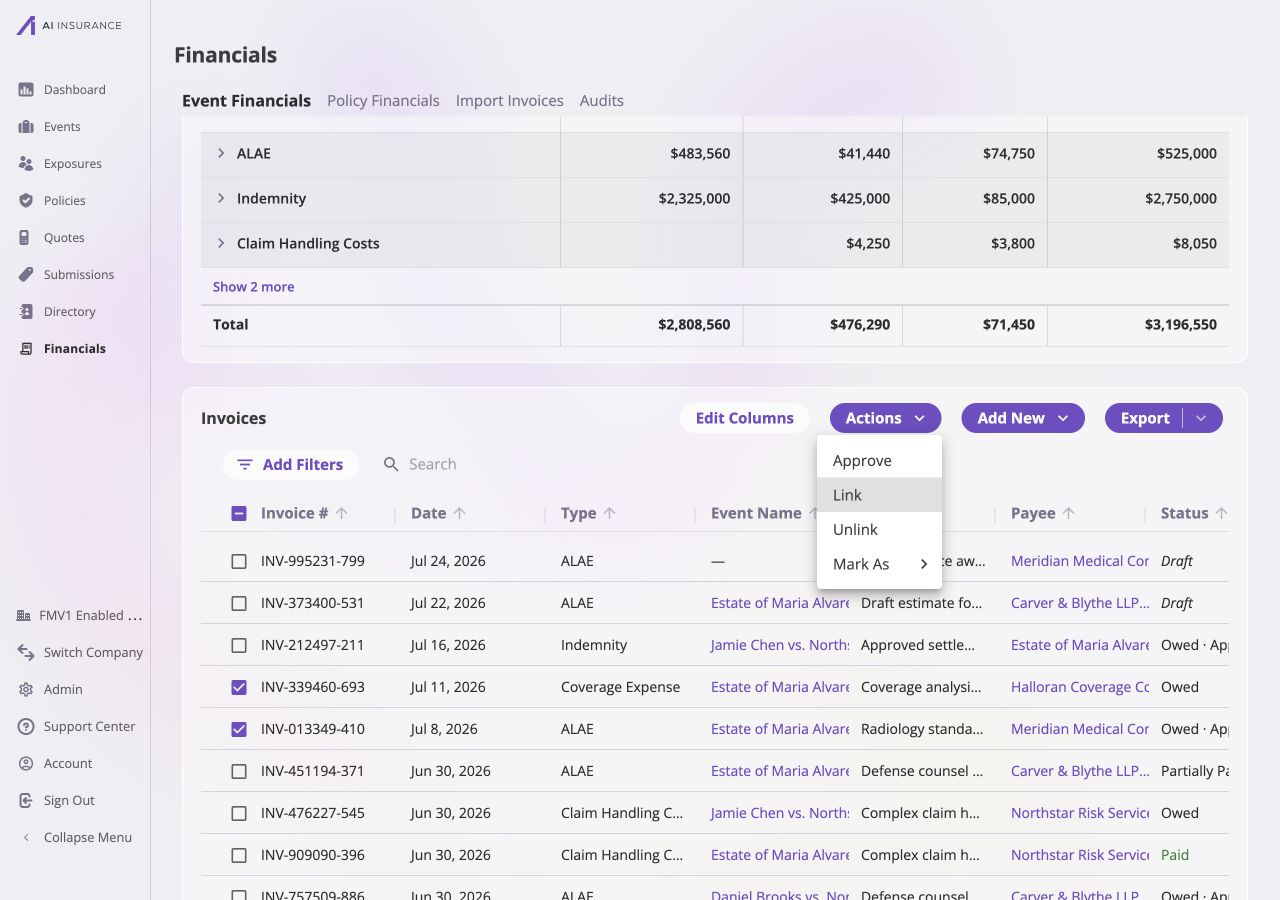
From [Company Event
Financials](/financials/pages/event-financials-page#bulk-actions), selected
invoices can be linked to an event or unlinked through the **Actions** menu.
Inside the [Event Financials Tab](/financials/pages/event-financials-tab), there
is no Link or Unlink — an invoice's event is fixed in that context, so relinking
is a company-wide operation.
The company-wide list shows the current event in its own column. Select one or
more rows, then use **Actions → Link** or **Actions → Unlink**; the same menu also
supports the other bulk invoice actions.
 Relinking moves *owed* money directly. If the invoice has already been paid, its
payments were attributed to the old event, so they have to come off before the
invoice can move. The app composes this automatically: it removes the payments,
relinks the invoice, and re-records the payments against the new event — all in
one step. A dialog states those steps before it happens, because they are
otherwise invisible. See [The Invoice Lifecycle](/financials/lifecycle).
## The Payee Is a Separate Link
An invoice also records a **payee** — the party the money is paid to, or
collected from. A vendor, an adjuster, a claimant, an insured.
The payee is *not* the primary link. It is a separate, secondary one:
| | Primary entity | Payee |
| ----------------- | ------------------------------------------------------------------------------- | ------------------------------------------------------------------------- |
| What it answers | What is this money *about*? | Who is on the other side of it? |
| Allowed targets | One event, or one policy, or nothing | A Person or an Organization |
| Effect on reports | Determines which event's or policy's totals the invoice counts toward | None — the payee is descriptive |
| Changeable later | Yes. Recorded payments have to come off first, which the app does automatically | Not on the invoice page — the payee is chosen when the invoice is created |
The payee picker offers People and Organizations, and can create either one
inline.
Policy invoices will additionally allow billing an Insured directly, at which
point Exposures become a third top-level entity eligible as a payee.
## Deleting a Record an Invoice Points At
Because invoices attribute money to events, policies, and payees, a record with
financial activity pointing at it cannot be deleted. Attempting to delete an
event, policy, or payee with linked invoices is blocked, and the message names
what is in the way — the count, up to three of the blocking invoice numbers, and
any reserve categories still carrying a balance.
Clearing the block means removing the financial activity, not hiding it:
* **Every linked invoice must be deleted, or relinked to another record.**
Voiding is not enough — a void is a deliberately retained record, so it still
counts as financial activity on the event.
* **Reserve history must be reset.** An event with a non-zero reserve balance in
any Invoice Type cannot be deleted until that balance is cleared, through
**Reset History** on each reserve category on the event's Financials tab. See
[Reserves](/financials/reserves).
A payee has a third route: reassign the payee on the invoices naming it, which
frees the record without touching the money.
Relinking moves *owed* money directly. If the invoice has already been paid, its
payments were attributed to the old event, so they have to come off before the
invoice can move. The app composes this automatically: it removes the payments,
relinks the invoice, and re-records the payments against the new event — all in
one step. A dialog states those steps before it happens, because they are
otherwise invisible. See [The Invoice Lifecycle](/financials/lifecycle).
## The Payee Is a Separate Link
An invoice also records a **payee** — the party the money is paid to, or
collected from. A vendor, an adjuster, a claimant, an insured.
The payee is *not* the primary link. It is a separate, secondary one:
| | Primary entity | Payee |
| ----------------- | ------------------------------------------------------------------------------- | ------------------------------------------------------------------------- |
| What it answers | What is this money *about*? | Who is on the other side of it? |
| Allowed targets | One event, or one policy, or nothing | A Person or an Organization |
| Effect on reports | Determines which event's or policy's totals the invoice counts toward | None — the payee is descriptive |
| Changeable later | Yes. Recorded payments have to come off first, which the app does automatically | Not on the invoice page — the payee is chosen when the invoice is created |
The payee picker offers People and Organizations, and can create either one
inline.
Policy invoices will additionally allow billing an Insured directly, at which
point Exposures become a third top-level entity eligible as a payee.
## Deleting a Record an Invoice Points At
Because invoices attribute money to events, policies, and payees, a record with
financial activity pointing at it cannot be deleted. Attempting to delete an
event, policy, or payee with linked invoices is blocked, and the message names
what is in the way — the count, up to three of the blocking invoice numbers, and
any reserve categories still carrying a balance.
Clearing the block means removing the financial activity, not hiding it:
* **Every linked invoice must be deleted, or relinked to another record.**
Voiding is not enough — a void is a deliberately retained record, so it still
counts as financial activity on the event.
* **Reserve history must be reset.** An event with a non-zero reserve balance in
any Invoice Type cannot be deleted until that balance is cleared, through
**Reset History** on each reserve category on the event's Financials tab. See
[Reserves](/financials/reserves).
A payee has a third route: reassign the payee on the invoices naming it, which
frees the record without touching the money.