> ## Documentation Index
> Fetch the complete documentation index at: https://docs.go.aiinsurance.io/llms.txt
> Use this file to discover all available pages before exploring further.
# Expected Direction
> Which way money of a given kind normally flows, and what happens when an amount runs against it
Money moves in two directions: **out** of the business, or **in** to it. Every
Invoice Type and every Line Item Type in Financials declares which of those it
*expects*.
| Direction | Means | Entered on the side labeled |
| ------------- | ------------------------------------------------------------------ | --------------------------- |
| **Money out** | The business pays. A loss payment, a vendor bill, a fee owed. | **Expense** |
| **Money in** | The business collects. A recovery, a subrogation receipt, premium. | **Income** |
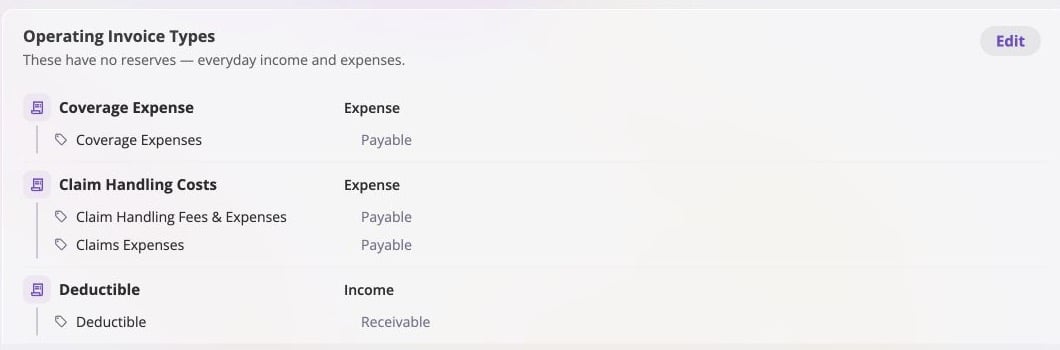
In [Event Invoice Types](/financials/pages/event-invoice-types), Invoice Types
summarize the expectation as **Expense** or **Income**, while their Line Item
Types display the corresponding **Payable** or **Receivable** direction. Coverage
expenses and claim-handling costs point out of the business; a deductible points
in.
 ## Expectation Is Not a Constraint
An expected direction says what money of this kind **normally** does. It does not
say what every invoice of this kind **must** do. Posting against the expectation
is allowed: the app warns, it does not block.
An Indemnity type expects money out, but a refund of an overpaid indemnity is
money in on that same type. A Subrogation type expects money in, but a
subrogation cost incurred is money out. Both are legal, both are recorded on the
type they belong to, and both show up correctly in the totals.
The expectation surfaces as a **warning at the moment of entry** — a prompt
confirming that an income amount is intended on an expense line item. It catches
the far more common case, a genuine mistake, without blocking the legitimate
one.
## Expectations Exist at Two Levels
Set when the type is configured. On a **Loss/Recovery** type this is
structural: it orients the reserve itself (a loss reserve expects money out,
a recovery reserve expects money in) and cannot be changed once the type
exists. On an **Operating** type it is a label — the figures are read from
each line item's own direction — so it can be corrected at any time.
Set when the line item is configured, and **it does not have to match its
Invoice Type's direction**. An expense-oriented type may own a recovery line
item. This is normal, not a misconfiguration.
Each amount is entered on an Income or Expense side. If that side opposes
the Line Item Type's own direction, the app warns and allows the save to
proceed. The amount is then stored **opposite that line item's own
direction**, so it counts against the other amounts on the line rather than
adding to them.
Only one of the two possible mismatches prompts:
| Mismatch | Where it happens | What the app does |
| ----------------------------------------------------------------- | ---------------- | ------------------------------------------- |
| A line item's direction differs from its Invoice Type's direction | Configuration | Nothing — this is a normal, supported setup |
| An entered amount's side opposes its line item's direction | Data entry | Warns, then allows |
### Worked Example
\$10,000 of legal fees was paid to a law firm on an **ALAE** Invoice Type, and
\$2,000 of it comes back as an overpayment refund. There are two legitimate ways
to record the refund, and the choice is a configuration one.
The live med-mal fixture uses **Attorney Fees & Expenses** and **Other ALAE
Expenses** as its configured ALAE lines, so those are the labels in the captures
below. The conceptual roles are the same as **Legal Fees** and **Expense
Recovery** in this example.
## Expectation Is Not a Constraint
An expected direction says what money of this kind **normally** does. It does not
say what every invoice of this kind **must** do. Posting against the expectation
is allowed: the app warns, it does not block.
An Indemnity type expects money out, but a refund of an overpaid indemnity is
money in on that same type. A Subrogation type expects money in, but a
subrogation cost incurred is money out. Both are legal, both are recorded on the
type they belong to, and both show up correctly in the totals.
The expectation surfaces as a **warning at the moment of entry** — a prompt
confirming that an income amount is intended on an expense line item. It catches
the far more common case, a genuine mistake, without blocking the legitimate
one.
## Expectations Exist at Two Levels
Set when the type is configured. On a **Loss/Recovery** type this is
structural: it orients the reserve itself (a loss reserve expects money out,
a recovery reserve expects money in) and cannot be changed once the type
exists. On an **Operating** type it is a label — the figures are read from
each line item's own direction — so it can be corrected at any time.
Set when the line item is configured, and **it does not have to match its
Invoice Type's direction**. An expense-oriented type may own a recovery line
item. This is normal, not a misconfiguration.
Each amount is entered on an Income or Expense side. If that side opposes
the Line Item Type's own direction, the app warns and allows the save to
proceed. The amount is then stored **opposite that line item's own
direction**, so it counts against the other amounts on the line rather than
adding to them.
Only one of the two possible mismatches prompts:
| Mismatch | Where it happens | What the app does |
| ----------------------------------------------------------------- | ---------------- | ------------------------------------------- |
| A line item's direction differs from its Invoice Type's direction | Configuration | Nothing — this is a normal, supported setup |
| An entered amount's side opposes its line item's direction | Data entry | Warns, then allows |
### Worked Example
\$10,000 of legal fees was paid to a law firm on an **ALAE** Invoice Type, and
\$2,000 of it comes back as an overpayment refund. There are two legitimate ways
to record the refund, and the choice is a configuration one.
The live med-mal fixture uses **Attorney Fees & Expenses** and **Other ALAE
Expenses** as its configured ALAE lines, so those are the labels in the captures
below. The conceptual roles are the same as **Legal Fees** and **Expense
Recovery** in this example.
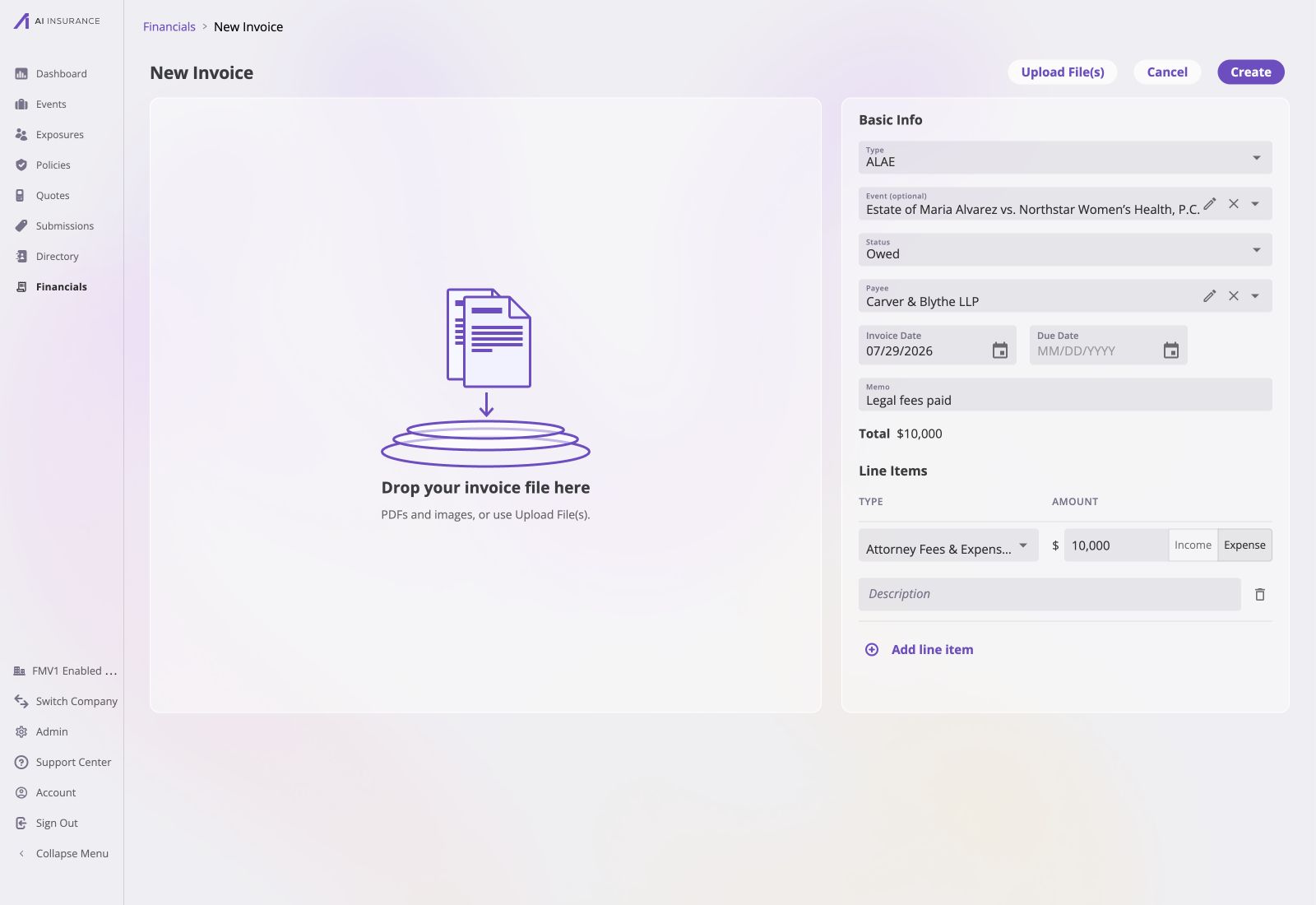 **A dedicated recovery line item.** ALAE owns an **Expense Recovery** line item
whose expected direction is Income. The refund goes there, on the Income side —
the side the line already expects, so nothing warns.
| Line item | Expects | Entered on | Amount | Warns? |
| ---------------- | ------- | ---------- | -------- | ------ |
| Legal Fees | Expense | Expense | \$10,000 | No |
| Expense Recovery | Income | Income | \$2,000 | No |
**Income against the original line item.** The refund goes on **Legal Fees**
itself, entered on the Income side. That side opposes the line's own direction, so
the app warns once and records it.
**A dedicated recovery line item.** ALAE owns an **Expense Recovery** line item
whose expected direction is Income. The refund goes there, on the Income side —
the side the line already expects, so nothing warns.
| Line item | Expects | Entered on | Amount | Warns? |
| ---------------- | ------- | ---------- | -------- | ------ |
| Legal Fees | Expense | Expense | \$10,000 | No |
| Expense Recovery | Income | Income | \$2,000 | No |
**Income against the original line item.** The refund goes on **Legal Fees**
itself, entered on the Income side. That side opposes the line's own direction, so
the app warns once and records it.
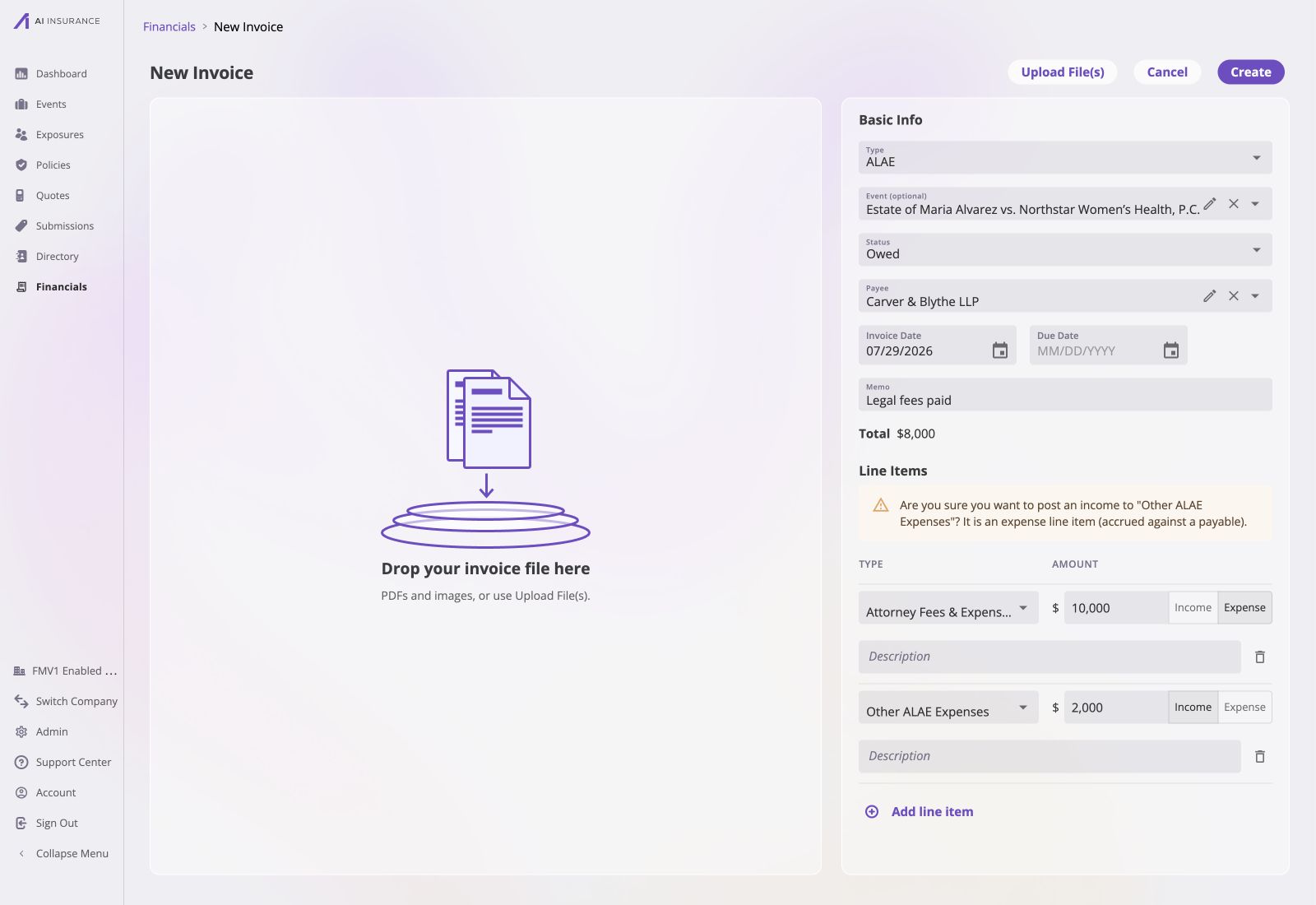 | Line item | Expects | Entered on | Amount | Warns? |
| ---------- | ------- | ---------- | -------- | ------ |
| Legal Fees | Expense | Expense | \$10,000 | No |
| Legal Fees | Expense | Income | \$2,000 | Yes |
Both net ALAE to \$8,000 of expense, and both are correct. What differs is how the
refund reads on a report: the first shows it as a recovery figure in its own right,
the second nets it silently into Legal Fees. AI Insurance has no preference —
configure whichever matches how the business wants its loss runs to read.
## Negative Amounts
A negative number is never entered. Direction is expressed by the Income/Expense
side, not by a minus sign, and a negative amount is rejected with an error.
An amount can still end up on the far side of zero once it is written out, and it
means exactly one thing: the amount ran **against** its line item's expected
direction. This matters when reading an export, where the sign is doing real work
— see [Reference Frames](/financials/reference-frames).
## Where Direction Is Load-Bearing
Expected direction is not only a data-entry guardrail. It carries weight in two
other places:
A reserve is money expected to move, and it needs a direction even though
nothing has moved yet. That direction comes from the Invoice Type's expected
direction. See [Reserves](/financials/reserves).
When a figure is written out to a spreadsheet or a document, one of the two
available conventions is "positive in the type's expected direction". Without
an expected direction there is no such convention. See [Reference
Frames](/financials/reference-frames).
| Line item | Expects | Entered on | Amount | Warns? |
| ---------- | ------- | ---------- | -------- | ------ |
| Legal Fees | Expense | Expense | \$10,000 | No |
| Legal Fees | Expense | Income | \$2,000 | Yes |
Both net ALAE to \$8,000 of expense, and both are correct. What differs is how the
refund reads on a report: the first shows it as a recovery figure in its own right,
the second nets it silently into Legal Fees. AI Insurance has no preference —
configure whichever matches how the business wants its loss runs to read.
## Negative Amounts
A negative number is never entered. Direction is expressed by the Income/Expense
side, not by a minus sign, and a negative amount is rejected with an error.
An amount can still end up on the far side of zero once it is written out, and it
means exactly one thing: the amount ran **against** its line item's expected
direction. This matters when reading an export, where the sign is doing real work
— see [Reference Frames](/financials/reference-frames).
## Where Direction Is Load-Bearing
Expected direction is not only a data-entry guardrail. It carries weight in two
other places:
A reserve is money expected to move, and it needs a direction even though
nothing has moved yet. That direction comes from the Invoice Type's expected
direction. See [Reserves](/financials/reserves).
When a figure is written out to a spreadsheet or a document, one of the two
available conventions is "positive in the type's expected direction". Without
an expected direction there is no such convention. See [Reference
Frames](/financials/reference-frames).