> ## Documentation Index
> Fetch the complete documentation index at: https://docs.go.aiinsurance.io/llms.txt
> Use this file to discover all available pages before exploring further.
# Invoice Types and Line Items
> The template behind every invoice: what it breaks into, and what it rolls up to
Every invoice has exactly one **Invoice Type**, chosen when the invoice is
created. The type is the template: it decides which line items the invoice's
amount can be broken down into, whether the type carries reserves, and which
totals the invoice rolls up into.
Invoice Types are configured under **Admin → Financials Configuration → Event
Invoice Types**. See [Event Invoice Types](/financials/pages/event-invoice-types)
for the configuration surface.
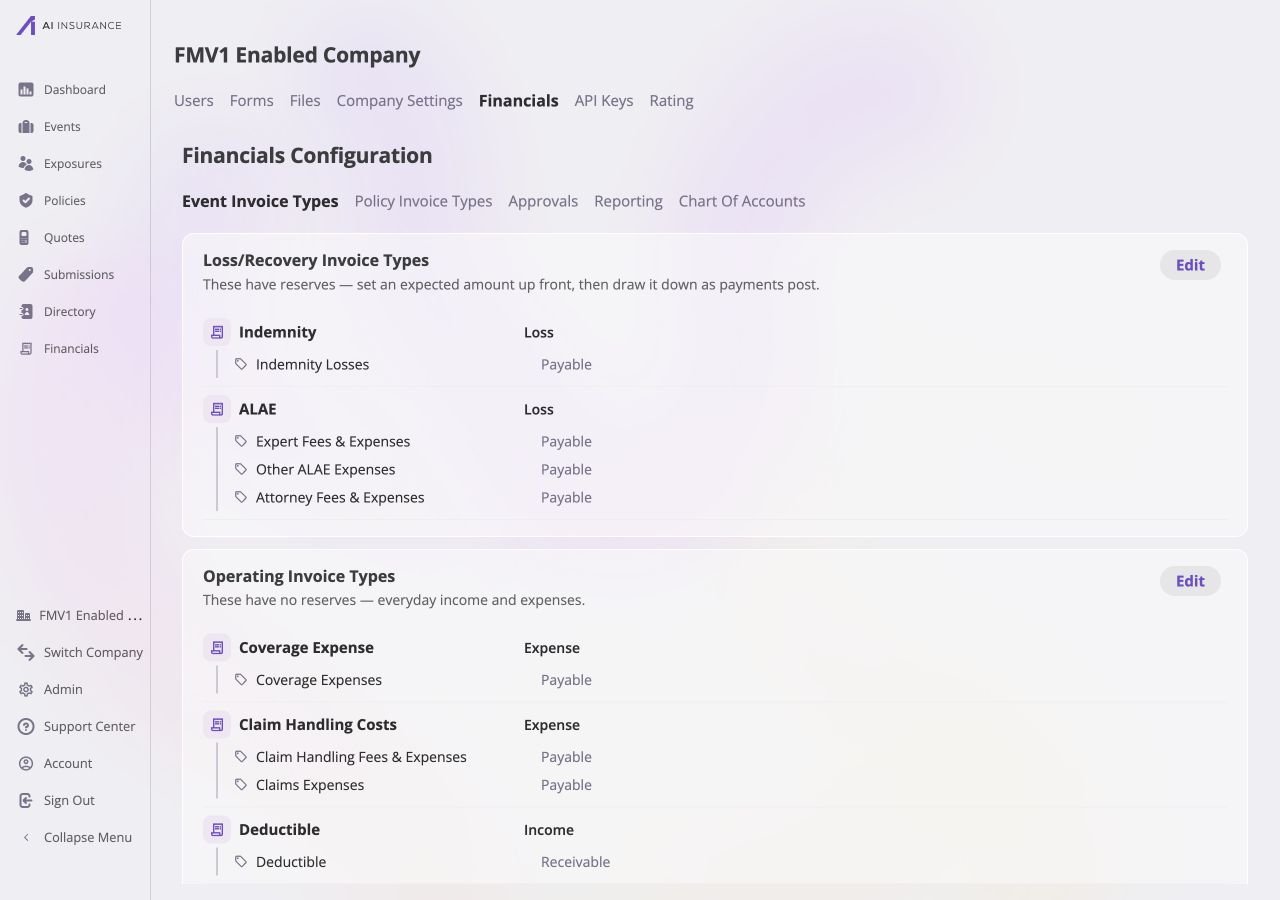
The configuration page makes the hierarchy visible: Invoice Types are grouped
into **Loss/Recovery** and **Operating**, and each type expands into the Line Item
Types that invoices may use. The example also shows that direction is configured
at both levels.
 ## What a Type Defines
A type owns a set of **Line Item Types**. An invoice of that type may use
those line items and no others.
Reports aggregate by type. Every headline figure — total owed, total paid —
is a per-type total.
Whether money of this kind normally flows out of the business or into it.
See [Expected Direction](/financials/expected-direction).
Loss/Recovery types track money expected to move before it moves. See
[Reserves](/financials/reserves).
## Loss/Recovery Types and Operating Types
Every Invoice Type is one of two kinds, fixed when the type is created. The
admin page groups them under exactly these two headings.
| Kind | What it means | Typical use |
| ----------------- | ------------------------------------------------------------------------------------------------------------------------------------------------------------------ | ------------------------------------------------------------------------------------------ |
| **Loss/Recovery** | Carries reserves. An expected total is set up front, per event, and the reserve updates as payments are recorded; the app reports Reserves, Owed, Paid, and Total. | Indemnity, ALAE, Subrogation — anything whose eventual cost is estimated before it is paid |
| **Operating** | No reserves. Everyday income and expenses, tracking only what has actually been invoiced and paid. | Fees, administrative costs, one-off charges |
An Operating type shows no Reserves figure anywhere — its Reserves column is
structurally empty, and its Total is simply Paid plus Owed.
A type's kind cannot change once the type exists — reserve tracking is
structural, not cosmetic. Switching kinds means creating a new type.
## Line Items
A line item is a component of an invoice's amount, drawn from the set its type
owns.
An **Indemnity** invoice for \$15,000 might be one line item of \$15,000. An
**ALAE** invoice for \$4,200 might be three: \$2,500 of expert fees, \$1,200 of
legal, \$500 of investigation. The invoice is one record either way; the line
items are how its money is described.
Each Line Item Type carries:
* **A name** — what appears in the picker and on reports.
* **An expected direction** — Income or Expense. This is the direction amounts on
that line normally move, and it does not have to match its Invoice Type's
expected direction. See [Expected
Direction](/financials/expected-direction).
## What a Type Defines
A type owns a set of **Line Item Types**. An invoice of that type may use
those line items and no others.
Reports aggregate by type. Every headline figure — total owed, total paid —
is a per-type total.
Whether money of this kind normally flows out of the business or into it.
See [Expected Direction](/financials/expected-direction).
Loss/Recovery types track money expected to move before it moves. See
[Reserves](/financials/reserves).
## Loss/Recovery Types and Operating Types
Every Invoice Type is one of two kinds, fixed when the type is created. The
admin page groups them under exactly these two headings.
| Kind | What it means | Typical use |
| ----------------- | ------------------------------------------------------------------------------------------------------------------------------------------------------------------ | ------------------------------------------------------------------------------------------ |
| **Loss/Recovery** | Carries reserves. An expected total is set up front, per event, and the reserve updates as payments are recorded; the app reports Reserves, Owed, Paid, and Total. | Indemnity, ALAE, Subrogation — anything whose eventual cost is estimated before it is paid |
| **Operating** | No reserves. Everyday income and expenses, tracking only what has actually been invoiced and paid. | Fees, administrative costs, one-off charges |
An Operating type shows no Reserves figure anywhere — its Reserves column is
structurally empty, and its Total is simply Paid plus Owed.
A type's kind cannot change once the type exists — reserve tracking is
structural, not cosmetic. Switching kinds means creating a new type.
## Line Items
A line item is a component of an invoice's amount, drawn from the set its type
owns.
An **Indemnity** invoice for \$15,000 might be one line item of \$15,000. An
**ALAE** invoice for \$4,200 might be three: \$2,500 of expert fees, \$1,200 of
legal, \$500 of investigation. The invoice is one record either way; the line
items are how its money is described.
Each Line Item Type carries:
* **A name** — what appears in the picker and on reports.
* **An expected direction** — Income or Expense. This is the direction amounts on
that line normally move, and it does not have to match its Invoice Type's
expected direction. See [Expected
Direction](/financials/expected-direction).
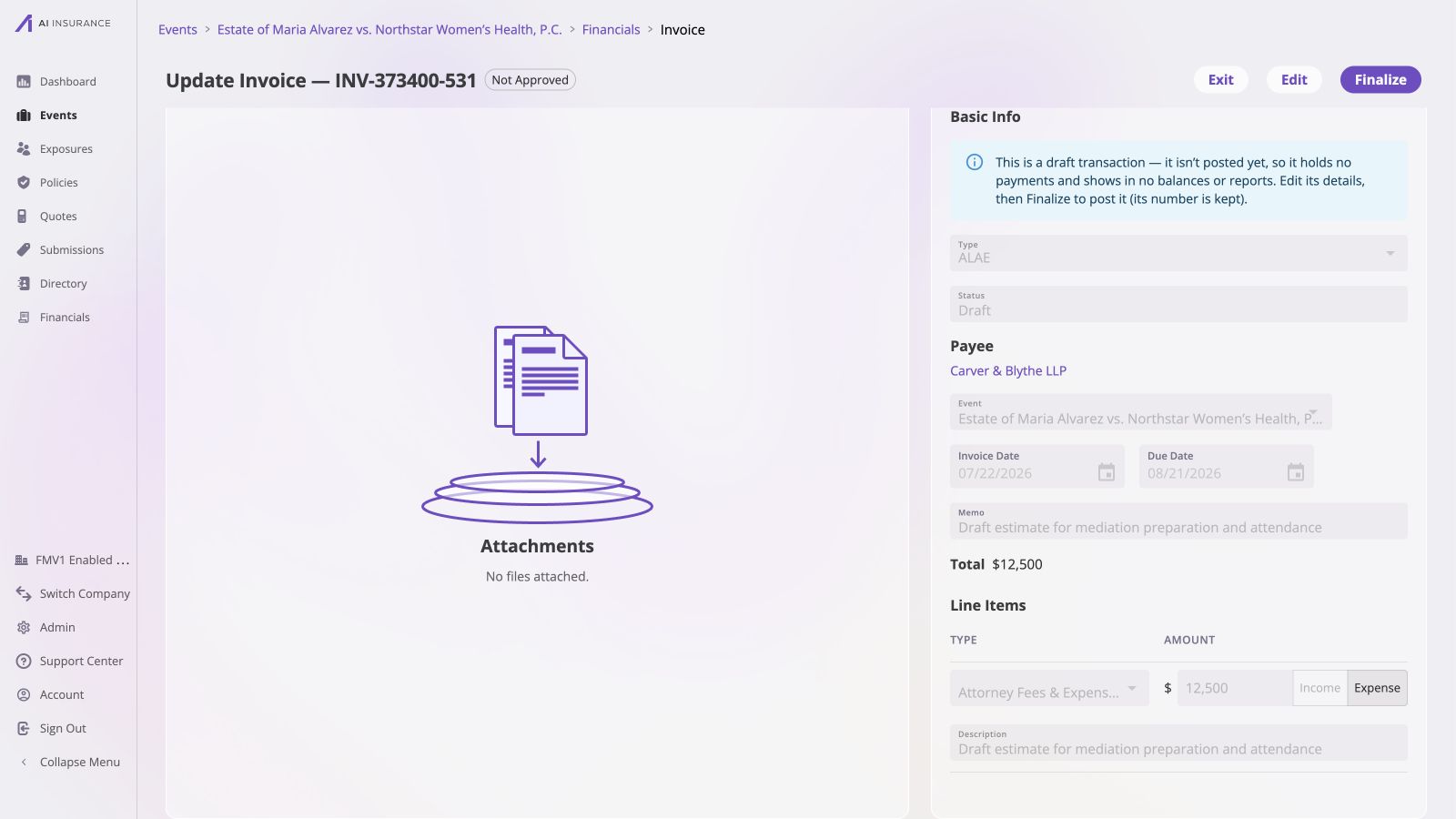 An invoice's line items — which types, which amounts — are fixed from the moment
it is created, at any payment count. None can be added, removed, or amended.
Corrections are made by voiding the invoice and creating a replacement.
## Aggregates Roll Up by Type
Financials reports totals **per Invoice Type**. This is the Overview Report at
the top of [Company Event Financials](/financials/pages/event-financials-page)
and the [Event Financials Tab](/financials/pages/event-financials-tab).
One row per type, with four columns:
| Column | What it means |
| ------------ | --------------------------------------------------------------------------------------------------------------- |
| **Reserves** | Money still expected to move. Empty for Operating types. |
| **Owed** | Invoiced but not yet paid. |
| **Paid** | Paid to date. |
| **Total** | For a Loss/Recovery type: Reserves plus Paid — the full expected amount. For an Operating type: Paid plus Owed. |
Expanding a type's row shows its line items broken out underneath, with **Owed**,
**Paid**, and **Total** per line item.
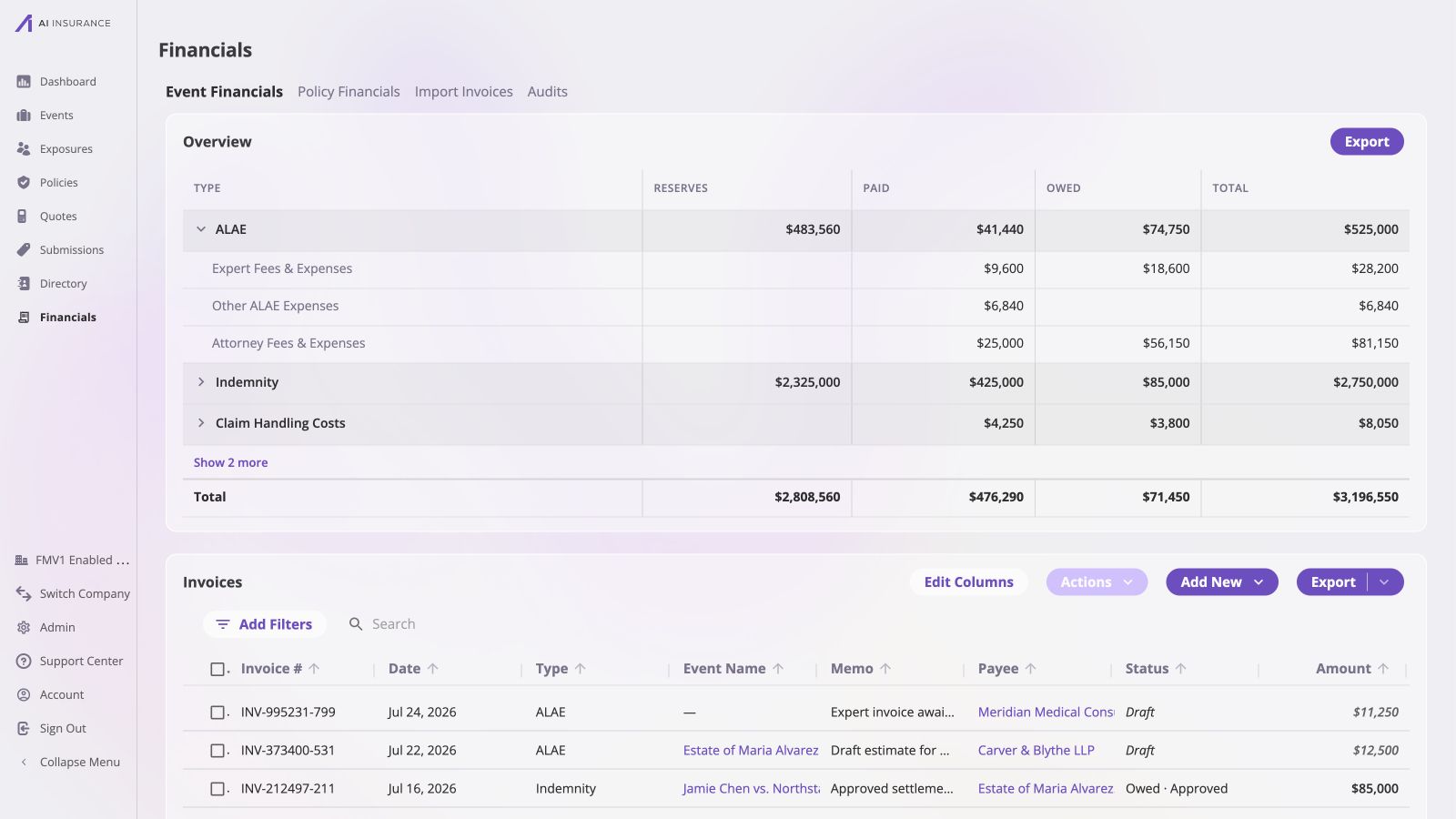
On the live Event Financials overview, expanding **ALAE** reveals the same line
item names configured for that type — **Expert Fees & Expenses**, **Other ALAE
Expenses**, and **Attorney Fees & Expenses** — with each row contributing its own
figures to the bold ALAE total above it.
An invoice's line items — which types, which amounts — are fixed from the moment
it is created, at any payment count. None can be added, removed, or amended.
Corrections are made by voiding the invoice and creating a replacement.
## Aggregates Roll Up by Type
Financials reports totals **per Invoice Type**. This is the Overview Report at
the top of [Company Event Financials](/financials/pages/event-financials-page)
and the [Event Financials Tab](/financials/pages/event-financials-tab).
One row per type, with four columns:
| Column | What it means |
| ------------ | --------------------------------------------------------------------------------------------------------------- |
| **Reserves** | Money still expected to move. Empty for Operating types. |
| **Owed** | Invoiced but not yet paid. |
| **Paid** | Paid to date. |
| **Total** | For a Loss/Recovery type: Reserves plus Paid — the full expected amount. For an Operating type: Paid plus Owed. |
Expanding a type's row shows its line items broken out underneath, with **Owed**,
**Paid**, and **Total** per line item.
On the live Event Financials overview, expanding **ALAE** reveals the same line
item names configured for that type — **Expert Fees & Expenses**, **Other ALAE
Expenses**, and **Attorney Fees & Expenses** — with each row contributing its own
figures to the bold ALAE total above it.
 **Reserves are never a per-line-item figure.** A reserve estimates what a whole
type will eventually cost on an event; it is not divided across the line items
subsequently invoiced. Every line item row therefore shows Owed, Paid, and Total
with an empty Reserves cell.
## Retiring a Type or Line Item
Types and line items can be **deprecated** rather than deleted. A deprecated type
or line item:
* disappears from every picker, so no new invoice can use it;
* keeps working on every invoice that already references it — those invoices
still list, open, and accept payments normally;
* still appears on reports for as long as it carries a non-zero figure.
A type or line item that has never been used can be deleted outright.
**Reserves are never a per-line-item figure.** A reserve estimates what a whole
type will eventually cost on an event; it is not divided across the line items
subsequently invoiced. Every line item row therefore shows Owed, Paid, and Total
with an empty Reserves cell.
## Retiring a Type or Line Item
Types and line items can be **deprecated** rather than deleted. A deprecated type
or line item:
* disappears from every picker, so no new invoice can use it;
* keeps working on every invoice that already references it — those invoices
still list, open, and accept payments normally;
* still appears on reports for as long as it carries a non-zero figure.
A type or line item that has never been used can be deleted outright.