> ## Documentation Index
> Fetch the complete documentation index at: https://docs.go.aiinsurance.io/llms.txt
> Use this file to discover all available pages before exploring further.
# Invoices
> The core record for tracking financial obligations
An **invoice** tracks an amount of money exchanged between two parties, and its
amount is summed across dimensions (payment status, line items, etc.) to generate
reports. It is one of two core obligation-layer records; the other is
[**Reserves**](/financials/reserves), which
track money expected to move but not yet recorded by an invoice.
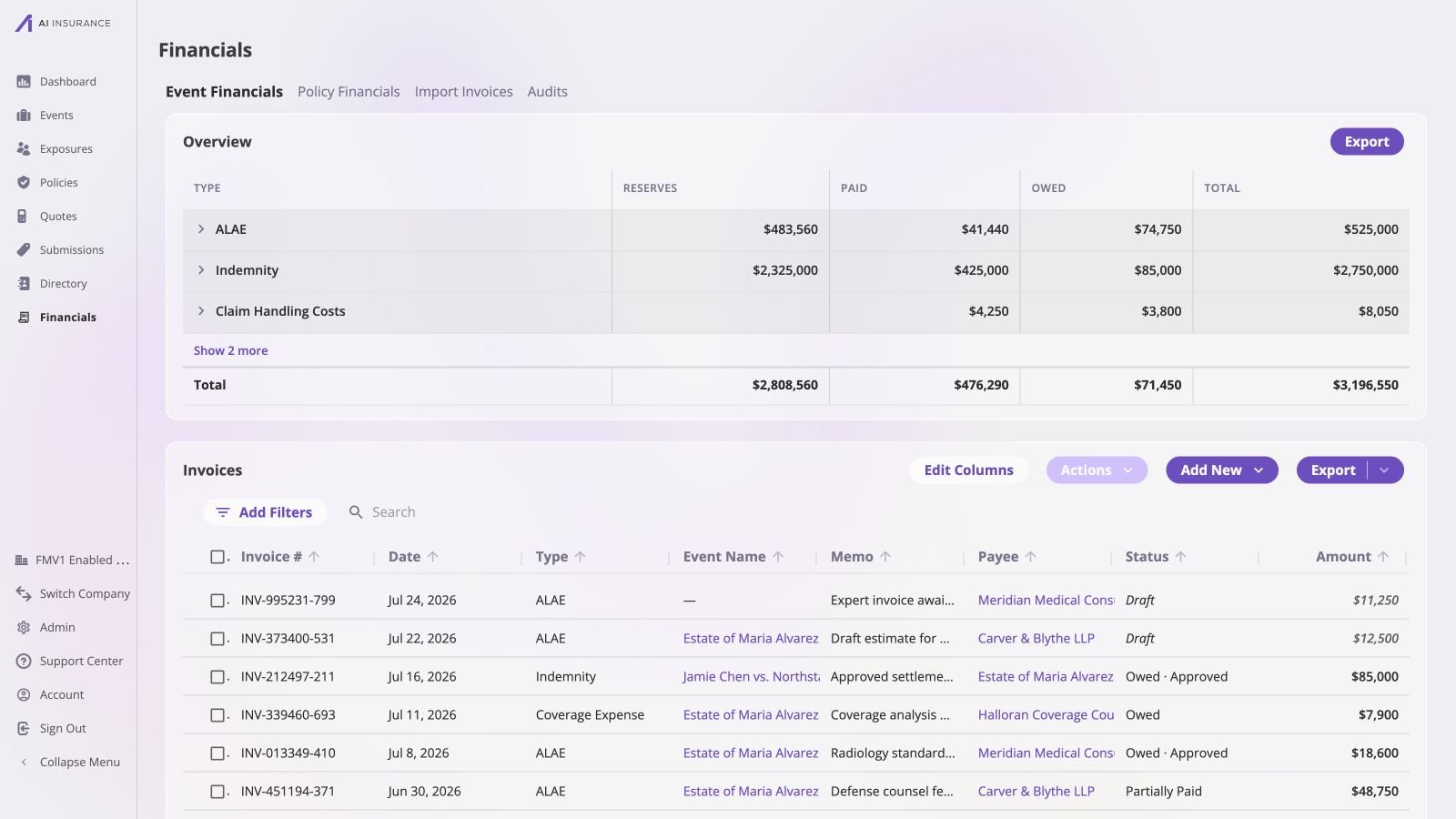
The company-wide [Company Event Financials](/financials/pages/event-financials-page)
page places the invoice list beneath the aggregate Overview Report. One list can
contain Draft, Owed, Partially Paid, Paid, and approved invoices, and an invoice
may have an event link or remain unlinked. The [Event Financials
Tab](/financials/pages/event-financials-tab) shows the same model for one event.
 ## Invoices Point in Either Direction
An invoice in AI Insurance covers both kinds of bill — one **received**, from a
vendor, an adjuster, or an expert, and one **issued**, billing an insured or a
third party. An invoice therefore records money moving in **either** direction.
| An invoice can be… | Example |
| ----------------------------------- | --------------------------------------------------------------------- |
| Money going **out** of the business | A claim indemnity payment, an adjuster's fee, an expert's bill |
| Money coming **in** to the business | A subrogation recovery, a salvage receipt, a deductible reimbursement |
There is no separate record type for expenses and income. One invoice can even
carry both directions at once — a bill with a fee on it and a credit against it
is one invoice with two line items pointing opposite ways.
This is why the app refers to the *direction* of money rather than to "payments"
and "receipts". Direction is a property of the amounts on an invoice, not a
property of the invoice's record type.
## What an Invoice Carries
| Field | What it is |
| ----------------------- | ------------------------------------------------------------------------------------------------------------------------------------------------------------------------------------------------------------------ |
| **Invoice number** | A unique identifier assigned by the app, in the form `INV-000000-000`. It is not user-chosen. |
| **Type** | The Invoice Type. Exactly one per invoice, chosen at creation. It decides which line items are available, and adds a rollup category for reporting. See [Invoice Types and Line Items](/financials/invoice-types). |
| **Line items** | How the invoice's amount is broken down. At least one is required. |
| **Invoice date** | When this money is *recognized* — the date the figure counts from for reporting. Required. |
| **Due date** | When payment is expected. Informational only: it never affects a total or a report figure. |
| **Status** | Where the invoice is in its lifecycle — Draft, Owed, Partially Paid, Paid, No Charges, or Void. See [The Invoice Lifecycle](/financials/lifecycle). |
| **Primary entity link** | The event or policy this money is about — or nothing at all. See [Invoice to Entity Linking](/financials/attaching-invoices). |
| **Payee** | Who the money is paid to or collected from. This will be either a Person or Organization entity. |
| **Memo** | Free text on the invoice, and optionally on each line item. |
| **Files** | Documents attached to the invoice record — the source PDF, a receipt, correspondence. |
| **Approval** | Whether the invoice is approved. Independent of status. See [Approvals](/financials/approvals). |
Opening an invoice brings those dimensions together. In the example below, the
payee and event identify the parties and context, while the line-item table
separates the original amount, what has been paid, and what remains outstanding.
The Payments section preserves the transaction that produced the paid figure.
## Invoices Point in Either Direction
An invoice in AI Insurance covers both kinds of bill — one **received**, from a
vendor, an adjuster, or an expert, and one **issued**, billing an insured or a
third party. An invoice therefore records money moving in **either** direction.
| An invoice can be… | Example |
| ----------------------------------- | --------------------------------------------------------------------- |
| Money going **out** of the business | A claim indemnity payment, an adjuster's fee, an expert's bill |
| Money coming **in** to the business | A subrogation recovery, a salvage receipt, a deductible reimbursement |
There is no separate record type for expenses and income. One invoice can even
carry both directions at once — a bill with a fee on it and a credit against it
is one invoice with two line items pointing opposite ways.
This is why the app refers to the *direction* of money rather than to "payments"
and "receipts". Direction is a property of the amounts on an invoice, not a
property of the invoice's record type.
## What an Invoice Carries
| Field | What it is |
| ----------------------- | ------------------------------------------------------------------------------------------------------------------------------------------------------------------------------------------------------------------ |
| **Invoice number** | A unique identifier assigned by the app, in the form `INV-000000-000`. It is not user-chosen. |
| **Type** | The Invoice Type. Exactly one per invoice, chosen at creation. It decides which line items are available, and adds a rollup category for reporting. See [Invoice Types and Line Items](/financials/invoice-types). |
| **Line items** | How the invoice's amount is broken down. At least one is required. |
| **Invoice date** | When this money is *recognized* — the date the figure counts from for reporting. Required. |
| **Due date** | When payment is expected. Informational only: it never affects a total or a report figure. |
| **Status** | Where the invoice is in its lifecycle — Draft, Owed, Partially Paid, Paid, No Charges, or Void. See [The Invoice Lifecycle](/financials/lifecycle). |
| **Primary entity link** | The event or policy this money is about — or nothing at all. See [Invoice to Entity Linking](/financials/attaching-invoices). |
| **Payee** | Who the money is paid to or collected from. This will be either a Person or Organization entity. |
| **Memo** | Free text on the invoice, and optionally on each line item. |
| **Files** | Documents attached to the invoice record — the source PDF, a receipt, correspondence. |
| **Approval** | Whether the invoice is approved. Independent of status. See [Approvals](/financials/approvals). |
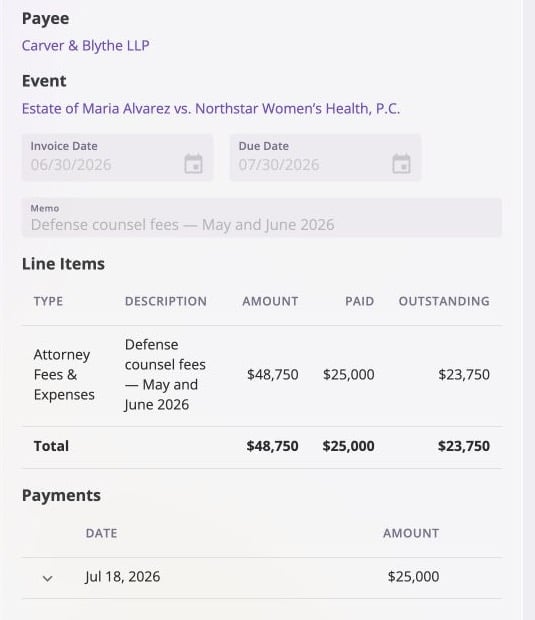
Opening an invoice brings those dimensions together. In the example below, the
payee and event identify the parties and context, while the line-item table
separates the original amount, what has been paid, and what remains outstanding.
The Payments section preserves the transaction that produced the paid figure.
 ## Amounts Are Always Positive
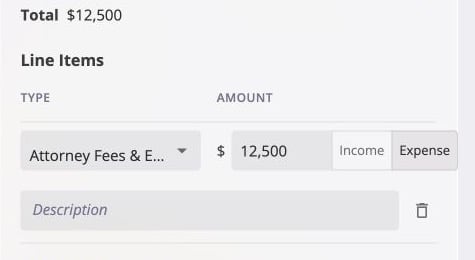
Every line item's amount is entered as a plain positive figure on an explicit
**Income** or **Expense** side. The flow of money is always carried by that
toggle, never by a minus sign — the UI disallows entry of negative amounts
outright.
## Amounts Are Always Positive
Every line item's amount is entered as a plain positive figure on an explicit
**Income** or **Expense** side. The flow of money is always carried by that
toggle, never by a minus sign — the UI disallows entry of negative amounts
outright.
 When you later edit a partial payment, the payment remains attached to one
fixed line item and inherits that line item's direction. The **Edit Payments**
dialog accepts another positive magnitude; it does not show a second direction
toggle that could contradict the line item.
## The Three Figures Every Invoice Reports
Once an invoice exists, it reports three amounts:
The net of every line item — the money this invoice commits to move.
The net of every payment recorded against it so far.
Total minus Paid — what is still outstanding.
Because line items can point in either direction, all three of these are *net*
figures. An invoice with a \$1,000 expense line and a \$200 credit line has a
total of \$800, not \$1,200.
Paid nets the same way. On an invoice with a \$400 expense line and a \$200
income line, settling both records \$200 paid, not \$600.
Balance due inherits both, because it is the difference between two net figures.
An \$800 total with \$300 recorded against it leaves \$500 outstanding.
### Worked Example
An invoice with two line items: a \$1,000 subrogation recovery on the income
side, and \$400 of associated legal fees on the expense side. Its total is
\$600 income — the net of the two.
| Point in time | Total | Paid | Balance due |
| -------------------------- | ------------ | -------------- | ------------- |
| Created, nothing settled | \$600 income | \$0 | \$600 income |
| \$1,000 recovery collected | \$600 income | \$1,000 income | \$400 expense |
| \$400 legal fee paid | \$600 income | \$600 income | \$0 |
Balance due changes direction between the first and second rows. Collecting the
recovery brings in more than the invoice nets to, so what remains outstanding is
no longer money owed *to* the business but the legal fee still owed *by* it.
Total never moves — it is fixed by the line items at creation. Paid accumulates
as money is recorded on either side, and Balance due is always the difference
between the two.
## What Can Change After Creation
**An invoice's type and line items are fixed the moment it is created.** Line
items cannot be added, removed, or amended, and the type cannot be switched.
Corrections are made by voiding the invoice and creating a replacement. For a
draft, "created" is the moment it is finalized — until then its type and line
items are still editable.
The following remain editable: the dates, the memos, the event or policy it links
to, its files, and — through recording and removing payments — its status.
[The Invoice Lifecycle](/financials/lifecycle) covers this in full.
When you later edit a partial payment, the payment remains attached to one
fixed line item and inherits that line item's direction. The **Edit Payments**
dialog accepts another positive magnitude; it does not show a second direction
toggle that could contradict the line item.
## The Three Figures Every Invoice Reports
Once an invoice exists, it reports three amounts:
The net of every line item — the money this invoice commits to move.
The net of every payment recorded against it so far.
Total minus Paid — what is still outstanding.
Because line items can point in either direction, all three of these are *net*
figures. An invoice with a \$1,000 expense line and a \$200 credit line has a
total of \$800, not \$1,200.
Paid nets the same way. On an invoice with a \$400 expense line and a \$200
income line, settling both records \$200 paid, not \$600.
Balance due inherits both, because it is the difference between two net figures.
An \$800 total with \$300 recorded against it leaves \$500 outstanding.
### Worked Example
An invoice with two line items: a \$1,000 subrogation recovery on the income
side, and \$400 of associated legal fees on the expense side. Its total is
\$600 income — the net of the two.
| Point in time | Total | Paid | Balance due |
| -------------------------- | ------------ | -------------- | ------------- |
| Created, nothing settled | \$600 income | \$0 | \$600 income |
| \$1,000 recovery collected | \$600 income | \$1,000 income | \$400 expense |
| \$400 legal fee paid | \$600 income | \$600 income | \$0 |
Balance due changes direction between the first and second rows. Collecting the
recovery brings in more than the invoice nets to, so what remains outstanding is
no longer money owed *to* the business but the legal fee still owed *by* it.
Total never moves — it is fixed by the line items at creation. Paid accumulates
as money is recorded on either side, and Balance due is always the difference
between the two.
## What Can Change After Creation
**An invoice's type and line items are fixed the moment it is created.** Line
items cannot be added, removed, or amended, and the type cannot be switched.
Corrections are made by voiding the invoice and creating a replacement. For a
draft, "created" is the moment it is finalized — until then its type and line
items are still editable.
The following remain editable: the dates, the memos, the event or policy it links
to, its files, and — through recording and removing payments — its status.
[The Invoice Lifecycle](/financials/lifecycle) covers this in full.