> ## Documentation Index
> Fetch the complete documentation index at: https://docs.go.aiinsurance.io/llms.txt
> Use this file to discover all available pages before exploring further.
# Chart of Accounts
> Read the accounts and balances generated by Financials
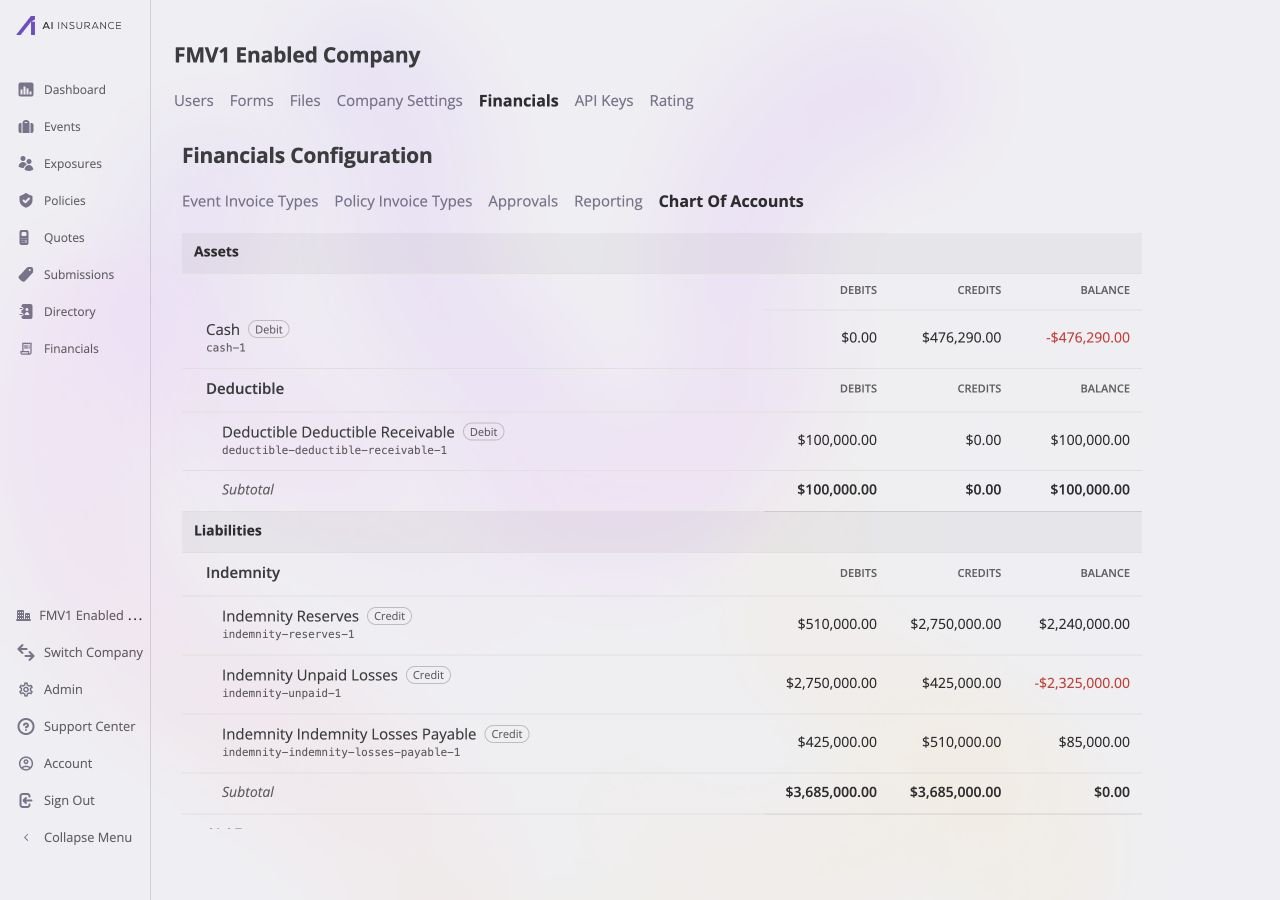
Open **Admin → Financials → Chart of Accounts** to view the read-only accounts
generated from Financials configuration and posted activity.
 ## Account Balances
The read-only page groups accounts under **Assets**, **Liabilities**,
**Income**, and **Expenses**, then under the applicable financial category.
Ungrouped accounts, such as Cash, appear directly in their account class. Each
group repeats the same balance columns and a subtotal for its accounts.
| Field | Meaning |
| ------------------------ | ----------------------------------------------------------------------------------------------------------------- |
| **Account Grouping** | The account class and financial category that organize the account. |
| **Account Name and Key** | Human-readable account plus its stable system identifier. |
| **Debit / Credit Badge** | The account's normal balance side. The badge identifies whether debits or credits normally increase that account. |
| **Debits / Credits** | Posted activity accumulated on each side. Draft invoices do not post. |
| **Balance** | Current balance after netting debits and credits. A red balance sits opposite the account's normal side. |
There are no edit controls here. Change categories and line items in [Event
Invoice Types](/financials/pages/event-invoice-types); posted financial activity
then contributes to the generated accounts. [Accounts](/financials/accounting-model/accounts)
and [Ledger](/financials/accounting-model/ledger) describe the underlying
accounting model, while [Postings](/financials/accounting-model/postings)
explains the posted debit and credit activity.
## Account Balances
The read-only page groups accounts under **Assets**, **Liabilities**,
**Income**, and **Expenses**, then under the applicable financial category.
Ungrouped accounts, such as Cash, appear directly in their account class. Each
group repeats the same balance columns and a subtotal for its accounts.
| Field | Meaning |
| ------------------------ | ----------------------------------------------------------------------------------------------------------------- |
| **Account Grouping** | The account class and financial category that organize the account. |
| **Account Name and Key** | Human-readable account plus its stable system identifier. |
| **Debit / Credit Badge** | The account's normal balance side. The badge identifies whether debits or credits normally increase that account. |
| **Debits / Credits** | Posted activity accumulated on each side. Draft invoices do not post. |
| **Balance** | Current balance after netting debits and credits. A red balance sits opposite the account's normal side. |
There are no edit controls here. Change categories and line items in [Event
Invoice Types](/financials/pages/event-invoice-types); posted financial activity
then contributes to the generated accounts. [Accounts](/financials/accounting-model/accounts)
and [Ledger](/financials/accounting-model/ledger) describe the underlying
accounting model, while [Postings](/financials/accounting-model/postings)
explains the posted debit and credit activity.