> ## Documentation Index
> Fetch the complete documentation index at: https://docs.go.aiinsurance.io/llms.txt
> Use this file to discover all available pages before exploring further.
# Company Financials
> Navigate the company-wide Financials workspace
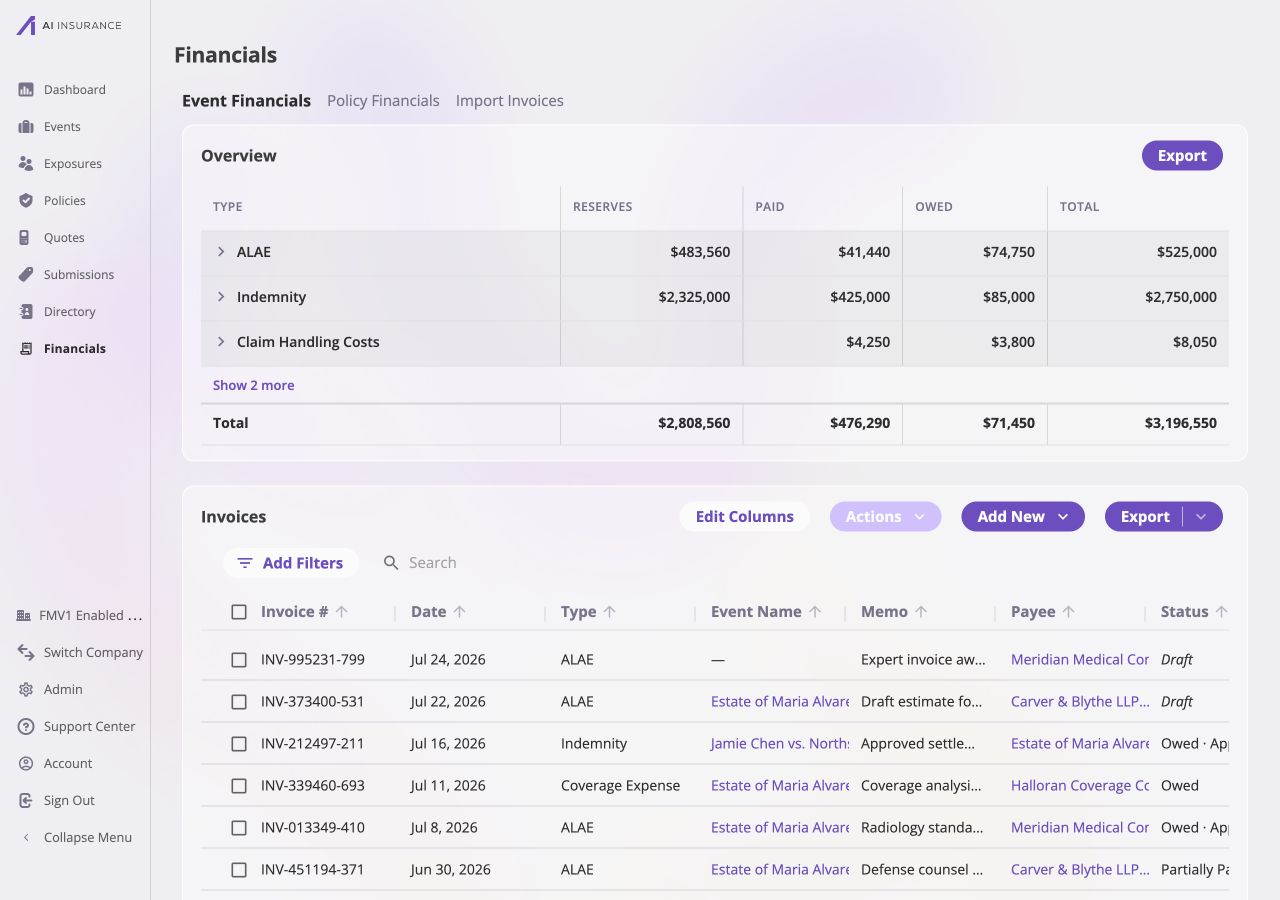
Open **Financials** from the main navigation to work with activity across the
company. This company-wide workspace contains the event financial reporting and
invoice listing, alongside the currently available Policy Financials and Import
Invoices entries.
It is the company-wide starting point described in the [Financials
overview](/financials/overview), and provides broad context for
[Invoices](/financials/invoices), configured [Invoice Types and Line
Items](/financials/invoice-types), and [Reserves](/financials/reserves) across
every event.
 ## Financials Workspaces
The navigation across the top separates three company-wide areas.
| Workspace | Use It For |
| ----------------------------------------------------------------------- | ------------------------------------------------------------------------------------------------------------------ |
| [**Company Event Financials**](/financials/pages/event-financials-page) | Review event-side reserves, paid and owed amounts, and invoices across the company. This is the default workspace. |
| [**Policy Financials**](/financials/pages/policy-tab) | View the current policy-side placeholder. |
| [**Import Invoices**](/financials/pages/import-tab) | Access the current invoice-import entry point. |
See [Company Event Financials](/financials/pages/event-financials-page) for
the Overview Report, invoice list, filters, bulk actions, and exports shown
here. [Financials Configuration](/financials/pages/financials-configuration)
controls the types, approvals, reporting frames, and accounts used throughout
these workspaces.
## Company and Event Scope
Company Event Financials and an event's Financials tab use the same financial
records, but answer different questions.
| | Company Event Financials | Event Financials Tab |
| ------------------- | -------------------------------------------------------------------------------- | --------------------------------------------------------------------------------------------- |
| **Scope** | Every event-side invoice and reserve position in the company | One event only |
| **Event Columns** | Shows the event name and can optionally show the event ID | Hidden because the event is already known |
| **Linking** | Bulk actions can **Link** or **Unlink** invoices | Linking actions are omitted |
| **Reserves** | Read-only rollup | Reserves can be updated on Loss/Recovery rows |
| **Reserve History** | Read-only **Reserve Updates** listing for every event, with an Event Name column | Includes the event's own **Reserve Updates** listing |
| **New Invoices** | [New Invoice](/financials/pages/new-invoice) starts without a preselected event | [New Invoice](/financials/pages/new-invoice) automatically starts linked to the current event |
Use the [Event Financials Tab](/financials/pages/event-financials-tab) when
work is centered on one event, or when reserves need to be updated or reset —
those actions are always scoped to a single event and are not offered on the
company-wide page.
## Financials Workspaces
The navigation across the top separates three company-wide areas.
| Workspace | Use It For |
| ----------------------------------------------------------------------- | ------------------------------------------------------------------------------------------------------------------ |
| [**Company Event Financials**](/financials/pages/event-financials-page) | Review event-side reserves, paid and owed amounts, and invoices across the company. This is the default workspace. |
| [**Policy Financials**](/financials/pages/policy-tab) | View the current policy-side placeholder. |
| [**Import Invoices**](/financials/pages/import-tab) | Access the current invoice-import entry point. |
See [Company Event Financials](/financials/pages/event-financials-page) for
the Overview Report, invoice list, filters, bulk actions, and exports shown
here. [Financials Configuration](/financials/pages/financials-configuration)
controls the types, approvals, reporting frames, and accounts used throughout
these workspaces.
## Company and Event Scope
Company Event Financials and an event's Financials tab use the same financial
records, but answer different questions.
| | Company Event Financials | Event Financials Tab |
| ------------------- | -------------------------------------------------------------------------------- | --------------------------------------------------------------------------------------------- |
| **Scope** | Every event-side invoice and reserve position in the company | One event only |
| **Event Columns** | Shows the event name and can optionally show the event ID | Hidden because the event is already known |
| **Linking** | Bulk actions can **Link** or **Unlink** invoices | Linking actions are omitted |
| **Reserves** | Read-only rollup | Reserves can be updated on Loss/Recovery rows |
| **Reserve History** | Read-only **Reserve Updates** listing for every event, with an Event Name column | Includes the event's own **Reserve Updates** listing |
| **New Invoices** | [New Invoice](/financials/pages/new-invoice) starts without a preselected event | [New Invoice](/financials/pages/new-invoice) automatically starts linked to the current event |
Use the [Event Financials Tab](/financials/pages/event-financials-tab) when
work is centered on one event, or when reserves need to be updated or reset —
those actions are always scoped to a single event and are not offered on the
company-wide page.