> ## Documentation Index
> Fetch the complete documentation index at: https://docs.go.aiinsurance.io/llms.txt
> Use this file to discover all available pages before exploring further.
# Event Invoice Types
> Configure event invoice categories, line items, and directions
Open **Admin → Financials → Event Invoice Types**. This [Financials
Configuration](/financials/pages/financials-configuration) area defines the
event-side categories available on invoices and in Overview Reports.
 ## Two Structural Kinds
The page keeps two separate cards:
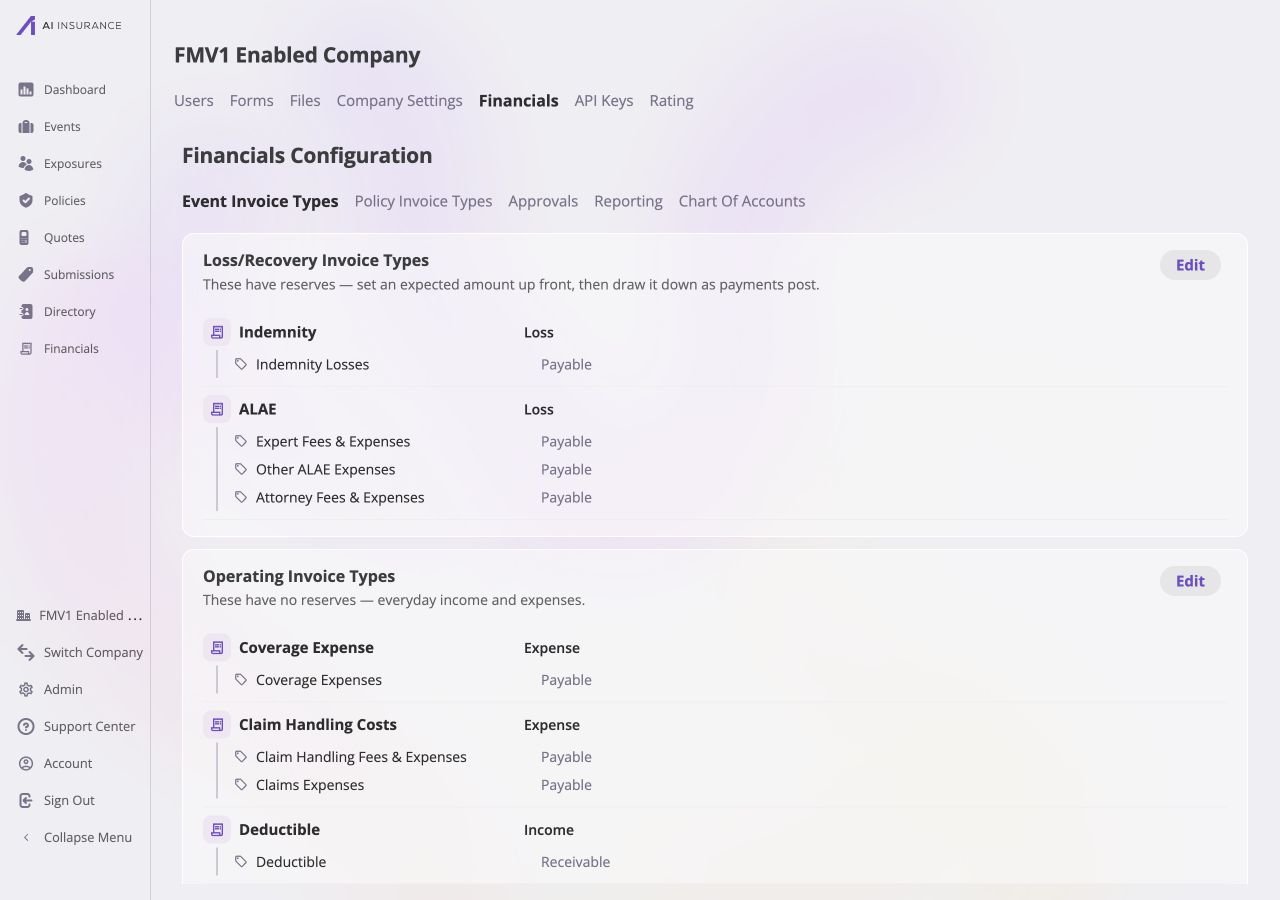
* **Loss/Recovery Invoice Types** carry reserves. Med-mal examples include
Indemnity and ALAE.
* **Operating Invoice Types** do not carry reserves. Examples include coverage
expense, claim handling fees, and deductible income.
An Invoice Type remains in the structural kind in which it was created; it
cannot be moved between the two cards. [Invoice Types and Line
Items](/financials/invoice-types) explains why reserve behavior is structural.
## Read and Edit States
Each card normally lists its Invoice Types and nested Line Item Types in read
mode. Select **Edit** on one card to edit that card only. While it is open, the
other card remains read-only; only one card can be edited at a time.
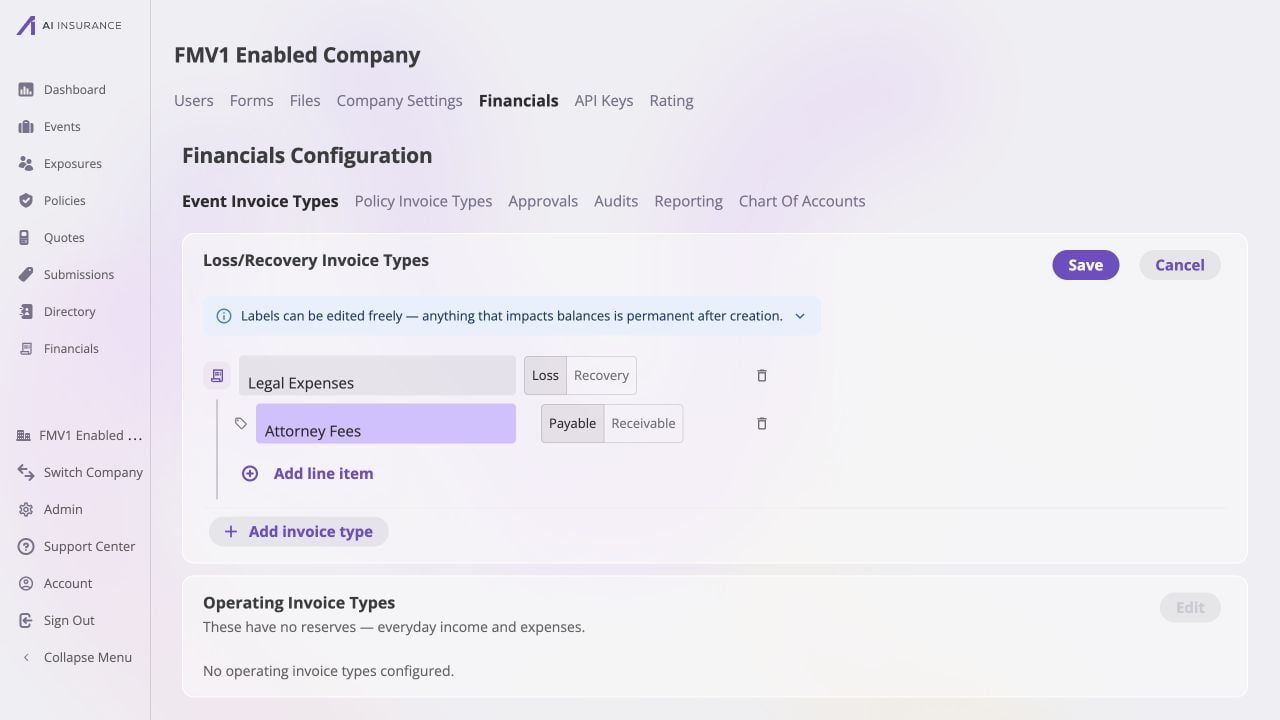
**Save** commits the card's changes and returns it to read mode. **Cancel**
discards that card's pending edits. There is no page-level save control. The
form keeps Save unavailable until every required name is present and every
Invoice Type has at least one Line Item Type.
## Two Structural Kinds
The page keeps two separate cards:
* **Loss/Recovery Invoice Types** carry reserves. Med-mal examples include
Indemnity and ALAE.
* **Operating Invoice Types** do not carry reserves. Examples include coverage
expense, claim handling fees, and deductible income.
An Invoice Type remains in the structural kind in which it was created; it
cannot be moved between the two cards. [Invoice Types and Line
Items](/financials/invoice-types) explains why reserve behavior is structural.
## Read and Edit States
Each card normally lists its Invoice Types and nested Line Item Types in read
mode. Select **Edit** on one card to edit that card only. While it is open, the
other card remains read-only; only one card can be edited at a time.
**Save** commits the card's changes and returns it to read mode. **Cancel**
discards that card's pending edits. There is no page-level save control. The
form keeps Save unavailable until every required name is present and every
Invoice Type has at least one Line Item Type.
 ## Names and Directions
| Item | What Can Change | Direction Behavior |
| ------------------ | ------------------------------------------------------------- | ---------------------------------------------------------------------------------------------------------------------------------------------------------- |
| **Invoice Type** | Its displayed name can be changed in the card's edit mode. | Loss/Recovery types use the **Loss/Recovery** direction established at creation. Operating types use **Expense/Income** and may be adjusted while editing. |
| **Line Item Type** | Its displayed name can be changed in the parent Invoice Type. | Its **Payable/Receivable** direction is selected while new and becomes write-once after it is saved. |
The page writes these directions into the available invoice choices. [Expected
Direction](/financials/expected-direction) describes how a configured direction
is used when entered activity differs from the expectation.
## Adding, Deprecating, and Restoring
Use **Add invoice type** to add a type to the current structural card, then add
its line item types with **Add line item**. New items must be named before the
card can be saved.
An unused type or line item can be deleted outright. A type or line item that
has been used by an invoice cannot be deleted; mark it deprecated instead. A
deprecated entry remains visible for historical records but is unavailable for
new selections. Use **Restore** to make a deprecated entry available again.
Configured types form the rows in the [Company Event Financials Overview
Report](/financials/pages/event-financials-page#overview-report) and the
[Event Financials Tab Overview
Report](/financials/pages/event-financials-tab#overview-report). They also
control the choices on [New Invoice](/financials/pages/new-invoice).
## Names and Directions
| Item | What Can Change | Direction Behavior |
| ------------------ | ------------------------------------------------------------- | ---------------------------------------------------------------------------------------------------------------------------------------------------------- |
| **Invoice Type** | Its displayed name can be changed in the card's edit mode. | Loss/Recovery types use the **Loss/Recovery** direction established at creation. Operating types use **Expense/Income** and may be adjusted while editing. |
| **Line Item Type** | Its displayed name can be changed in the parent Invoice Type. | Its **Payable/Receivable** direction is selected while new and becomes write-once after it is saved. |
The page writes these directions into the available invoice choices. [Expected
Direction](/financials/expected-direction) describes how a configured direction
is used when entered activity differs from the expectation.
## Adding, Deprecating, and Restoring
Use **Add invoice type** to add a type to the current structural card, then add
its line item types with **Add line item**. New items must be named before the
card can be saved.
An unused type or line item can be deleted outright. A type or line item that
has been used by an invoice cannot be deleted; mark it deprecated instead. A
deprecated entry remains visible for historical records but is unavailable for
new selections. Use **Restore** to make a deprecated entry available again.
Configured types form the rows in the [Company Event Financials Overview
Report](/financials/pages/event-financials-page#overview-report) and the
[Event Financials Tab Overview
Report](/financials/pages/event-financials-tab#overview-report). They also
control the choices on [New Invoice](/financials/pages/new-invoice).