> ## Documentation Index
> Fetch the complete documentation index at: https://docs.go.aiinsurance.io/llms.txt
> Use this file to discover all available pages before exploring further.
# New Invoice
> Reference for the invoice creation page and its visible states
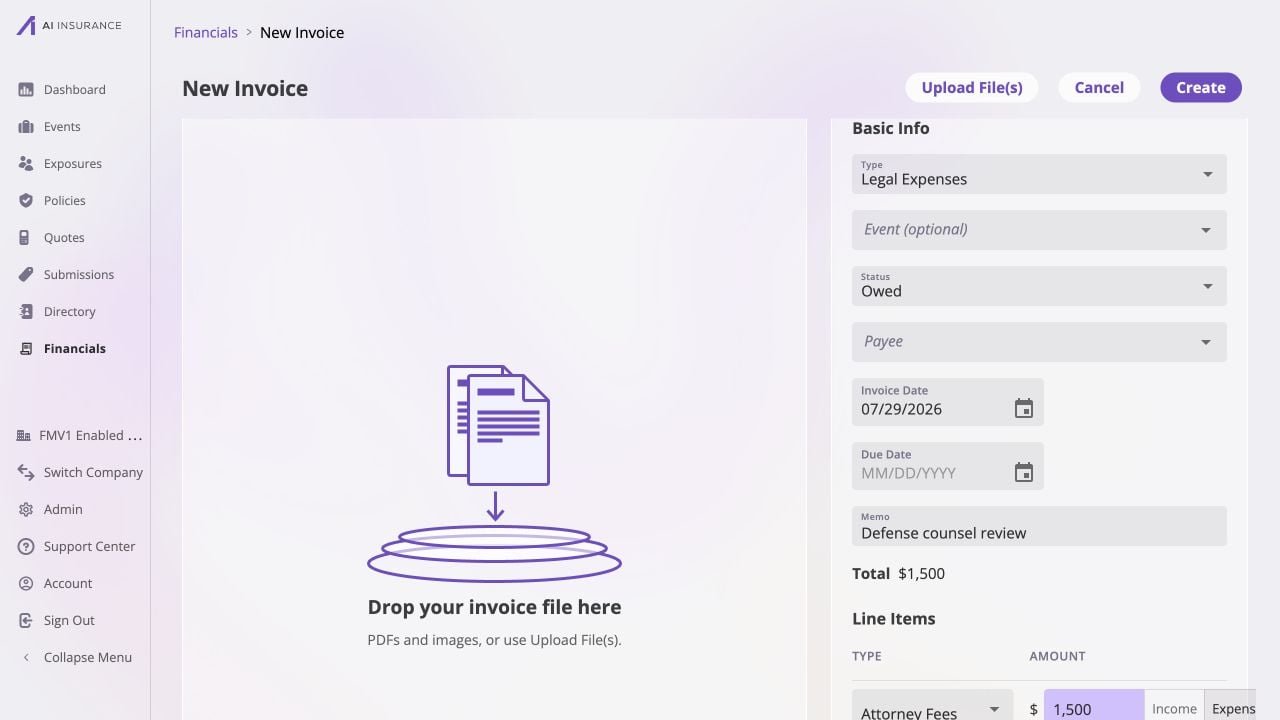
**New Invoice** is the page that creates an event-side invoice. Open it with
**Add New** from [Company Event
Financials](/financials/pages/event-financials-page) or an [Event Financials
Tab](/financials/pages/event-financials-tab). The company-wide entry point
starts without an event selected; the event-scoped entry point starts linked to
that event.
 ## Scope and Header Controls
The header provides **Upload File(s)**, **Cancel**, and **Create**. Cancel
leaves the unsaved page. The source list determines the scope shown below.
| Opened From | Event Behavior | After Create |
| ------------------------------------------------------------------- | ------------------------------------------------------------------------------------------------------------------------------------------- | --------------------------------------- |
| [Company Event Financials](/financials/pages/event-financials-page) | The **Event (optional)** picker is available. Leaving it empty creates an unlinked invoice; selecting an event links the new invoice to it. | Returns to Company Event Financials. |
| [Event Financials Tab](/financials/pages/event-financials-tab) | The current event is already linked and the optional Event picker is not shown. | Returns to that event's Financials tab. |
Changing **Type** after line items have been added asks for confirmation because
the type change discards those line-item edits. Attachments remain staged on the
page until Create.
## Invoice Fields
| Field or Control | Visible Behavior |
| ---------------- | ------------------------------------------------------------------------------------------------------------------------------------------------------------------------------------------------------ |
| **Type** | Selects one configured [Event Invoice Type](/financials/pages/event-invoice-types). It determines the available Line Item Types and their expected directions. |
| **Status** | **Owed** creates an unpaid invoice. **Paid** creates the invoice with a full settlement and adds a required Paid Date. |
| **Payee** | Selects a Person or Organization associated with the invoice. It can be left blank. |
| **Invoice Date** | Defaults to today and is required. This is the date used for the invoice's financial activity. |
| **Due Date** | Optional expected-payment date. It is informational and does not change totals. |
| **Memo** | Optional invoice-level description. |
| **Line Items** | Each row has a Line Item Type, a positive amount, and an Income or Expense side. **Add line item** adds another row. See [Expected Direction](/financials/expected-direction) for the direction model. |
| **Attachments** | Drag PDFs or images into the attachment pane, or use **Upload File(s)**. Attachments may be added before the invoice is created. |
The displayed **Total** is the net of the line items. [Invoices](/financials/invoices)
explains how the Total, Paid, and Balance Due figures are derived after the
record exists.
## Validation
After an attempted Create, the form identifies the visible blocking condition:
* an Invoice Date is required;
* at least one line item is required, and every line item needs a type;
* line-item amounts cannot be negative;
* a **Paid** invoice needs a Paid Date and at least one non-zero line item.
For a paid Loss/Recovery invoice linked to an event, the page can also show a
reserve decision before it completes creation. The visible prompt protects the
event's reserve position; [Reserves](/financials/reserves) explains the
financial relationship rather than the page flow.
## Created Record
**Create** assigns the invoice number, creates the selected Owed or Paid state,
links the chosen event when there is one, and commits staged attachments. The
new record is then visible in the launching invoice list. Open it there to use
the [Invoice Detail](/financials/pages/invoice-detail) page.
## Scope and Header Controls
The header provides **Upload File(s)**, **Cancel**, and **Create**. Cancel
leaves the unsaved page. The source list determines the scope shown below.
| Opened From | Event Behavior | After Create |
| ------------------------------------------------------------------- | ------------------------------------------------------------------------------------------------------------------------------------------- | --------------------------------------- |
| [Company Event Financials](/financials/pages/event-financials-page) | The **Event (optional)** picker is available. Leaving it empty creates an unlinked invoice; selecting an event links the new invoice to it. | Returns to Company Event Financials. |
| [Event Financials Tab](/financials/pages/event-financials-tab) | The current event is already linked and the optional Event picker is not shown. | Returns to that event's Financials tab. |
Changing **Type** after line items have been added asks for confirmation because
the type change discards those line-item edits. Attachments remain staged on the
page until Create.
## Invoice Fields
| Field or Control | Visible Behavior |
| ---------------- | ------------------------------------------------------------------------------------------------------------------------------------------------------------------------------------------------------ |
| **Type** | Selects one configured [Event Invoice Type](/financials/pages/event-invoice-types). It determines the available Line Item Types and their expected directions. |
| **Status** | **Owed** creates an unpaid invoice. **Paid** creates the invoice with a full settlement and adds a required Paid Date. |
| **Payee** | Selects a Person or Organization associated with the invoice. It can be left blank. |
| **Invoice Date** | Defaults to today and is required. This is the date used for the invoice's financial activity. |
| **Due Date** | Optional expected-payment date. It is informational and does not change totals. |
| **Memo** | Optional invoice-level description. |
| **Line Items** | Each row has a Line Item Type, a positive amount, and an Income or Expense side. **Add line item** adds another row. See [Expected Direction](/financials/expected-direction) for the direction model. |
| **Attachments** | Drag PDFs or images into the attachment pane, or use **Upload File(s)**. Attachments may be added before the invoice is created. |
The displayed **Total** is the net of the line items. [Invoices](/financials/invoices)
explains how the Total, Paid, and Balance Due figures are derived after the
record exists.
## Validation
After an attempted Create, the form identifies the visible blocking condition:
* an Invoice Date is required;
* at least one line item is required, and every line item needs a type;
* line-item amounts cannot be negative;
* a **Paid** invoice needs a Paid Date and at least one non-zero line item.
For a paid Loss/Recovery invoice linked to an event, the page can also show a
reserve decision before it completes creation. The visible prompt protects the
event's reserve position; [Reserves](/financials/reserves) explains the
financial relationship rather than the page flow.
## Created Record
**Create** assigns the invoice number, creates the selected Owed or Paid state,
links the chosen event when there is one, and commits staged attachments. The
new record is then visible in the launching invoice list. Open it there to use
the [Invoice Detail](/financials/pages/invoice-detail) page.