> ## Documentation Index
> Fetch the complete documentation index at: https://docs.go.aiinsurance.io/llms.txt
> Use this file to discover all available pages before exploring further.
# Reference Frames
> Flow frame and type frame — how a figure gets its sign when it leaves the app
A financial figure is one fact: an amount of money that moved, or is expected to
move, in one direction. But there is more than one correct way to *write that
fact down*. A **reference frame** is the convention that decides which.
Financials has two.
Signed by **which way the money actually flows**. Money in is positive, money
out is negative. A \$10,000 loss payment is `-10000`; a \$3,000 recovery is
`3000`.
Signed by **whether the money went the way its Invoice Type expects**.
Positive in the expected direction. A \$10,000 loss on a loss type is
`10000`; a \$3,000 recovery on a recovery type is also `3000`. A figure
running *against* what the type expects is the negative one here.
Both describe the same money. They disagree only about which side of zero it
sits on.
## When to Use Each Frame
**Flow frame** answers "what happened to cash?" A summed column gives the net
effect on the business. Losses and recoveries offset each other, which is
usually what a finance team wants from a spreadsheet.
**Type frame** answers "how big was this?" A claim's costs read as positive
numbers, which is how most loss runs, bordereaux, and reports to carriers are
conventionally presented. A summed column gives total incurred, not a net.
Neither is more correct. The right choice depends on who is reading the file.
## On Screen the Frame Is Carried by Color
Every screen in Financials reads the **flow frame**, and expresses it with color
instead of a sign:
* Green — money coming
in, where the flow frame would write a positive number.
* **Black** — money going out, where the flow frame would write a negative one.
* **`$0`, uncolored** — a real zero. There is no flow to ink.
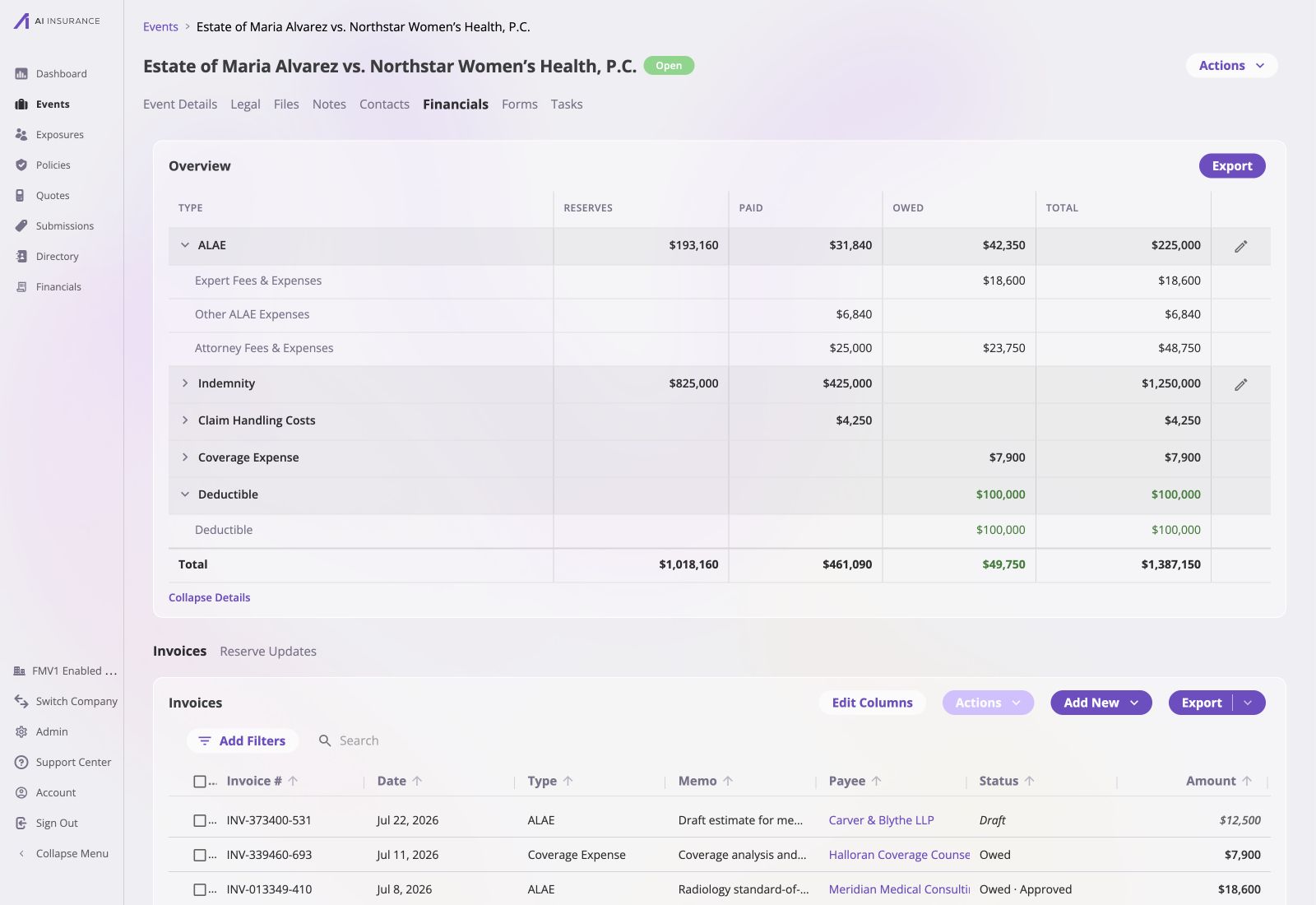 In the live event above, the black ALAE, Indemnity, Coverage Expense, and
claim-cost figures are unsigned magnitudes of money leaving the business. The
green **Deductible** is money coming in, and the green `$49,750` owed total is the
net result after that incoming recovery offsets the outstanding outgoing amounts.
The screen never needs a minus sign: color carries the flow frame while the
number stays positive.
So every figure on screen is an unsigned magnitude, and the frame setting changes
nothing about how it looks. Choosing a frame only matters where a figure leaves
the app and a sign has to do the work the color was doing.
A zero is not the same as a missing value. A settled line, a cleared reserve, or
a type with no activity yet shows `$0`. A genuinely absent value — no date, no
payee — shows an em dash.
## Where a Frame Applies
Five surfaces write figures out of the app. Each one carries a frame.
| Surface | What it is |
| ------------------ | -------------------------------------------------------------------------------------------------------------------------------- |
| **Invoices** | Amount columns in the [Company Event Financials invoice-list export](/financials/pages/event-financials-page#exporting-invoices) |
| **Overview** | Figures in the loss & operating report export |
| **Reserve Update** | The Reserve and Adj columns in the reserve listing export |
| **Event Export** | The financial columns on an entity's spreadsheet export |
| **Smart Tags** | Financial values substituted into generated documents |
**Everything defaults to the flow frame.** A company that changes nothing gets
flow-framed signs on every export and every generated document.
## Choosing a Frame
Under **Admin → Financials Configuration → Reporting**, each of the five exports
has its own **Flow / Type** toggle. See [Reporting](/financials/pages/reporting)
for that configuration surface. The setting is **company-wide per export**: one
choice that every Invoice Type follows, including types created later.
The Reporting page names the exact export surface beside each toggle, so a
change can be scoped to invoice exports, Overview exports, reserve updates,
event exports, or smart tags without changing how figures appear on screen.
In the live event above, the black ALAE, Indemnity, Coverage Expense, and
claim-cost figures are unsigned magnitudes of money leaving the business. The
green **Deductible** is money coming in, and the green `$49,750` owed total is the
net result after that incoming recovery offsets the outstanding outgoing amounts.
The screen never needs a minus sign: color carries the flow frame while the
number stays positive.
So every figure on screen is an unsigned magnitude, and the frame setting changes
nothing about how it looks. Choosing a frame only matters where a figure leaves
the app and a sign has to do the work the color was doing.
A zero is not the same as a missing value. A settled line, a cleared reserve, or
a type with no activity yet shows `$0`. A genuinely absent value — no date, no
payee — shows an em dash.
## Where a Frame Applies
Five surfaces write figures out of the app. Each one carries a frame.
| Surface | What it is |
| ------------------ | -------------------------------------------------------------------------------------------------------------------------------- |
| **Invoices** | Amount columns in the [Company Event Financials invoice-list export](/financials/pages/event-financials-page#exporting-invoices) |
| **Overview** | Figures in the loss & operating report export |
| **Reserve Update** | The Reserve and Adj columns in the reserve listing export |
| **Event Export** | The financial columns on an entity's spreadsheet export |
| **Smart Tags** | Financial values substituted into generated documents |
**Everything defaults to the flow frame.** A company that changes nothing gets
flow-framed signs on every export and every generated document.
## Choosing a Frame
Under **Admin → Financials Configuration → Reporting**, each of the five exports
has its own **Flow / Type** toggle. See [Reporting](/financials/pages/reporting)
for that configuration surface. The setting is **company-wide per export**: one
choice that every Invoice Type follows, including types created later.
The Reporting page names the exact export surface beside each toggle, so a
change can be scoped to invoice exports, Overview exports, reserve updates,
event exports, or smart tags without changing how figures appear on screen.
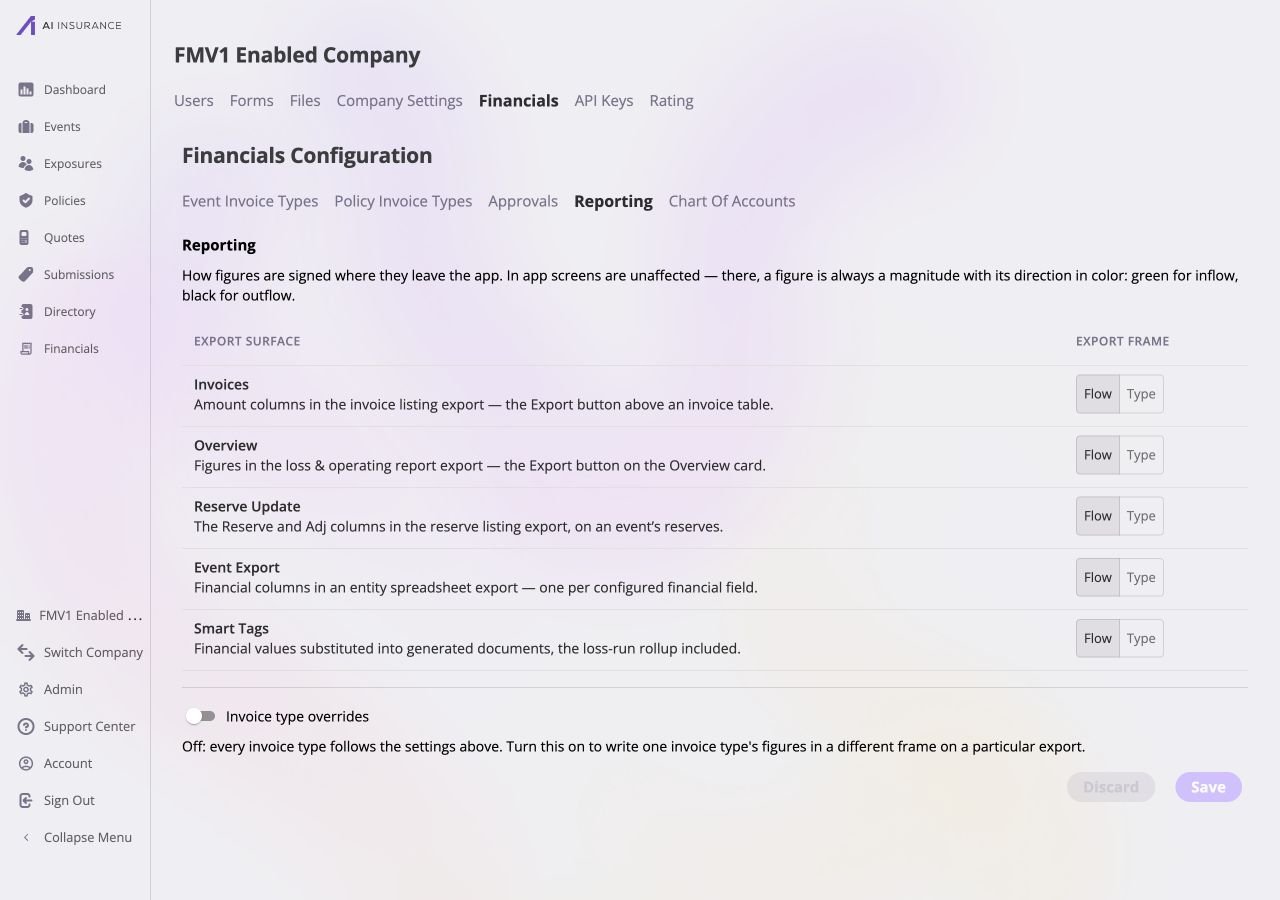 Below the toggles, an **Invoice type overrides** switch turns on a list of
deviations — one row naming an Invoice Type, an export, and the frame it takes
instead.
* **Two exports cannot be overridden.** **Invoices** and **Overview** have amount
columns that add up *across* Invoice Types, so a document mixing frames within
one of them would produce a column that sums to nothing meaningful. Both appear
in the override picker disabled, with that reason on hover, rather than hidden.
* **Flipping a company-wide export to Type warns.** In the type frame every figure
is positive in its own type's expected direction, so the sign stops
distinguishing money in from money out — which on a column that nets is the
sign's whole job.
* **A Reserve Update override on an Operating type has nothing to describe** and is
dropped: an Operating type holds no reserves.
* **Only signs change.** Which figures exist, which rows they sit on, and which
cells are blank are all unaffected. Zeros stay real zeros.
* **Two exports set differently will disagree, on purpose.** A smart tag in the
type frame prints `$6,000.00` where the flow-framed event export prints `-6000`.
They agree to the cent whenever both are on the same frame — which is the
default.
## Worked Example
An event with two Invoice Types. **Indemnity** expects money out: \$10,000
expected, \$4,000 paid. **Subrogation** expects money in: \$3,000 expected,
\$1,000 collected.
| Figure | On screen | Flow frame | Type frame |
| ---------------------- | ---------------------------------------------------------------------------- | ---------- | ---------- |
| Indemnity — Reserves | 6,000.00 in **black** | `-6000` | `6000` |
| Indemnity — Paid | 4,000.00 in **black** | `-4000` | `4000` |
| Indemnity — Total | 10,000.00 in **black** | `-10000` | `10000` |
| Subrogation — Reserves | 2,000.00 in green | `2000` | `2000` |
| Subrogation — Paid | 1,000.00 in green | `1000` | `1000` |
| Subrogation — Total | 3,000.00 in green | `3000` | `3000` |
Subrogation is unaffected. Its money flows *in*, which is also what its type
expects, so both frames agree. The frames only diverge on types whose expected
direction is money out.
In every frame, `Reserves + Paid = Total` holds with signs intact — for
Indemnity, `(-6000) + (-4000) = -10000` in the flow frame and
`6000 + 4000 = 10000` in the type frame. The three figures are always on the same
side, so a row never sums to zero by accident.
Below the toggles, an **Invoice type overrides** switch turns on a list of
deviations — one row naming an Invoice Type, an export, and the frame it takes
instead.
* **Two exports cannot be overridden.** **Invoices** and **Overview** have amount
columns that add up *across* Invoice Types, so a document mixing frames within
one of them would produce a column that sums to nothing meaningful. Both appear
in the override picker disabled, with that reason on hover, rather than hidden.
* **Flipping a company-wide export to Type warns.** In the type frame every figure
is positive in its own type's expected direction, so the sign stops
distinguishing money in from money out — which on a column that nets is the
sign's whole job.
* **A Reserve Update override on an Operating type has nothing to describe** and is
dropped: an Operating type holds no reserves.
* **Only signs change.** Which figures exist, which rows they sit on, and which
cells are blank are all unaffected. Zeros stay real zeros.
* **Two exports set differently will disagree, on purpose.** A smart tag in the
type frame prints `$6,000.00` where the flow-framed event export prints `-6000`.
They agree to the cent whenever both are on the same frame — which is the
default.
## Worked Example
An event with two Invoice Types. **Indemnity** expects money out: \$10,000
expected, \$4,000 paid. **Subrogation** expects money in: \$3,000 expected,
\$1,000 collected.
| Figure | On screen | Flow frame | Type frame |
| ---------------------- | ---------------------------------------------------------------------------- | ---------- | ---------- |
| Indemnity — Reserves | 6,000.00 in **black** | `-6000` | `6000` |
| Indemnity — Paid | 4,000.00 in **black** | `-4000` | `4000` |
| Indemnity — Total | 10,000.00 in **black** | `-10000` | `10000` |
| Subrogation — Reserves | 2,000.00 in green | `2000` | `2000` |
| Subrogation — Paid | 1,000.00 in green | `1000` | `1000` |
| Subrogation — Total | 3,000.00 in green | `3000` | `3000` |
Subrogation is unaffected. Its money flows *in*, which is also what its type
expects, so both frames agree. The frames only diverge on types whose expected
direction is money out.
In every frame, `Reserves + Paid = Total` holds with signs intact — for
Indemnity, `(-6000) + (-4000) = -10000` in the flow frame and
`6000 + 4000 = 10000` in the type frame. The three figures are always on the same
side, so a row never sums to zero by accident.