> ## Documentation Index
> Fetch the complete documentation index at: https://docs.go.aiinsurance.io/llms.txt
> Use this file to discover all available pages before exploring further.
# Reserves
> Money expected to move, tracked before it moves
Everything else in Financials records money that has moved or been committed to.
A **reserve** is different: it records money *expected* to move, before any of it
has.
A claim may be expected to cost \$50,000 even though not a dollar has been paid.
That \$50,000 estimate is a reserve. It must appear in the numbers before the
money moves, and it must shrink as real payments come in.
## Reserves Belong to a Type on an Event
Reserves exist only on Loss/Recovery Invoice Types. An Operating type has no
reserve figure anywhere. See [Invoice Types and Line
Items](/financials/invoice-types).
A reserve is set for one Invoice Type on one event — "Indemnity on this
claim." It is not set on an invoice, and not company-wide.
A reserve is an estimate of what the whole type will cost. It is not divided
across the line items subsequently invoiced.
## The Reserve Identity
One equation governs every reserve figure:
```
Reserves + Paid = Expected Total
```
* **Expected Total** — the estimate of what this type will eventually cost on this
event.
* **Paid** — what has actually moved so far.
* **Reserves** — what is left, the money still expected to move.
Any two of the three fix the third, which is what makes the two ways of changing a
reserve different.
A \$50,000 expected total with \$12,000 paid leaves \$38,000 in reserves. A further
\$8,000 payment brings reserves to \$30,000, while the expected total stays at
\$50,000. **Paying updates the reserve; it does not change the estimate.**
Revising the estimate is the separate act. Recording \$50,000 of reserves against
that \$20,000 paid moves the expected total to \$70,000.
## Recording a Reserve Update
Reserve updates are recorded from the [Event Financials
Tab](/financials/pages/event-financials-tab) — reserves are per event, so the
company-wide [Company Event Financials Overview
Report](/financials/pages/event-financials-page#overview-report) is read-only
for them. On the Overview Report, each Loss/Recovery type has an update action
on its row.
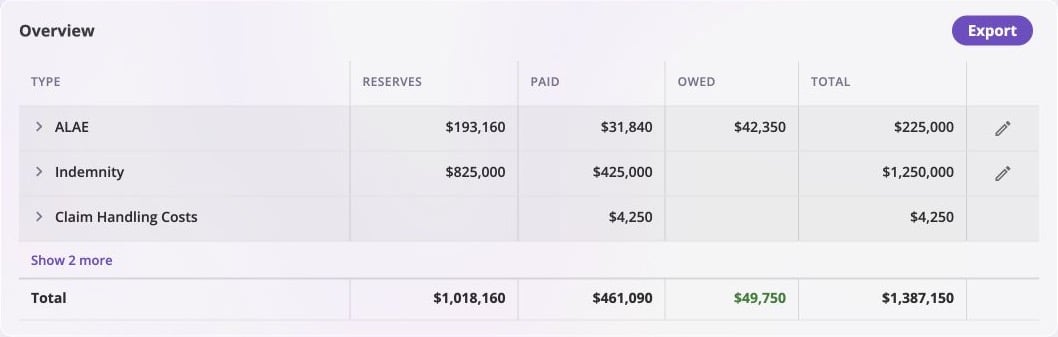
The event Overview puts Reserves, Paid, Owed, and Total together. Only the
Loss/Recovery rows have the update control at the far right; the Operating row
for Claim Handling Costs has no reserve action or reserve value.
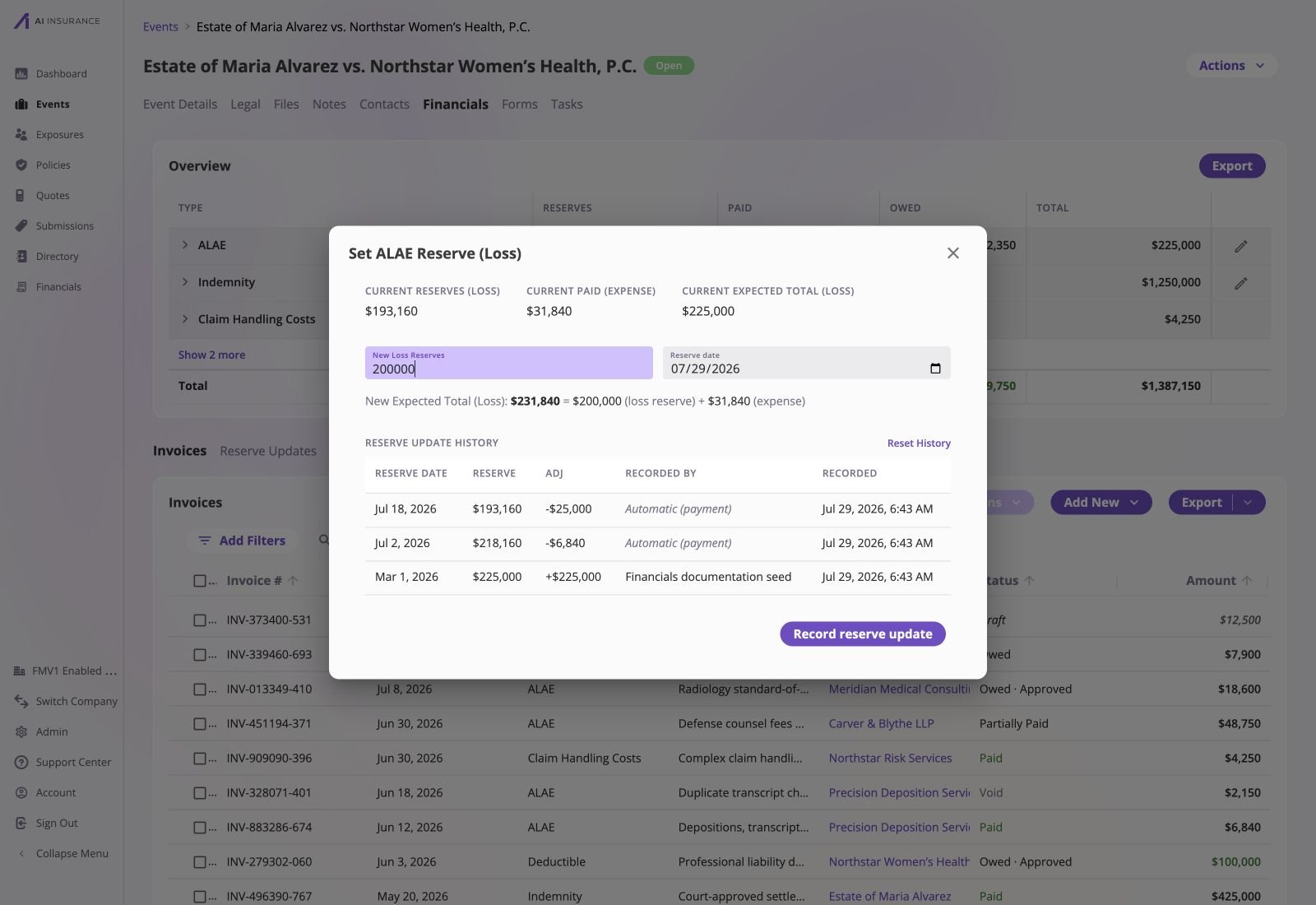
 An update declares the **new reserves balance** — what is still expected to move
from here — as an absolute figure, not a change. Below the field, the form shows
the **New Expected Total** it implies: the reserves entered plus what has already
been paid.
Each update carries:
* **The new reserves balance** — a positive figure on the type's own side.
* **A reserve date** — when this estimate takes effect. Cannot be in the future; a
date in the past asks for confirmation.
* **A memo** — optionally, why it changed.
An update declares the **new reserves balance** — what is still expected to move
from here — as an absolute figure, not a change. Below the field, the form shows
the **New Expected Total** it implies: the reserves entered plus what has already
been paid.
Each update carries:
* **The new reserves balance** — a positive figure on the type's own side.
* **A reserve date** — when this estimate takes effect. Cannot be in the future; a
date in the past asks for confirmation.
* **A memo** — optionally, why it changed.
 The smallest reserve that can be entered is zero, which sets the expected total to
exactly what has been paid. An expected total *below* the paid-to-date is not
something to declare directly — it arises only from paying past the estimate.
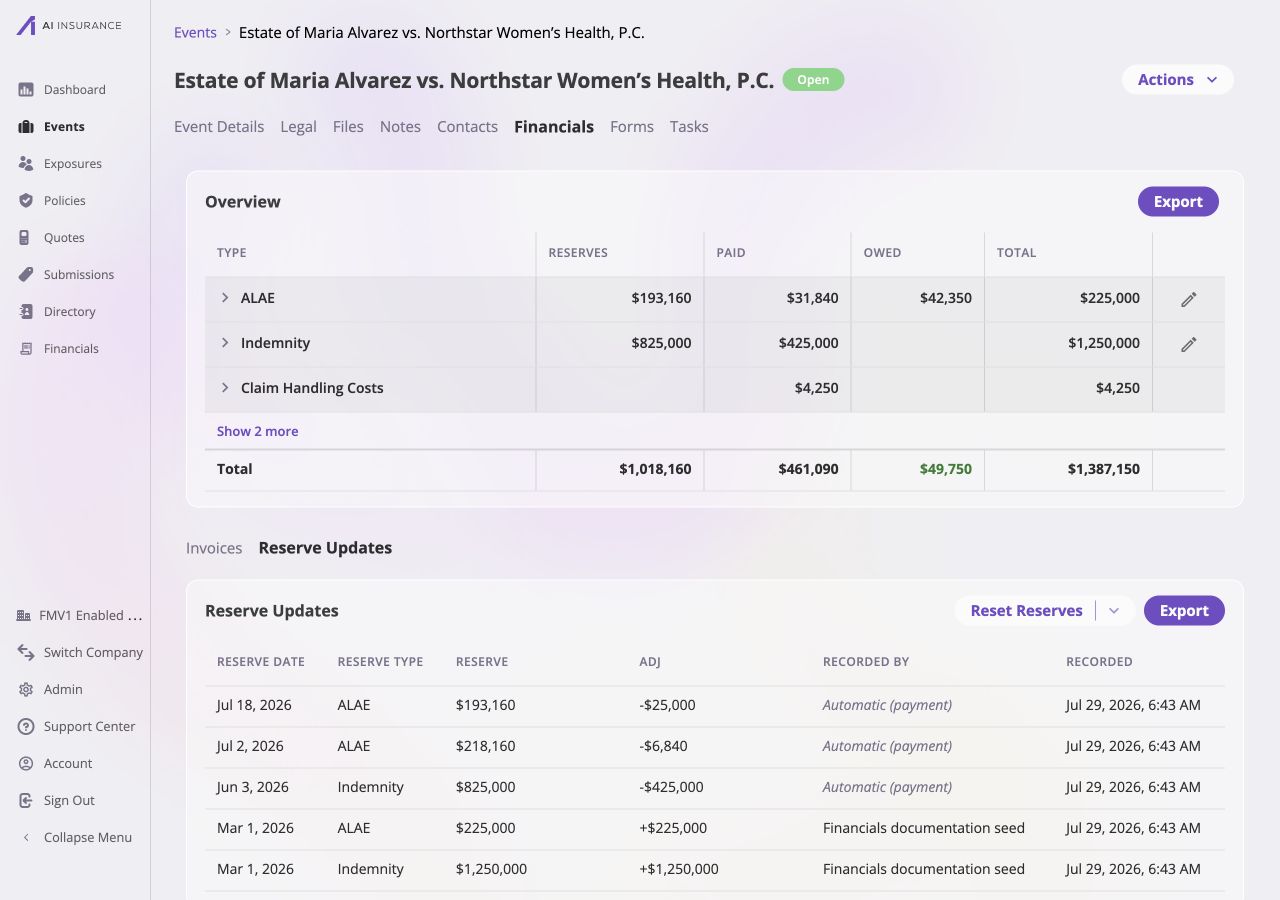
Every update is kept. The [**Reserve
Updates**](/financials/pages/event-financials-tab#reserve-updates) section on an
event lists them in order, showing the previous total, the new total, the change,
who recorded it, and the memo. Reserve updates export to a spreadsheet like any
other listing.
The history makes both kinds of change visible: deliberate reserve estimates
name the recorder, while rows created by payments are labeled **Automatic
(payment)** and show the adjustment that drew the balance down.
The smallest reserve that can be entered is zero, which sets the expected total to
exactly what has been paid. An expected total *below* the paid-to-date is not
something to declare directly — it arises only from paying past the estimate.
Every update is kept. The [**Reserve
Updates**](/financials/pages/event-financials-tab#reserve-updates) section on an
event lists them in order, showing the previous total, the new total, the change,
who recorded it, and the memo. Reserve updates export to a spreadsheet like any
other listing.
The history makes both kinds of change visible: deliberate reserve estimates
name the recorder, while rows created by payments are labeled **Automatic
(payment)** and show the adjustment that drew the balance down.
 ## Reserves Have a Direction
A reserve is money expected to move, and it needs to know which way. That
direction comes from the Invoice Type's expected direction: an Indemnity reserve
is money expected to go **out**, a Subrogation reserve is money expected to come
**in**.
This is why the expected direction on a Loss/Recovery type is structural and
cannot be changed after the type is created — see [Expected
Direction](/financials/expected-direction).
On screen it behaves like every other figure: an unsigned amount, green when it
represents money coming in. In an export it takes a sign according to the
reference frame — see [Reference Frames](/financials/reference-frames).
## When the App Asks How to Record a Payment
A payment against a Loss/Recovery type normally updates the reserve silently. Two
situations are ambiguous enough that the app stops and asks.
**The payment would carry the reserve across zero.** A \$5,000 payment against a
\$3,000 reserve runs straight through zero and out the other side — and so does any
payment against a type with no reserve set at all. A payment that lands exactly on
zero is clean, and never prompts.
**The payment moves the reserve the wrong way.** A payment that grows the balance
away from zero rather than toward it — a recovery collected on a loss type, for
instance.
Both offer the same two choices, with **Update Reserves** selected by default:
* **Update Reserves** — raise the expected total so the payment brings the reserve
cleanly to zero. Appropriate when the estimate was simply too low.
* **Update Expected Totals** — leave the reserve where it is and let the expected
total grow by the payment instead. Appropriate when the payment is additional
to what was reserved for.
Either answer is legitimate. The prompt exists because the two produce different
expected totals, and only the person recording the payment knows which reflects
reality.
### Worked Example
Indemnity on one event: a \$50,000 expected total, \$47,000 of it already paid,
leaving \$3,000 reserved. A \$5,000 payment arrives — more than the reserve can
absorb — so the app prompts.
| | Expected Total | Paid | Reserves |
| -------------------------- | -------------- | -------- | -------- |
| Before the payment | \$50,000 | \$47,000 | \$3,000 |
| **Update Reserves** | \$52,000 | \$52,000 | \$0 |
| **Update Expected Totals** | \$55,000 | \$52,000 | \$3,000 |
**Update Reserves** treats the estimate as having been too low. It lifts the
expected total just far enough for the payment to bring the reserve exactly to
zero: the claim is now fully paid out, and nothing further is expected on it.
**Update Expected Totals** treats the payment as additional to what was reserved
for. The reserve is left untouched and the expected total absorbs the payment on
top of it, so \$3,000 is still expected to move.
Both record the same \$5,000. They disagree about what the claim is now expected
to cost, which is why only the person recording the payment can settle it.
It is legal for a reserve to end up with a balance **opposite its expected
direction**, and it means something specific: more money has moved than the
expected total says the claim is worth. The app reads that as **over-paid** (on a
type expecting money out) or **over-collected** (on a type expecting money in),
not as a reserve now running the other way.
## Resetting Reserve History
A type's reserve history on an event can be **reset**. A reset reverses the
accumulated reserve estimates for that type on that event, returning the reserve
balance to zero and starting the history fresh from that point. The reserve
updates before the reset stay visible, marked as history that was reset.
There are two reasons to use it:
* The reserve history on an event is wrong in a way that individual updates
cannot untangle.
* The event needs to be deleted, and its reserve balance is blocking the delete.
An event with a non-zero reserve balance in any Invoice Type cannot be deleted.
Clear the balance — by resetting history, or by setting the expected total so the
reserve nets to zero — before deleting the event. See [Invoice to Entity
Linking](/financials/attaching-invoices).
## Reserves on Reports
Reserves appear in three places, all reading the same figures:
| Where | What it shows |
| ------------------------------- | ------------------------------------------------------------------------------------------------------------------------------------------------------------------------------------------------------------------------------------------------- |
| **Overview report** | One row per Invoice Type: Reserves, Owed, Paid, Total. Reserves is blank for Operating types; expanding a row shows line items with no Reserves figure. |
| **Reserve Updates listing** | Every reserve update, with a running balance — for one event on its Financials tab, or for every event on the **Reserve Updates** sub-tab of Company Event Financials, which adds an Event Name column. Both can be exported as of a chosen date. |
| **Event export and smart tags** | Reserves, Owed, Paid, and Total per type, available as spreadsheet columns and as values in generated documents. |
## Reserves Have a Direction
A reserve is money expected to move, and it needs to know which way. That
direction comes from the Invoice Type's expected direction: an Indemnity reserve
is money expected to go **out**, a Subrogation reserve is money expected to come
**in**.
This is why the expected direction on a Loss/Recovery type is structural and
cannot be changed after the type is created — see [Expected
Direction](/financials/expected-direction).
On screen it behaves like every other figure: an unsigned amount, green when it
represents money coming in. In an export it takes a sign according to the
reference frame — see [Reference Frames](/financials/reference-frames).
## When the App Asks How to Record a Payment
A payment against a Loss/Recovery type normally updates the reserve silently. Two
situations are ambiguous enough that the app stops and asks.
**The payment would carry the reserve across zero.** A \$5,000 payment against a
\$3,000 reserve runs straight through zero and out the other side — and so does any
payment against a type with no reserve set at all. A payment that lands exactly on
zero is clean, and never prompts.
**The payment moves the reserve the wrong way.** A payment that grows the balance
away from zero rather than toward it — a recovery collected on a loss type, for
instance.
Both offer the same two choices, with **Update Reserves** selected by default:
* **Update Reserves** — raise the expected total so the payment brings the reserve
cleanly to zero. Appropriate when the estimate was simply too low.
* **Update Expected Totals** — leave the reserve where it is and let the expected
total grow by the payment instead. Appropriate when the payment is additional
to what was reserved for.
Either answer is legitimate. The prompt exists because the two produce different
expected totals, and only the person recording the payment knows which reflects
reality.
### Worked Example
Indemnity on one event: a \$50,000 expected total, \$47,000 of it already paid,
leaving \$3,000 reserved. A \$5,000 payment arrives — more than the reserve can
absorb — so the app prompts.
| | Expected Total | Paid | Reserves |
| -------------------------- | -------------- | -------- | -------- |
| Before the payment | \$50,000 | \$47,000 | \$3,000 |
| **Update Reserves** | \$52,000 | \$52,000 | \$0 |
| **Update Expected Totals** | \$55,000 | \$52,000 | \$3,000 |
**Update Reserves** treats the estimate as having been too low. It lifts the
expected total just far enough for the payment to bring the reserve exactly to
zero: the claim is now fully paid out, and nothing further is expected on it.
**Update Expected Totals** treats the payment as additional to what was reserved
for. The reserve is left untouched and the expected total absorbs the payment on
top of it, so \$3,000 is still expected to move.
Both record the same \$5,000. They disagree about what the claim is now expected
to cost, which is why only the person recording the payment can settle it.
It is legal for a reserve to end up with a balance **opposite its expected
direction**, and it means something specific: more money has moved than the
expected total says the claim is worth. The app reads that as **over-paid** (on a
type expecting money out) or **over-collected** (on a type expecting money in),
not as a reserve now running the other way.
## Resetting Reserve History
A type's reserve history on an event can be **reset**. A reset reverses the
accumulated reserve estimates for that type on that event, returning the reserve
balance to zero and starting the history fresh from that point. The reserve
updates before the reset stay visible, marked as history that was reset.
There are two reasons to use it:
* The reserve history on an event is wrong in a way that individual updates
cannot untangle.
* The event needs to be deleted, and its reserve balance is blocking the delete.
An event with a non-zero reserve balance in any Invoice Type cannot be deleted.
Clear the balance — by resetting history, or by setting the expected total so the
reserve nets to zero — before deleting the event. See [Invoice to Entity
Linking](/financials/attaching-invoices).
## Reserves on Reports
Reserves appear in three places, all reading the same figures:
| Where | What it shows |
| ------------------------------- | ------------------------------------------------------------------------------------------------------------------------------------------------------------------------------------------------------------------------------------------------- |
| **Overview report** | One row per Invoice Type: Reserves, Owed, Paid, Total. Reserves is blank for Operating types; expanding a row shows line items with no Reserves figure. |
| **Reserve Updates listing** | Every reserve update, with a running balance — for one event on its Financials tab, or for every event on the **Reserve Updates** sub-tab of Company Event Financials, which adds an Event Name column. Both can be exported as of a chosen date. |
| **Event export and smart tags** | Reserves, Owed, Paid, and Total per type, available as spreadsheet columns and as values in generated documents. |