
What every entity has in common
They all carry fields. Every entity’s data is just a set of fields, and the exact set is configured per company. Some fields are required by the platform (for example, an exposure always has a name and a type), but beyond those you can add as many custom fields as you like — text, numbers, dates, yes/no, dropdowns, and nested objects. Two companies using AI Insurance can model the same entity very differently. They all connect to each other. A submission fans out into quotes, a quote binds into a policy, a policy accrues events, and exposures sit at the center — referenced by submissions, quotes, policies, and events alike. See How entities relate below. They support Files, Notes, and Contacts — though not uniformly. Notes are available on nearly every entity; Files and Contacts appear on a smaller set (Exposure, Event, and Submission). Where they appear, each works the same way:- Files — upload arbitrary documents and attachments.
- Notes — free-text notes recorded against the record.
- Contacts — link people (from the directory) to the record.
These three are not present on every entity. Today they appear as follows:
This table reflects the in-app tabs: Exposure, Event, and Submission show all
three; Quote, Person, and Organization show Notes only; Policy shows none.The API is broader than the in-app tabs. Through the API, notes can be
recorded against every top-level entity type (Policy included), and files can
be attached to every entity type as well as at the company level — even where the
app doesn’t surface a tab for it.
How entities relate
For most entities, a link is stored on one side (the side you edit) and read back automatically from the other side. The full set of relationships: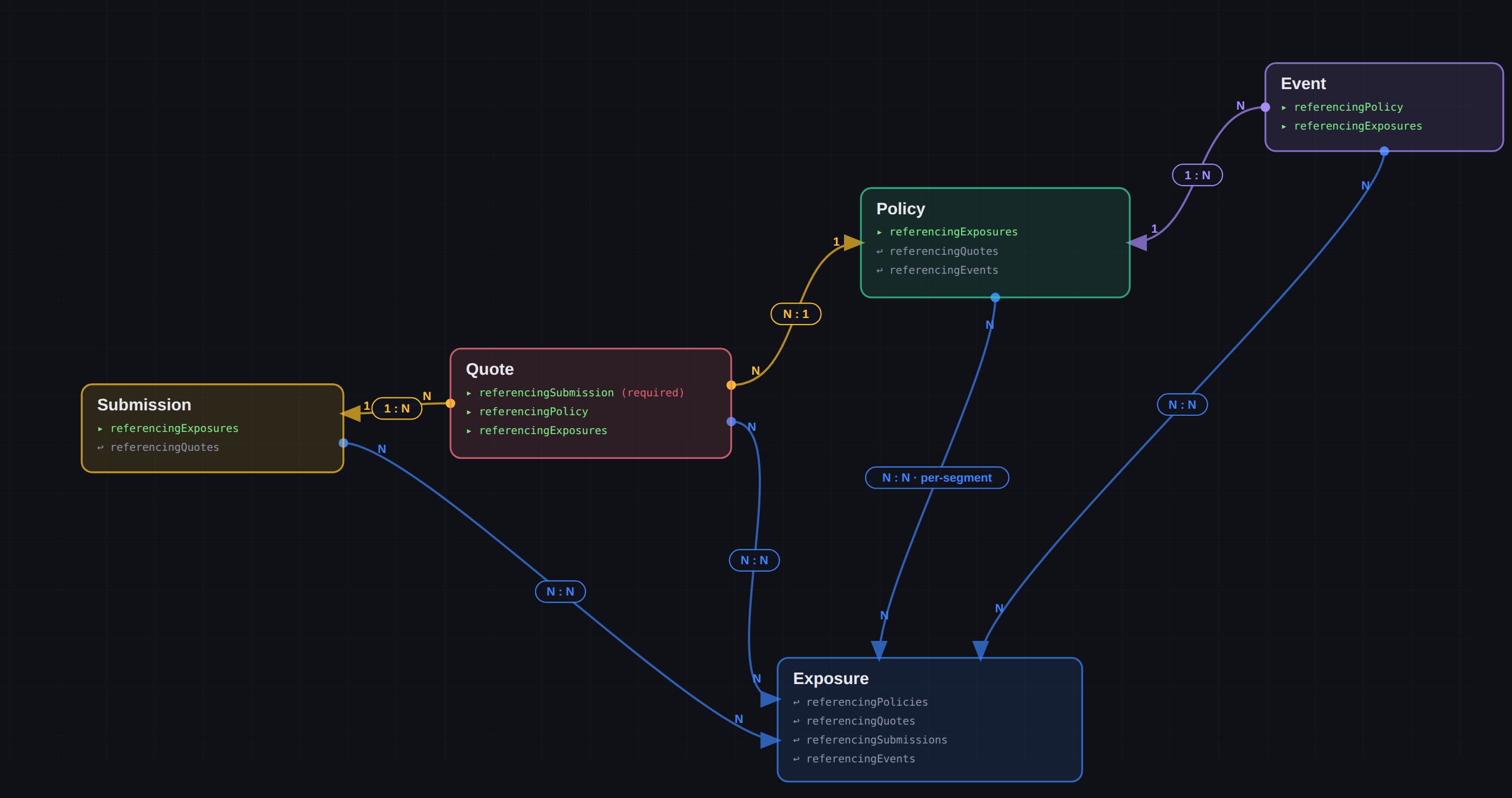
How the top-level entities connect. Exposure is the shared hub; each link is written on one side and read back from the other.
The building blocks
Under the hood, everything in the platform is built from four ideas. You don’t need these to use AI Insurance, but they explain why the entities behave the way they do:- Record — a thing that exists on its own, with its own id, page, and place in a list. Every top-level entity is a record.
- Field — a single value on a record. The set of fields is configured per company.
- Link (Join) — two records pointing at one shared record (a person linked to an organization, a contact linked to an event). A link is readable from both sides.
- Embedded copy — a record that another record keeps its own private copy of, with a permanent pointer back to the original. This is how a policy carries exposure data it can change over time without rewriting history for everyone else.
Technical reference
Technical reference
Entity types (API slugs). Six entities are managed through the unified CRUD
surface, keyed on a lowercase-kebab
{entityType} slug: event, exposure,
quote, submission, person, organization. Policy is not a CRUD entity —
its writes go through the Policy Transaction
API. See the Entities API
overview for the request/response envelope,
PATCH merge semantics, configuration discovery, and permissions.Relationship fields. Cross-entity links use referencing* fields. The link is
written on one entity and read back from the other (for most pairs the reverse is
read-only; Event ↔ Exposure can be written from either side):Note
referencingSubmission is singular (a quote has exactly one submission);
the rest are lists. Relationship ids are stored in a separate join table, not in
the entity’s own field data — they are stripped from the request body on write and
injected back on read.