
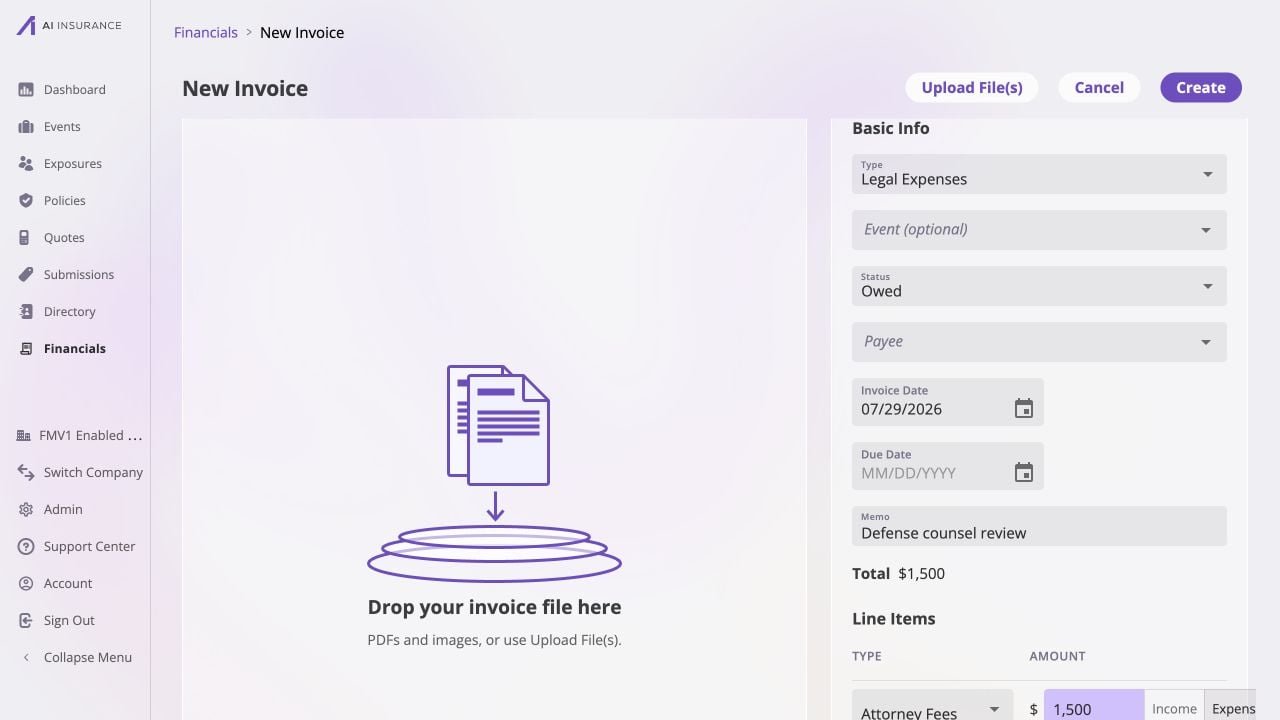
A company-wide New Invoice page. The optional Event picker is available only when the page was not opened from an event, while the form keeps invoice details, line items, and attachments together.
Scope and Header Controls
The header provides Upload File(s), Cancel, and Create. Cancel leaves the unsaved page. The source list determines the scope shown below.
Changing Type after line items have been added asks for confirmation because
the type change discards those line-item edits. Attachments remain staged on the
page until Create.
Invoice Fields
The displayed Total is the net of the line items. Invoices
explains how the Total, Paid, and Balance Due figures are derived after the
record exists.
Validation
After an attempted Create, the form identifies the visible blocking condition:- an Invoice Date is required;
- at least one line item is required, and every line item needs a type;
- line-item amounts cannot be negative;
- a Paid invoice needs a Paid Date and at least one non-zero line item.
For a paid Loss/Recovery invoice linked to an event, the page can also show a
reserve decision before it completes creation. The visible prompt protects the
event’s reserve position; Reserves explains the
financial relationship rather than the page flow.